
VexenXx - Minecraft Skins & Skin History
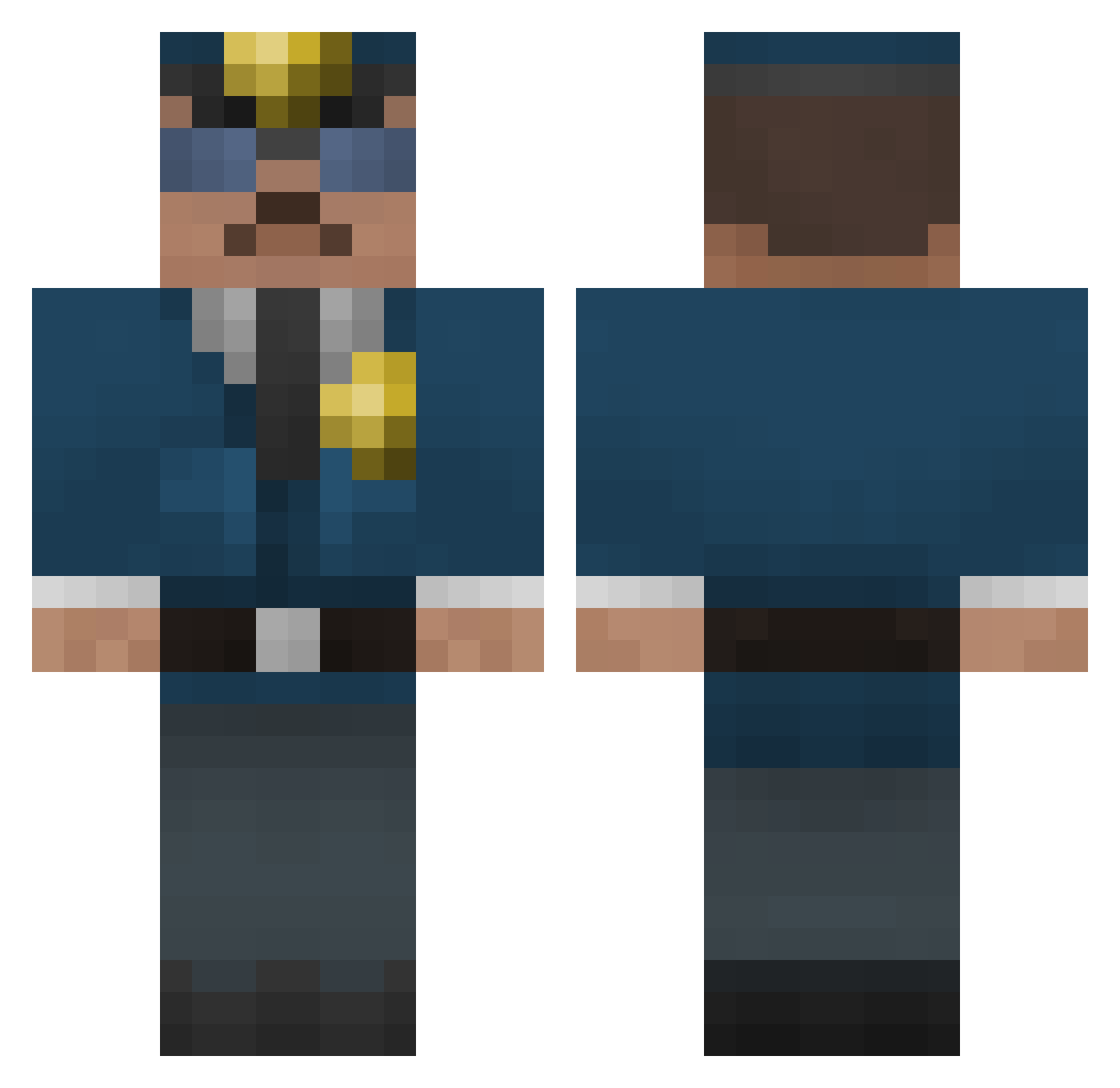
Current Minecraft skin of the player VexenXx, loaded from the official Mojang API. Rotate the 3D model with your mouse or finger, then download the skin as a PNG file and use it in Minecraft: Bedrock Edition or Java Edition for free. When VexenXx changes their skin, this page updates automatically and the old skin stays in the history below.
Other players with this skin (287)
VexenXx was the 91st player we have seen with this skin, first spotted on 25.08.2026. The same skin was seen on these players. Open a nickname to see their current skin and skin history.
 Acillius tyguy143 mustang414 kelsto TheRealSKEETER FuturisticAxeCop nico16705 My_Mastermind Dr_Scotty91 koumak47 yodasmartman bloom079 GORAVENS Zdzichu96 LesHendeck sigge97300 ZeTank13 kofrederik Gromcorg JordyMCGamer senne_ward MotoCopV1 MaiJesu bendsssss LostATLien gingerphil4 mcmaniacek SRich12 DanAlt35 Robbeck0904 magnusthrysoe bassmaster9312 mister_flexi vdestructo Twicehealed zxzxzxcvcvcv BlyR67 gash91 Mael92 bumca TusikLavan Trojan26 Joshua_DaSilva sirbobbi leern vulcano148 Locoporcoco MisterShiine jeb009 Ra1nb0wGam3r Jan30028 dking55 katsuma2013 SHEEPDOG231 wiwiouz Miechen_ MONSTERTRUCK602 Xx_Mein_Kampf_xX jumine47 liranfon
More Cop Minecraft skins
How to install the VexenXx skin
- Press the Download button above to save the skin as a PNG file.
- Minecraft: Bedrock Edition (PE): open the Dressing Room from the main menu (or tap your character → Edit Character), go to Classic Skins → Owned, press the + (new skin) button, choose the downloaded PNG and pick the Classic (Steve) model. Works on PC and mobile; consoles cannot import custom skins.
- Minecraft: Java Edition: open the Minecraft Launcher, go to the Skins tab, click New Skin, load the PNG, pick the Classic (Steve) model and press Save & Use. You can also upload it at minecraft.net → Profile → Change Skin.
The skin does not show up after import - what should I do?
Restart Minecraft and open the Dressing Room again - imported skins sometimes appear only after a restart. Also make sure you selected the imported skin and picked the Classic (Steve) model.
Which model should I choose, Classic or Slim?
This skin is designed for the Classic (Steve) model. If you pick the wrong model, the arms of the skin will look stretched or squeezed.
Is the skin of VexenXx free to download?
Yes. Press Download, save the PNG file and use it in Minecraft: Bedrock Edition or Java Edition - no payment or registration needed. The skin also works on multiplayer servers and Realms.
More skins
Looking for more? Go back to all Minecraft skins and check the top skins of the week, month and all time, or find any player's skin by nickname.