
Valeridze - Minecraft Skins & Skin History
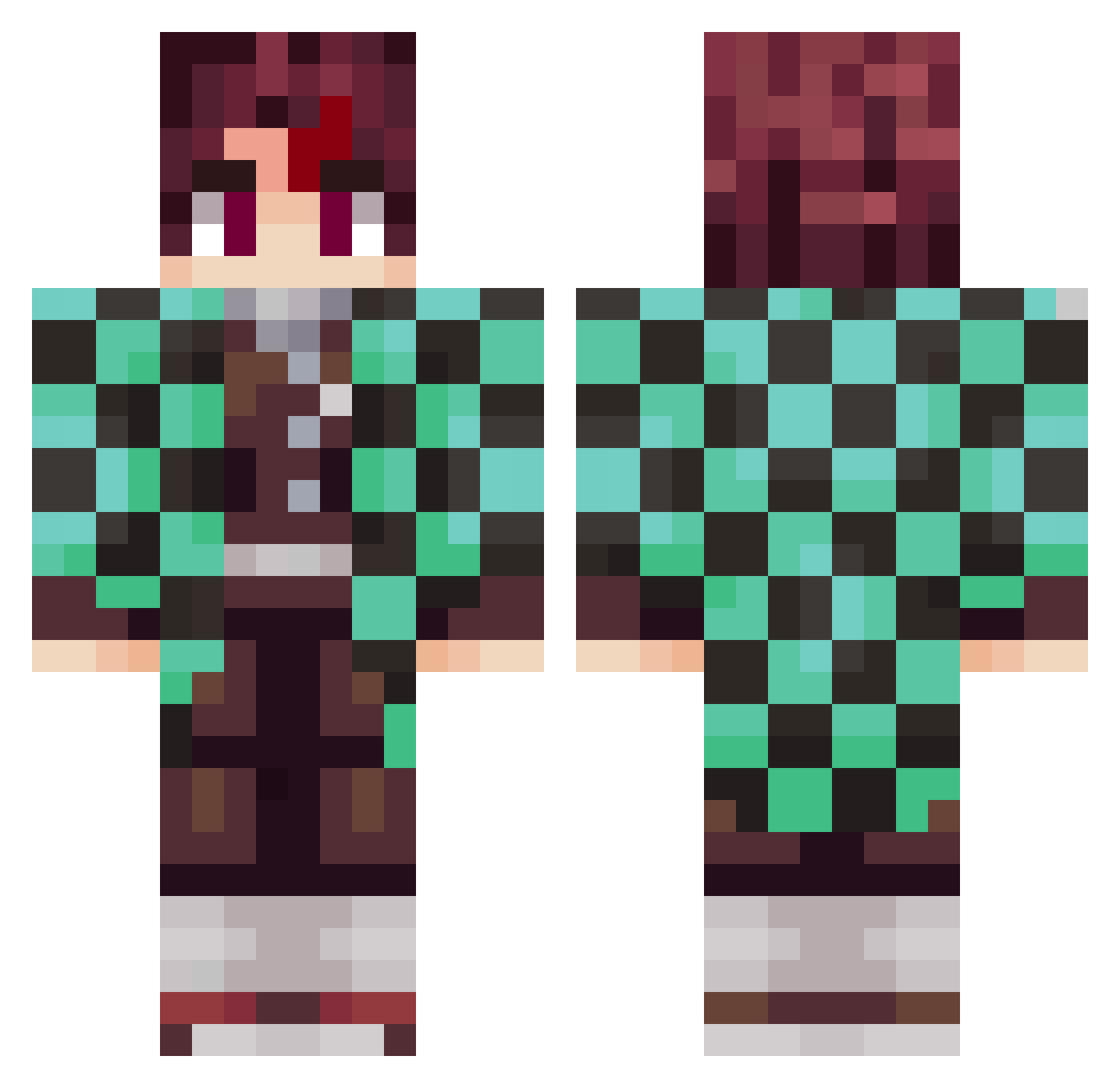
Current Minecraft skin of the player Valeridze, loaded from the official Mojang API. Rotate the 3D model with your mouse or finger, then download the skin as a PNG file and use it in Minecraft: Bedrock Edition or Java Edition for free. When Valeridze changes their skin, this page updates automatically and the old skin stays in the history below.
Other players with this skin (798)
Valeridze was the 602nd player we have seen with this skin, first spotted on 05.10.2026. The same skin was seen on these players. Open a nickname to see their current skin and skin history.
 umetonko sakuratrick Tweakzyi PRocker1 CDF313131 alexach kiilr RResolute DimzonYT Tony7909 ReuzKnight Camdameron HongKong2305 SirHenryFlying 19niko95 HIKARI0990 BenjaBelha Laruccia_ SagittariusII gimaeyoon MxTapeee Xenird dany_nvs_ maxumumx KNavarro ToxMC tanjiro91 not_poof CacaLion ElGompachiro123 Udunmanned MONZER8_8 MathBraga NongPonDA arnaud227 Akai12 VITALTA LelioC Izanmh13 MangoThor Kedar__ FwYour Nalyshigami AhiLLL maksim_shigeno DonGelatt0 oluhhulo kiubill Sanitar_ BerkayExpert Adust4m Eric_23X Artik0 Hunter_Gamer vLeuriRD Dark_Joker_97 Adriancilo montfnaf PandaGaming323 heavenlyyxo
More Tanjiro Kamado Minecraft skins
See all 389 Tanjiro Kamado skins
How to install the Valeridze skin
- Press the Download button above to save the skin as a PNG file.
- Minecraft: Bedrock Edition (PE): open the Dressing Room from the main menu (or tap your character → Edit Character), go to Classic Skins → Owned, press the + (new skin) button, choose the downloaded PNG and pick the Classic (Steve) model. Works on PC and mobile; consoles cannot import custom skins.
- Minecraft: Java Edition: open the Minecraft Launcher, go to the Skins tab, click New Skin, load the PNG, pick the Classic (Steve) model and press Save & Use. You can also upload it at minecraft.net → Profile → Change Skin.
The skin does not show up after import - what should I do?
Restart Minecraft and open the Dressing Room again - imported skins sometimes appear only after a restart. Also make sure you selected the imported skin and picked the Classic (Steve) model.
Which model should I choose, Classic or Slim?
This skin is designed for the Classic (Steve) model. If you pick the wrong model, the arms of the skin will look stretched or squeezed.
Is the skin of Valeridze free to download?
Yes. Press Download, save the PNG file and use it in Minecraft: Bedrock Edition or Java Edition - no payment or registration needed. The skin also works on multiplayer servers and Realms.
More skins
Looking for more? Go back to all Minecraft skins and check the top skins of the week, month and all time, or find any player's skin by nickname.