
UncleBogdan_ - Minecraft Skins & Skin History
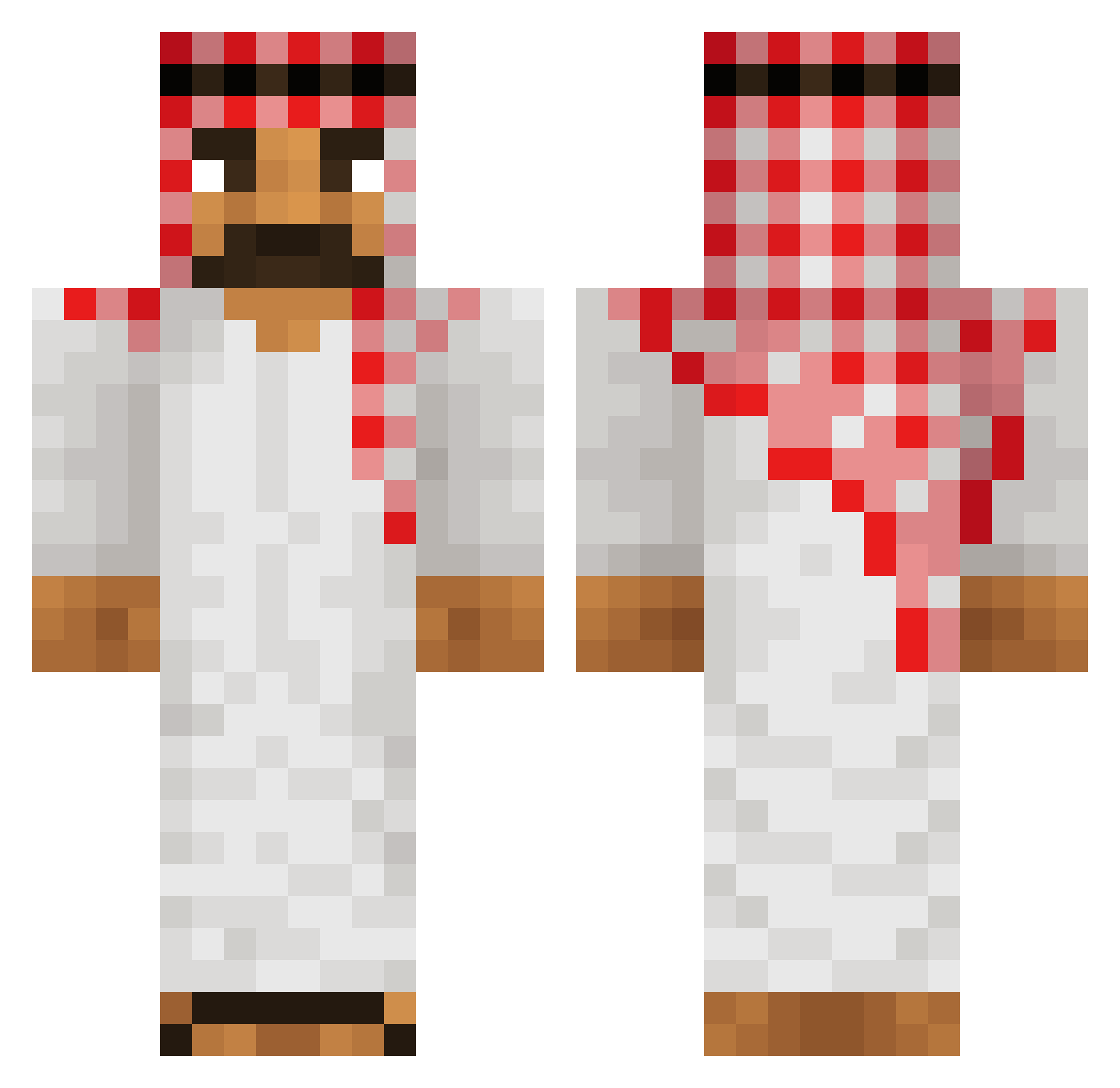
Current Minecraft skin of the player UncleBogdan_, loaded from the official Mojang API. Rotate the 3D model with your mouse or finger, then download the skin as a PNG file and use it in Minecraft: Bedrock Edition or Java Edition for free. When UncleBogdan_ changes their skin, this page updates automatically and the old skin stays in the history below.
Other players with this skin (490)
UncleBogdan_ was the 225th player we have seen with this skin, first spotted on 06.09.2026. The same skin was seen on these players. Open a nickname to see their current skin and skin history.
 YasinAbi
 Hans_1313 Istadboy ultrainstinct777 QOrlie leopardtanklover rokedgreat Ranke61 Hyperstrahl tfyian trollimmannoo Kev20_LaSoupape Execko princess_zaxy boatlisck goproben TheShawarmaEater xavik12 deatax84 OverClock534 Jimbo1103 CaptainP3nguin k_ah_ ep1d nomimg_2 tgpboy SlowZyO Baileykeithelfrd GETlnwZA007 DieGrafenschaft ChickenShield Kringel_krantz69 Marcin2137_ xlN1ch0laslx crqwnz Avdio Xic0n Dereckbar hazalben Relevantly child_m0l3st3r Satiricality FIRMIN24 Timirettich Fuhnyyy muchDope Rubbertoe123 LmaoXidy Harry_LL Kezrr _Sandrey_ kibelek123 Ciekawski_ Domi5802 silvan2104 Blazej1337 O0O0 Klobig_ FINNLEYDAI_ Tobsy92
More Traditional Minecraft skins
How to install the UncleBogdan_ skin
- Press the Download button above to save the skin as a PNG file.
- Minecraft: Bedrock Edition (PE): open the Dressing Room from the main menu (or tap your character → Edit Character), go to Classic Skins → Owned, press the + (new skin) button, choose the downloaded PNG and pick the Classic (Steve) model. Works on PC and mobile; consoles cannot import custom skins.
- Minecraft: Java Edition: open the Minecraft Launcher, go to the Skins tab, click New Skin, load the PNG, pick the Classic (Steve) model and press Save & Use. You can also upload it at minecraft.net → Profile → Change Skin.
The skin does not show up after import - what should I do?
Restart Minecraft and open the Dressing Room again - imported skins sometimes appear only after a restart. Also make sure you selected the imported skin and picked the Classic (Steve) model.
Which model should I choose, Classic or Slim?
This skin is designed for the Classic (Steve) model. If you pick the wrong model, the arms of the skin will look stretched or squeezed.
Is the skin of UncleBogdan_ free to download?
Yes. Press Download, save the PNG file and use it in Minecraft: Bedrock Edition or Java Edition - no payment or registration needed. The skin also works on multiplayer servers and Realms.
More skins
Looking for more? Go back to all Minecraft skins and check the top skins of the week, month and all time, or find any player's skin by nickname.