
Tygo07 - Minecraft Skins & Skin History
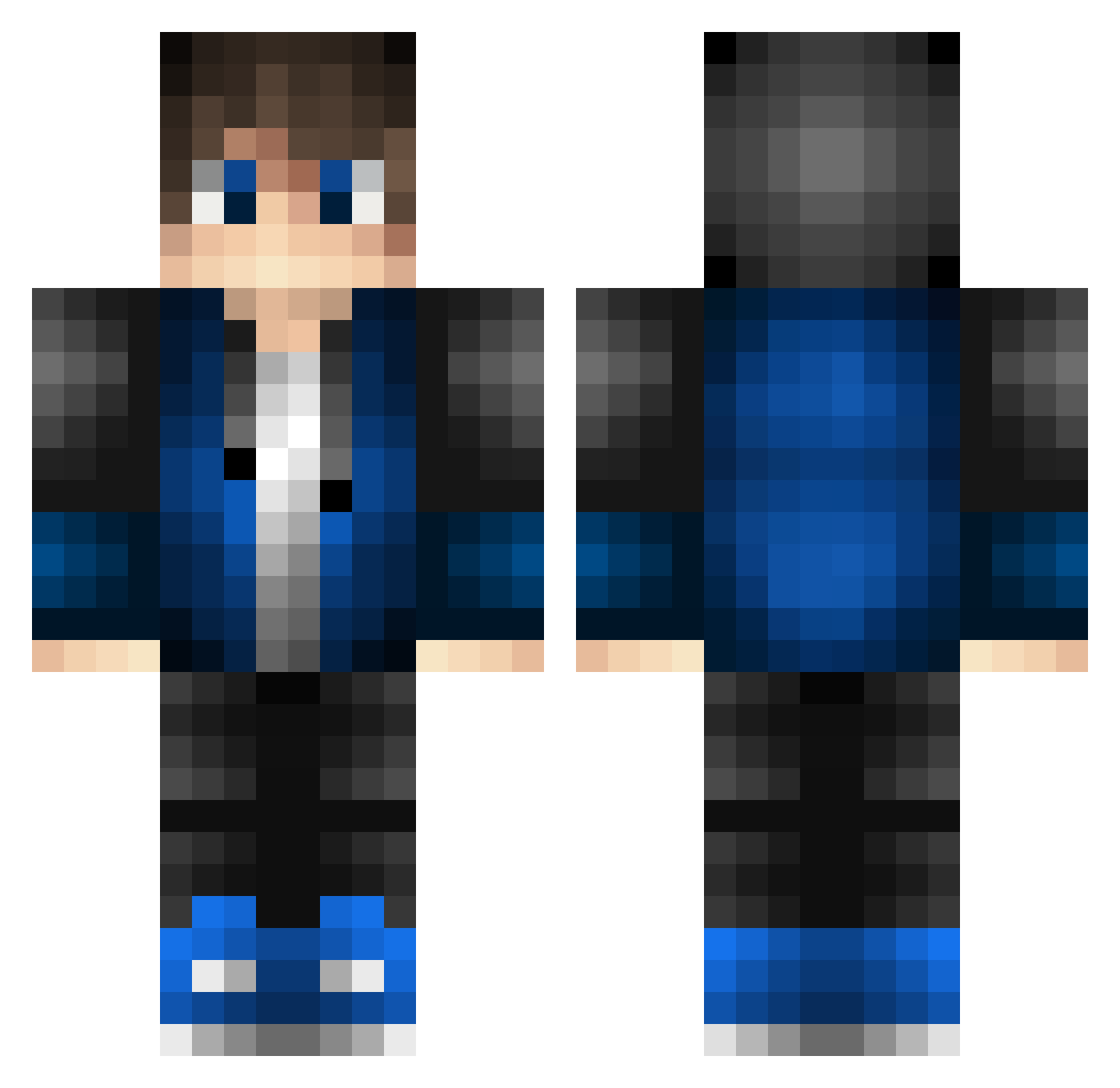
Current Minecraft skin of the player Tygo07, loaded from the official Mojang API. Rotate the 3D model with your mouse or finger, then download the skin as a PNG file and use it in Minecraft: Bedrock Edition or Java Edition for free. When Tygo07 changes their skin, this page updates automatically and the old skin stays in the history below.
Other players with this skin (528)
Tygo07 was the 156th player we have seen with this skin, first spotted on 29.08.2026. The same skin was seen on these players. Open a nickname to see their current skin and skin history.
 Ziorente SorinCloud L4D1 SILENT_HUNTER Noob_Boy321 Veno69 StoneofSoul BingoHey MagmaTube_ TwoAverage JoriX5 Stirmin Ziwea CHAwqy MCM007 BluexShadow 11zhe Oxygen1221 tori_carrie codymol17 yrs_ EinAlexZockt YukiHatake GUI0508 EldestRug726132 Zombie_Hunter2 panda1025 Hugo_awsome Eszet ZioGab Kaelin77 BlasterScorpion Literary3169 Leickel Joriin Ole1509 Skatecraft ylwg NemkeEnhance ChenZhuoRan2012 rubydachump kamiya6020 Zeyami17 paprotek8000 Kingwersen _Semm_ Freeman92 Night_35 cube_239 AUG113
 ener1108 Cyrus0609 FWolfs J_Japple_e jreey MaxenceLH jeremy_Pascal904 ImPorter95 fanderr braydonsticks
How to install the Tygo07 skin
- Press the Download button above to save the skin as a PNG file.
- Minecraft: Bedrock Edition (PE): open the Dressing Room from the main menu (or tap your character → Edit Character), go to Classic Skins → Owned, press the + (new skin) button, choose the downloaded PNG and pick the Classic (Steve) model. Works on PC and mobile; consoles cannot import custom skins.
- Minecraft: Java Edition: open the Minecraft Launcher, go to the Skins tab, click New Skin, load the PNG, pick the Classic (Steve) model and press Save & Use. You can also upload it at minecraft.net → Profile → Change Skin.
The skin does not show up after import - what should I do?
Restart Minecraft and open the Dressing Room again - imported skins sometimes appear only after a restart. Also make sure you selected the imported skin and picked the Classic (Steve) model.
Which model should I choose, Classic or Slim?
This skin is designed for the Classic (Steve) model. If you pick the wrong model, the arms of the skin will look stretched or squeezed.
Is the skin of Tygo07 free to download?
Yes. Press Download, save the PNG file and use it in Minecraft: Bedrock Edition or Java Edition - no payment or registration needed. The skin also works on multiplayer servers and Realms.
More skins
Looking for more? Go back to all Minecraft skins and check the top skins of the week, month and all time, or find any player's skin by nickname.