
Ttalgi_Kiti - Minecraft Skins & Skin History
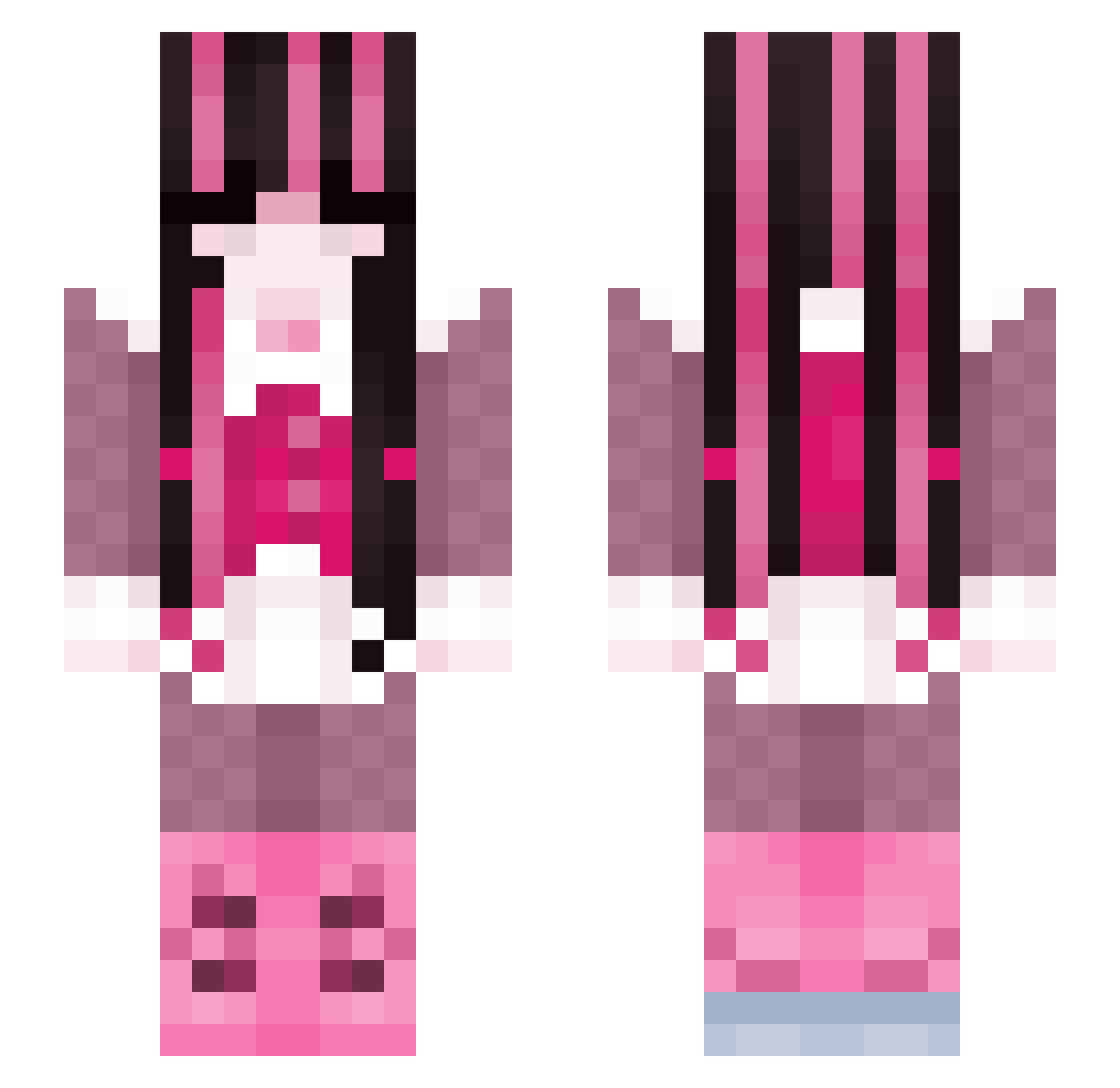
Current Minecraft skin of the player Ttalgi_Kiti, loaded from the official Mojang API. Rotate the 3D model with your mouse or finger, then download the skin as a PNG file and use it in Minecraft: Bedrock Edition or Java Edition for free. When Ttalgi_Kiti changes their skin, this page updates automatically and the old skin stays in the history below.
Other players with this skin (256)
Ttalgi_Kiti was the 234th player we have seen with this skin, first spotted on 26.10.2026. The same skin was seen on these players. Open a nickname to see their current skin and skin history.
 marjoriiie stella2424 Cable_Girl14 ghostofstormy drewemosser tooniek vampirellas dudninha Nobmaster90 SpookyWitch74 cr8ybaby lyleux Amayiko666 brvokie Aaliyah08 Trindade__ Rxakii YlimeLind ansiies callmeMAMl May5012 Lumiful VSaam ScarletGabyz_WuW mariaglvz33 jollly GirliePop123 hifunami popmiau Fraisen_ hazzles_ pequitass getinmytummy Mavi02 MoonCarver1 PixelKat45 SlickAsAlways jojopinaaa chaosiplier Nataliaxox14 Yuri_Blossom gyaaru ElenaFaye mothsteria _enhypens LogiMech Vamppyrr Marvinelas lesliuchis tchaikovskyq HoneybeeDarling Elca13 Stickypickle642 SevONea burntnoodles14 vodzuken helovesnatalia RudiRehlein Elzav LUNARSGIRLFRIEND
More Draculaura Minecraft skins
How to install the Ttalgi_Kiti skin
- Press the Download button above to save the skin as a PNG file.
- Minecraft: Bedrock Edition (PE): open the Dressing Room from the main menu (or tap your character → Edit Character), go to Classic Skins → Owned, press the + (new skin) button, choose the downloaded PNG and pick the Slim (Alex) model. Works on PC and mobile; consoles cannot import custom skins.
- Minecraft: Java Edition: open the Minecraft Launcher, go to the Skins tab, click New Skin, load the PNG, pick the Slim (Alex) model and press Save & Use. You can also upload it at minecraft.net → Profile → Change Skin.
The skin does not show up after import - what should I do?
Restart Minecraft and open the Dressing Room again - imported skins sometimes appear only after a restart. Also make sure you selected the imported skin and picked the Slim (Alex) model.
Which model should I choose, Classic or Slim?
This skin is designed for the Slim (Alex) model. If you pick the wrong model, the arms of the skin will look stretched or squeezed.
Is the skin of Ttalgi_Kiti free to download?
Yes. Press Download, save the PNG file and use it in Minecraft: Bedrock Edition or Java Edition - no payment or registration needed. The skin also works on multiplayer servers and Realms.
More skins
Looking for more? Go back to all Minecraft skins and check the top skins of the week, month and all time, or find any player's skin by nickname.