
ToyStory7 - Minecraft Skins & Skin History
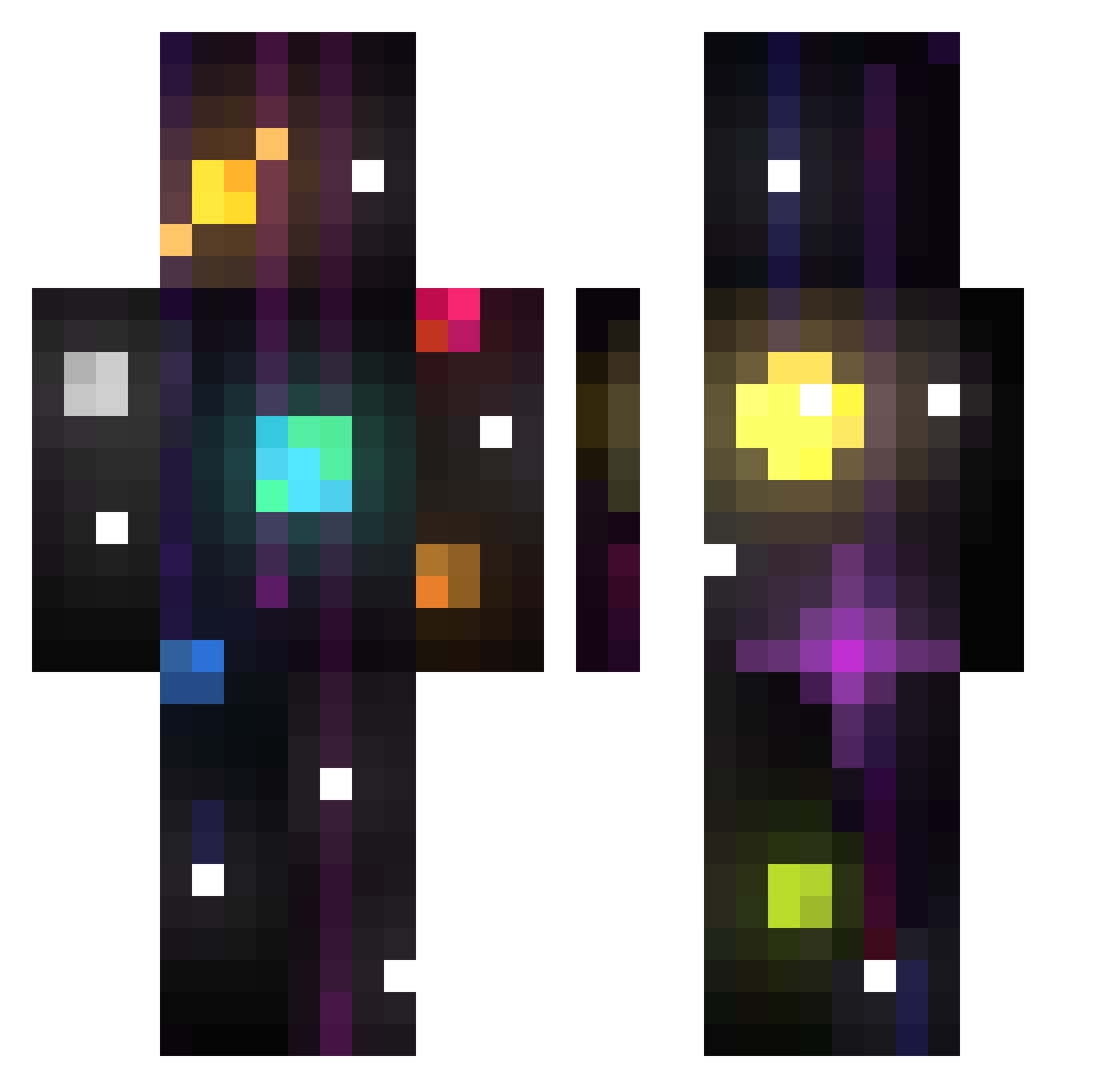
Current Minecraft skin of the player ToyStory7, loaded from the official Mojang API. Rotate the 3D model with your mouse or finger, then download the skin as a PNG file and use it in Minecraft: Bedrock Edition or Java Edition for free. When ToyStory7 changes their skin, this page updates automatically and the old skin stays in the history below.
Other players with this skin (90)
ToyStory7 was the 23rd player we have seen with this skin, first spotted on 18.08.2026. The same skin was seen on these players. Open a nickname to see their current skin and skin history.
 alikemoonn zwazu idontknowwhatt 32Solo StepsonEthan santiz420 lozobyte Cant1208 Dream_4764
 malinaa00 MoShark07 ETOturtle buzzboy1 Stickman123344 ivanhollsen WalkinTalkinCat DONTask1498 nvsv jxiq SuperGabou88 Angeltron167 Zabka2115115 Aveleun KidBlind Zerox697472 jiwon090403 Agileator LiivaTerake biggrr Krzysztof455 Wrests matteoscodella Ne_Ver_More
 xdoom1 mathrockR
 gansito69 JayBeeeBezBejbi JuanitoGolondri tzft
 lnheritance
 hb7q iheartcpvp LouisDlr ShadowDemon23
 BrunoGaymer Brito24
 PADUCK15 yerxcmot Jucuhh Kroylex Snuest AchillesPro11 PrismBait Zylooo LucaYt_ fussers fartham_ Semmettjee sunflowercom PrzyczajonyT
More Universe Minecraft skins
How to install the ToyStory7 skin
- Press the Download button above to save the skin as a PNG file.
- Minecraft: Bedrock Edition (PE): open the Dressing Room from the main menu (or tap your character → Edit Character), go to Classic Skins → Owned, press the + (new skin) button, choose the downloaded PNG and pick the Classic (Steve) model. Works on PC and mobile; consoles cannot import custom skins.
- Minecraft: Java Edition: open the Minecraft Launcher, go to the Skins tab, click New Skin, load the PNG, pick the Classic (Steve) model and press Save & Use. You can also upload it at minecraft.net → Profile → Change Skin.
The skin does not show up after import - what should I do?
Restart Minecraft and open the Dressing Room again - imported skins sometimes appear only after a restart. Also make sure you selected the imported skin and picked the Classic (Steve) model.
Which model should I choose, Classic or Slim?
This skin is designed for the Classic (Steve) model. If you pick the wrong model, the arms of the skin will look stretched or squeezed.
Is the skin of ToyStory7 free to download?
Yes. Press Download, save the PNG file and use it in Minecraft: Bedrock Edition or Java Edition - no payment or registration needed. The skin also works on multiplayer servers and Realms.
More skins
Looking for more? Go back to all Minecraft skins and check the top skins of the week, month and all time, or find any player's skin by nickname.