
Tortasbebe33 - Minecraft Skins & Skin History
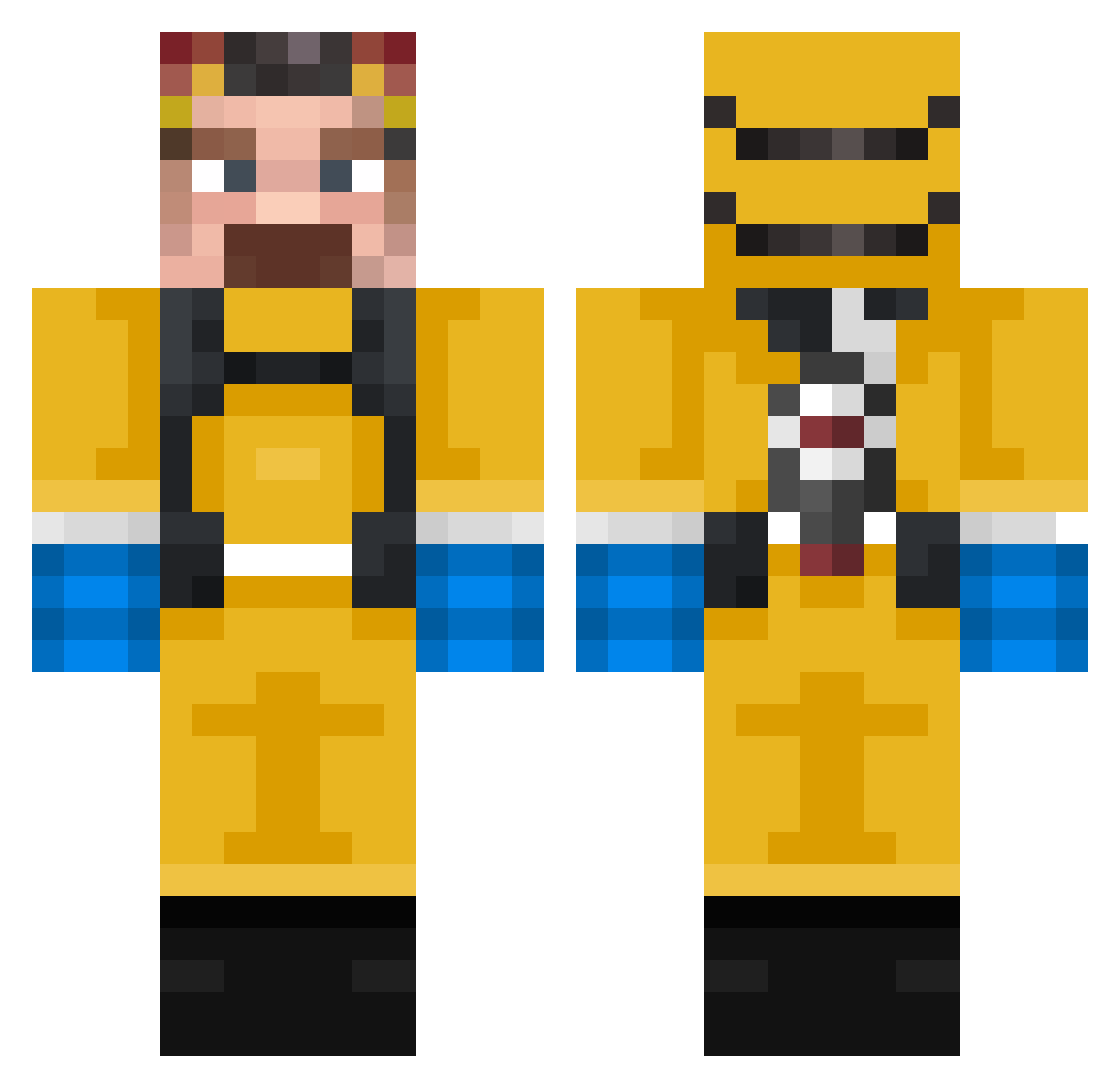
Current Minecraft skin of the player Tortasbebe33, loaded from the official Mojang API. Rotate the 3D model with your mouse or finger, then download the skin as a PNG file and use it in Minecraft: Bedrock Edition or Java Edition for free. When Tortasbebe33 changes their skin, this page updates automatically and the old skin stays in the history below.
Other players with this skin (317)
Tortasbebe33 was the 172nd player we have seen with this skin, first spotted on 20.09.2026. The same skin was seen on these players. Open a nickname to see their current skin and skin history.
 SHEHAB1231 z8hs padredomingo15 BoomerMNT Nur912 albondylan Liqu1dd_ ItsDunban NoLoSeRickHN Juanchito12 ImASquare67 FruitShoot0 zajeron Phineas214709 Gurgulio YORSHPLAYER shigetsuy Farnky 11cookie08 SamuNUV ulte24 acemace12 Siewni shnekser NxtGenn87 Shadowzys BerkayBey1 L3M0N97 nyuq Captintimi CHecuak RAFF_8 c6rner AntiGoldfish98 Peracr7rm Itamr KONFUPANDA 5RedDots Nazarchik228 RumWithCoke lluisp7 naacho99 RoseCobra339221 emowalterwhite RApq Walter_001 YungLuhTwizzy PROGAMERBOY_911 chemicalsonfire Delta819 Severnal Pirona Leg1tBusnessman 130sa fisheydre l_4ndl_ORd Kamper420 Sibikson GLMlol dudi3210
More Walter White Minecraft skins
See all 567 Walter White skins
How to install the Tortasbebe33 skin
- Press the Download button above to save the skin as a PNG file.
- Minecraft: Bedrock Edition (PE): open the Dressing Room from the main menu (or tap your character → Edit Character), go to Classic Skins → Owned, press the + (new skin) button, choose the downloaded PNG and pick the Classic (Steve) model. Works on PC and mobile; consoles cannot import custom skins.
- Minecraft: Java Edition: open the Minecraft Launcher, go to the Skins tab, click New Skin, load the PNG, pick the Classic (Steve) model and press Save & Use. You can also upload it at minecraft.net → Profile → Change Skin.
The skin does not show up after import - what should I do?
Restart Minecraft and open the Dressing Room again - imported skins sometimes appear only after a restart. Also make sure you selected the imported skin and picked the Classic (Steve) model.
Which model should I choose, Classic or Slim?
This skin is designed for the Classic (Steve) model. If you pick the wrong model, the arms of the skin will look stretched or squeezed.
Is the skin of Tortasbebe33 free to download?
Yes. Press Download, save the PNG file and use it in Minecraft: Bedrock Edition or Java Edition - no payment or registration needed. The skin also works on multiplayer servers and Realms.
More skins
Looking for more? Go back to all Minecraft skins and check the top skins of the week, month and all time, or find any player's skin by nickname.