
TorbenK21 - Minecraft Skins & Skin History
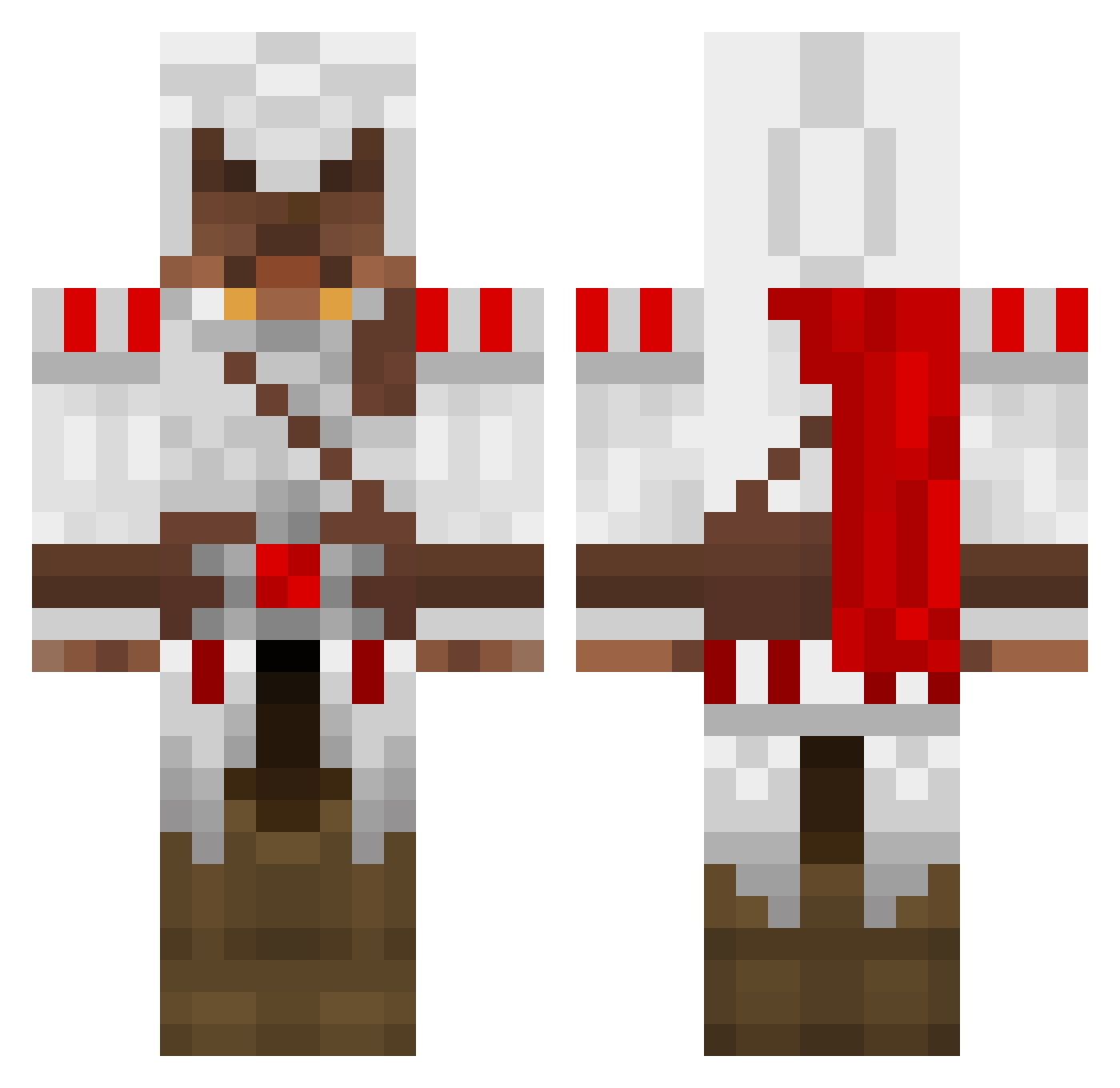
Current Minecraft skin of the player TorbenK21, loaded from the official Mojang API. Rotate the 3D model with your mouse or finger, then download the skin as a PNG file and use it in Minecraft: Bedrock Edition or Java Edition for free. When TorbenK21 changes their skin, this page updates automatically and the old skin stays in the history below.
Other players with this skin (1390)
TorbenK21 was the 360th player we have seen with this skin, first spotted on 22.08.2026. The same skin was seen on these players. Open a nickname to see their current skin and skin history.
 botulinumtxn ac_137 64bitz johngus97 Bates23 trrs888 blackshook97 Thib1219 lordalex2009 rendear2 jorisxp psychokiller847 Raelon526 EpicusDeus Poison_Serpant xxmarius98xx dannyboy2404 706048 roboticman30 Lembaz reese2011669 Panderman1 dannifly Scouse94 adumm91 Zalcad PermittedTThree6 Buniam mormonmaster Borni26 Decoy92 calben11 Maroon_Leader DanL3597 lionboyprs Biertastisch ManaszuneX oboy05 warfare_icedog AlexPepe1 fifafifafifa Magnusen03 Hollands MasterAssman lourenco1 davidJ538 DarkTanzanite Redbood martinbrennsund Joshua2203 Tyranticle Leodane A3ther LeatherHelmet legoman0 CKemu AllenGabriel Swiftblink blindeyecat mindblowin67
More Altair Ibn La Ahad Minecraft skins
See all 196 Altair Ibn La Ahad skins
How to install the TorbenK21 skin
- Press the Download button above to save the skin as a PNG file.
- Minecraft: Bedrock Edition (PE): open the Dressing Room from the main menu (or tap your character → Edit Character), go to Classic Skins → Owned, press the + (new skin) button, choose the downloaded PNG and pick the Classic (Steve) model. Works on PC and mobile; consoles cannot import custom skins.
- Minecraft: Java Edition: open the Minecraft Launcher, go to the Skins tab, click New Skin, load the PNG, pick the Classic (Steve) model and press Save & Use. You can also upload it at minecraft.net → Profile → Change Skin.
The skin does not show up after import - what should I do?
Restart Minecraft and open the Dressing Room again - imported skins sometimes appear only after a restart. Also make sure you selected the imported skin and picked the Classic (Steve) model.
Which model should I choose, Classic or Slim?
This skin is designed for the Classic (Steve) model. If you pick the wrong model, the arms of the skin will look stretched or squeezed.
Is the skin of TorbenK21 free to download?
Yes. Press Download, save the PNG file and use it in Minecraft: Bedrock Edition or Java Edition - no payment or registration needed. The skin also works on multiplayer servers and Realms.
More skins
Looking for more? Go back to all Minecraft skins and check the top skins of the week, month and all time, or find any player's skin by nickname.