
Tony1303 - Minecraft Skins & Skin History
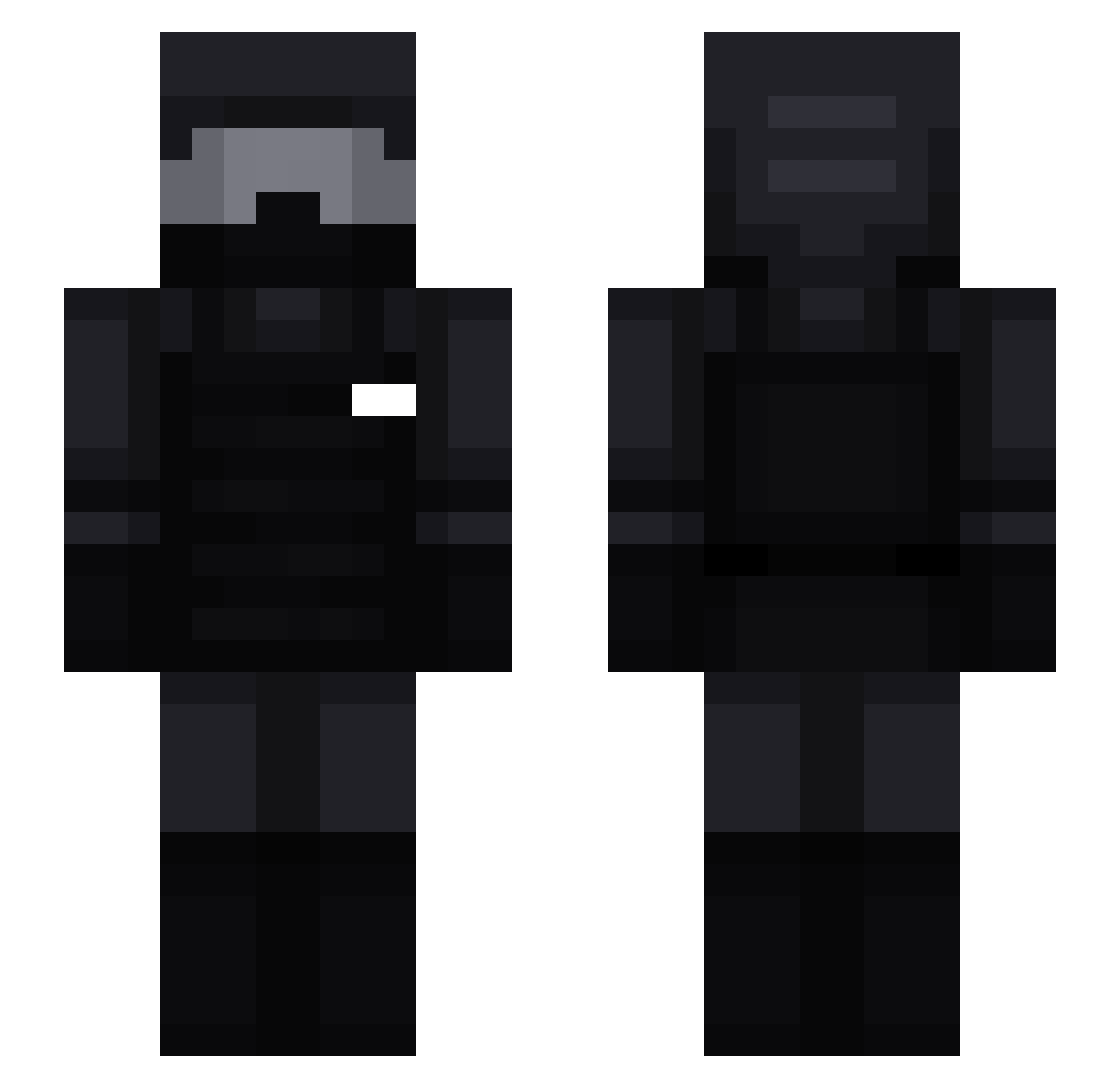
Current Minecraft skin of the player Tony1303, loaded from the official Mojang API. Rotate the 3D model with your mouse or finger, then download the skin as a PNG file and use it in Minecraft: Bedrock Edition or Java Edition for free. When Tony1303 changes their skin, this page updates automatically and the old skin stays in the history below.
Other players with this skin (202)
Tony1303 was the 99th player we have seen with this skin, first spotted on 19.09.2026. The same skin was seen on these players. Open a nickname to see their current skin and skin history.
 YerielG4 HawkT1 diixon GrizzlyWG1 FLX38 pegg127 simonhhh Moueleux BoxPvPV N_K_____ PundsAFK3 Gandhi2_0 csdaev Ardnac Melvix__ 9inchlivesmatter kiriguya_Kazuto Peanut0173 Titi52500 WaterBubble00 Konejj bottle_joon RedMK98 Nathanth2003 Bromvd kabanello 08_Shbenti4Ban yazino_knight alex_marca Sodzy JJ_444 synexleon Aj_shoe MoshOnTopV1 Kandiaru Kingfalkna Weioooo x_Xxo Rogmaz DRGAME23 Goggii Shbent4Blacklist Portierone12 xVxid_Jo3l hoaxiz 3amo_ Bekas_007 TTSnake CaptainWeiTuLo Ciotolino22 cnturia BloodDragonYT sel7 BennettCane finburu LeonTheEditor Mister_Ozzy vettel7852 BennettVPS FeuilleSphinx7
More Swat Minecraft skins
How to install the Tony1303 skin
- Press the Download button above to save the skin as a PNG file.
- Minecraft: Bedrock Edition (PE): open the Dressing Room from the main menu (or tap your character → Edit Character), go to Classic Skins → Owned, press the + (new skin) button, choose the downloaded PNG and pick the Slim (Alex) model. Works on PC and mobile; consoles cannot import custom skins.
- Minecraft: Java Edition: open the Minecraft Launcher, go to the Skins tab, click New Skin, load the PNG, pick the Slim (Alex) model and press Save & Use. You can also upload it at minecraft.net → Profile → Change Skin.
The skin does not show up after import - what should I do?
Restart Minecraft and open the Dressing Room again - imported skins sometimes appear only after a restart. Also make sure you selected the imported skin and picked the Slim (Alex) model.
Which model should I choose, Classic or Slim?
This skin is designed for the Slim (Alex) model. If you pick the wrong model, the arms of the skin will look stretched or squeezed.
Is the skin of Tony1303 free to download?
Yes. Press Download, save the PNG file and use it in Minecraft: Bedrock Edition or Java Edition - no payment or registration needed. The skin also works on multiplayer servers and Realms.
More skins
Looking for more? Go back to all Minecraft skins and check the top skins of the week, month and all time, or find any player's skin by nickname.