
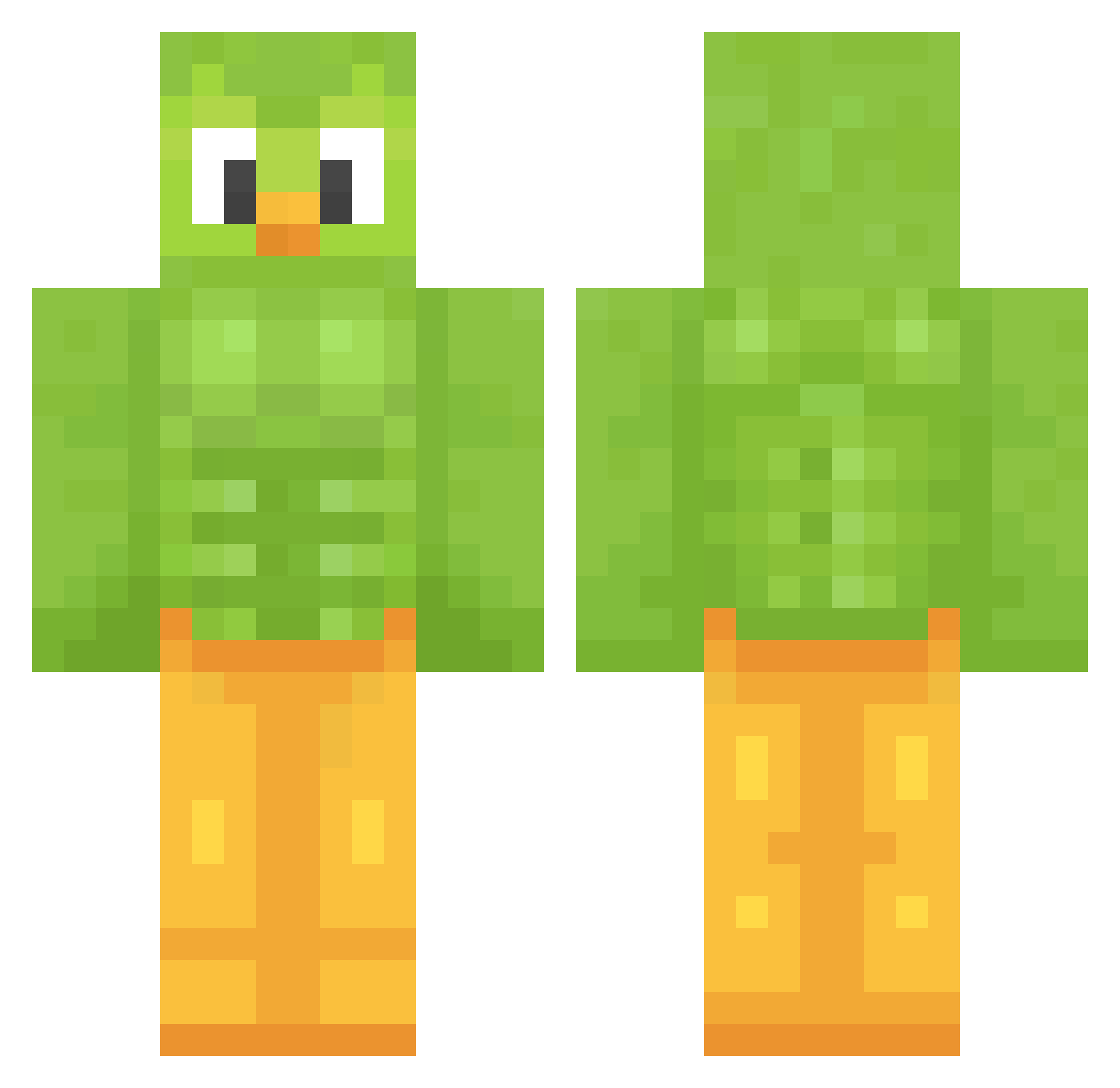
Current Minecraft skin of the player TimTomTommy, loaded from the official Mojang API. Rotate the 3D model with your mouse or finger, then download the skin as a PNG file and use it in Minecraft: Bedrock Edition or Java Edition for free. When TimTomTommy changes their skin, this page updates automatically and the old skin stays in the history below.
Other players with this skin (1019)
TimTomTommy was the 44th player we have seen with this skin, first spotted on 26.07.2026. The same skin was seen on these players. Open a nickname to see their current skin and skin history.
 GentleMovie4701 shawkBOLSONARO NobbyTheSkelly Shark_boi14
 marathuy KANG_113 DrDonttnut
 skema34 ShuntaClaus Piotereq EdaterHeaven GreekYoghurt04
 theWicked_Wiener MiniNapo Violetteh123 curlytate TideWarpTheTired
 goontosoon HeyPoco Deqwetrius LarsoMania
 dandann41 miglobo135 CamelMoney FortniteSlayer41 NPKfertile Pajarao XMlky PE_PPERMIN_T Brachet Bradles69 DontSpeakHuman wldls27 SOUNDnb Muckelmann McAghon Redude25
 Savotraz
 __Shinonome__ DeNikto Adridguez Xeal18 its_masonn Sprhunt LeviAkerman2022 BetaBerk MorsitaPijita WittyKitty666 dermodemonnn farmgal4244 Enchan1ed yMatthz
 minus1237 mariella0907 yangjie0601 ggracie367 tyk1ng TunaPastaBakes
 dabuluW38 Jannis199
More Duo Minecraft skins
How to install the TimTomTommy skin
- Press the Download button above to save the skin as a PNG file.
- Minecraft: Bedrock Edition (PE): open the Dressing Room from the main menu (or tap your character → Edit Character), go to Classic Skins → Owned, press the + (new skin) button, choose the downloaded PNG and pick the Classic (Steve) model. Works on PC and mobile; consoles cannot import custom skins.
- Minecraft: Java Edition: open the Minecraft Launcher, go to the Skins tab, click New Skin, load the PNG, pick the Classic (Steve) model and press Save & Use. You can also upload it at minecraft.net → Profile → Change Skin.
The skin does not show up after import - what should I do?
Restart Minecraft and open the Dressing Room again - imported skins sometimes appear only after a restart. Also make sure you selected the imported skin and picked the Classic (Steve) model.
Which model should I choose, Classic or Slim?
This skin is designed for the Classic (Steve) model. If you pick the wrong model, the arms of the skin will look stretched or squeezed.
Is the skin of TimTomTommy free to download?
Yes. Press Download, save the PNG file and use it in Minecraft: Bedrock Edition or Java Edition - no payment or registration needed. The skin also works on multiplayer servers and Realms.
More skins
Looking for more? Go back to all Minecraft skins and check the top skins of the week, month and all time, or find any player's skin by nickname.