
Thspider47 - Minecraft Skins & Skin History
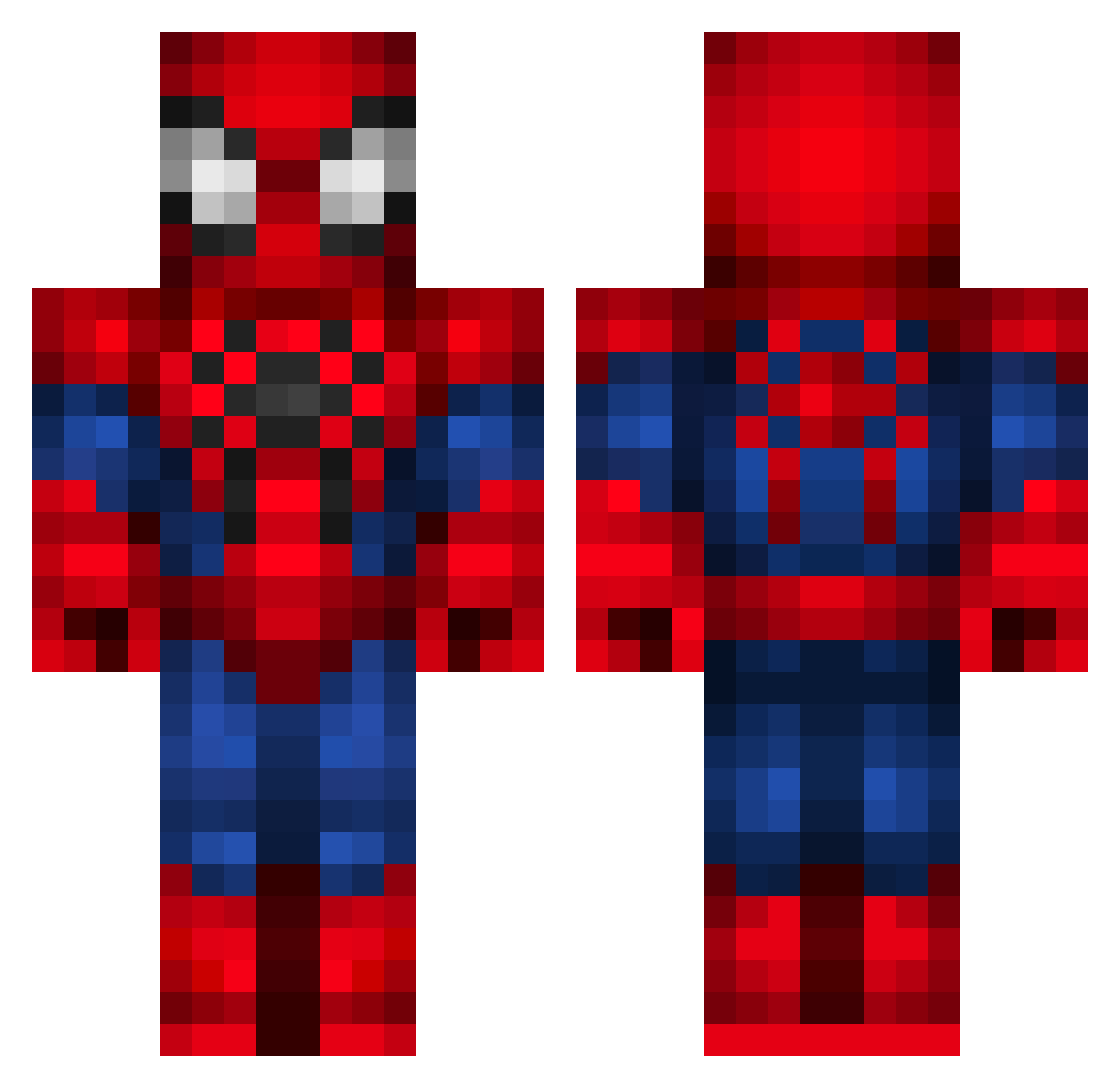
Current Minecraft skin of the player Thspider47, loaded from the official Mojang API. Rotate the 3D model with your mouse or finger, then download the skin as a PNG file and use it in Minecraft: Bedrock Edition or Java Edition for free. When Thspider47 changes their skin, this page updates automatically and the old skin stays in the history below.
Other players with this skin (336)
Thspider47 was the 215th player we have seen with this skin, first spotted on 01.10.2026. The same skin was seen on these players. Open a nickname to see their current skin and skin history.
 pedrocaPacoca spiderman155 Gabbyds12 dakshpat andychiu0818 bauruna Coruje Bimercito fenixgamer8 RedBul_101 uhmikaela UniV21 Smewthie irmaGostosa FeltyMallard52 SamMcFly ErrorKidPlata carlasignoris Manguzz_NTN vulgo_LT xLovelyGirlx zgooze MIRANHAA rikkosuave mariz78 Flying_Dutchie Waltergstz eduznxx ShooterJL Sheeeep97 lulu2004X mellyyy1 oswaldo0811 atahang Thixxx STYN01 johpohnt cheguevara34 Luisfersol alonsoax122 jazzplasticola Anloma UnoHonos SnowZxya OKAM96 Overtripp Neruzzz idatboi_354 Ashremmers Elmbro Deadzert lilkiane Enriic4 JamaicaLopes KubilayDark ess2905 ThunderingKevin krol_sentino ResolveSnow val_tkat
More Spider-Man Minecraft skins
How to install the Thspider47 skin
- Press the Download button above to save the skin as a PNG file.
- Minecraft: Bedrock Edition (PE): open the Dressing Room from the main menu (or tap your character → Edit Character), go to Classic Skins → Owned, press the + (new skin) button, choose the downloaded PNG and pick the Classic (Steve) model. Works on PC and mobile; consoles cannot import custom skins.
- Minecraft: Java Edition: open the Minecraft Launcher, go to the Skins tab, click New Skin, load the PNG, pick the Classic (Steve) model and press Save & Use. You can also upload it at minecraft.net → Profile → Change Skin.
The skin does not show up after import - what should I do?
Restart Minecraft and open the Dressing Room again - imported skins sometimes appear only after a restart. Also make sure you selected the imported skin and picked the Classic (Steve) model.
Which model should I choose, Classic or Slim?
This skin is designed for the Classic (Steve) model. If you pick the wrong model, the arms of the skin will look stretched or squeezed.
Is the skin of Thspider47 free to download?
Yes. Press Download, save the PNG file and use it in Minecraft: Bedrock Edition or Java Edition - no payment or registration needed. The skin also works on multiplayer servers and Realms.
More skins
Looking for more? Go back to all Minecraft skins and check the top skins of the week, month and all time, or find any player's skin by nickname.