
The_Real_Puki - Minecraft Skins & Skin History
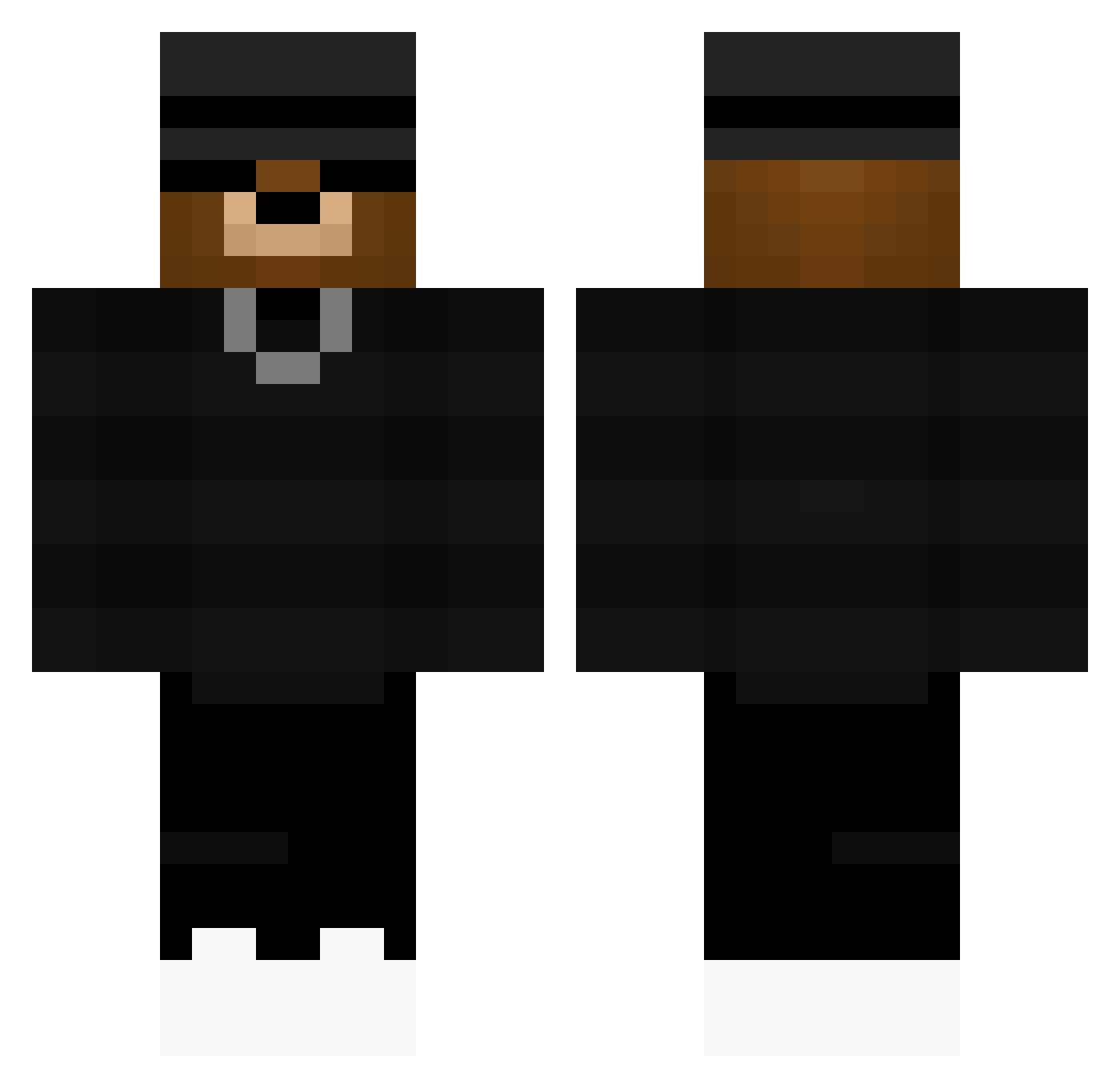
Current Minecraft skin of the player The_Real_Puki, loaded from the official Mojang API. Rotate the 3D model with your mouse or finger, then download the skin as a PNG file and use it in Minecraft: Bedrock Edition or Java Edition for free. When The_Real_Puki changes their skin, this page updates automatically and the old skin stays in the history below.
Other players with this skin (58)
The_Real_Puki was the 3rd player we have seen with this skin, first spotted on 21.07.2026. The same skin was seen on these players. Open a nickname to see their current skin and skin history.
 drSeasmp
 FarzyYT5617
 BraxWon
 Jonteilm
 FordBoy15 DZebus
 MrNicx wS1mply
 N0vqxir
 hidenosukeY DragonVm Majike
 Fruchtzwerg4136
 makky44109
 Standardmjolk Lupzy0 soldrik9484 DECDOGG Montrose2005
 NL2055
 mrkittycatwho Kleanpower
 colin_de
 lukeypookiedooky Fredelino hi3023 SpiegelEIIII
 _SmileyOS_
 Terlix1900 xNico502 7ar_ MaxRizz09 Leck3ier Darknessteve28 Krompi SuperSteve77777 BeastyBeastTorin SHARK4771 HuseyinOfficiall __Nega FireCrayon41543 rezyx_x DerEchteOxi
 ChamorroKid99 Kryan31 jkbb7 BlackCyberXMC fael_das_paty GOAT4894 hunterg0705 ChristosGR Gamer_Miko15 33Felix7 PortenEsport5 MrRonaldo14 Philip_0 KevThe10 Darian_DX
More Chain Necklace Minecraft skins
See all 208 Chain Necklace skins
How to install the The_Real_Puki skin
- Press the Download button above to save the skin as a PNG file.
- Minecraft: Bedrock Edition (PE): open the Dressing Room from the main menu (or tap your character → Edit Character), go to Classic Skins → Owned, press the + (new skin) button, choose the downloaded PNG and pick the Classic (Steve) model. Works on PC and mobile; consoles cannot import custom skins.
- Minecraft: Java Edition: open the Minecraft Launcher, go to the Skins tab, click New Skin, load the PNG, pick the Classic (Steve) model and press Save & Use. You can also upload it at minecraft.net → Profile → Change Skin.
The skin does not show up after import - what should I do?
Restart Minecraft and open the Dressing Room again - imported skins sometimes appear only after a restart. Also make sure you selected the imported skin and picked the Classic (Steve) model.
Which model should I choose, Classic or Slim?
This skin is designed for the Classic (Steve) model. If you pick the wrong model, the arms of the skin will look stretched or squeezed.
Is the skin of The_Real_Puki free to download?
Yes. Press Download, save the PNG file and use it in Minecraft: Bedrock Edition or Java Edition - no payment or registration needed. The skin also works on multiplayer servers and Realms.
More skins
Looking for more? Go back to all Minecraft skins and check the top skins of the week, month and all time, or find any player's skin by nickname.