
TheUnicorn4053 - Minecraft Skins & Skin History
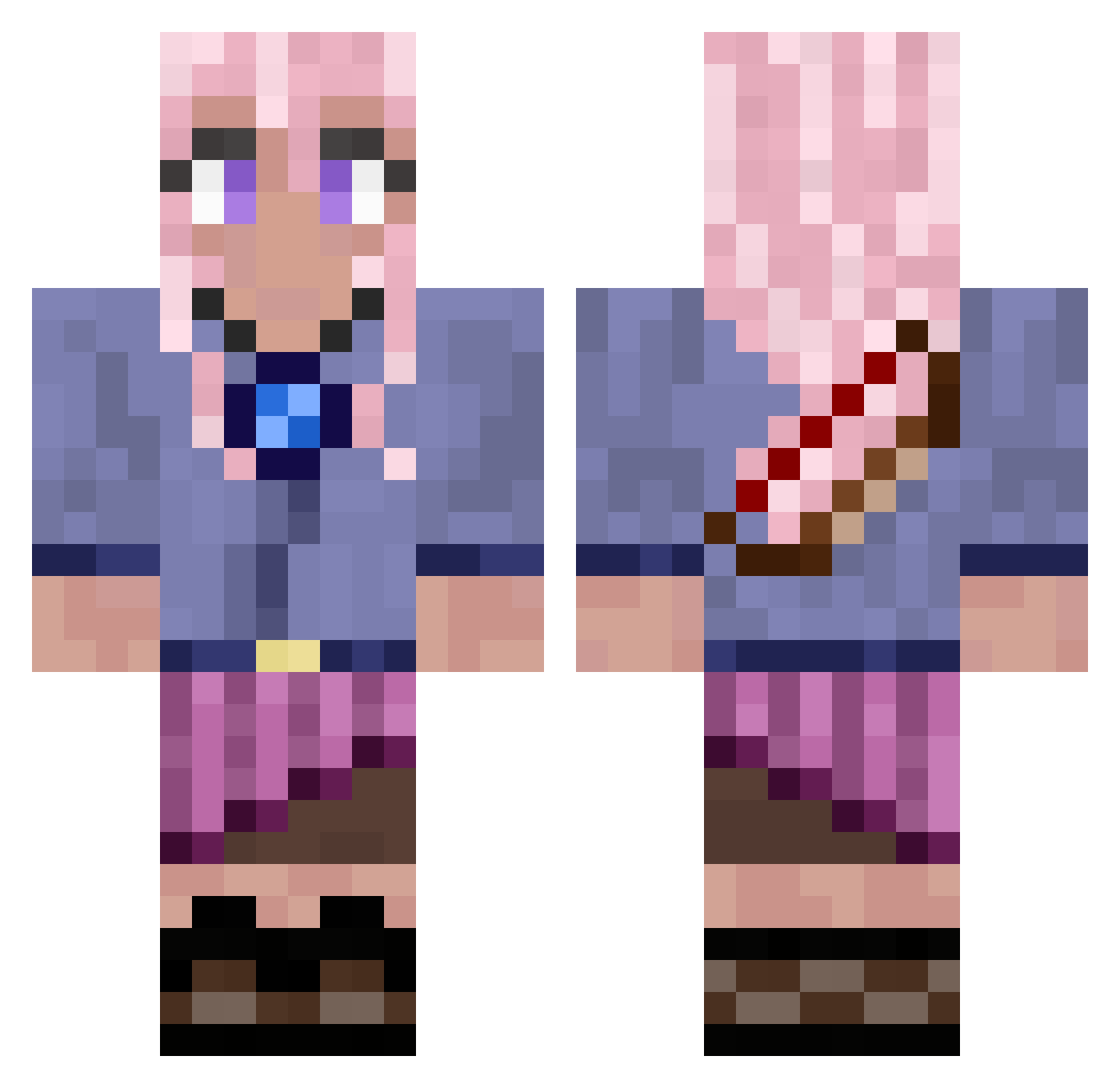
Current Minecraft skin of the player TheUnicorn4053, loaded from the official Mojang API. Rotate the 3D model with your mouse or finger, then download the skin as a PNG file and use it in Minecraft: Bedrock Edition or Java Edition for free. When TheUnicorn4053 changes their skin, this page updates automatically and the old skin stays in the history below.
Other players with this skin (778)
TheUnicorn4053 was the 534th player we have seen with this skin, first spotted on 05.10.2026. The same skin was seen on these players. Open a nickname to see their current skin and skin history.
 Maricuchi JohnQuinn23 The_Freya Trevor_a1999 titso Djeanbaptiste77 floristheh Semla8031 Melodyspiee Brallislallis111 khorses Skibidirizller10 Tinkerbell221 DerOnkoZockt wonderlandcircus Paradise_07 Zris96 Maijune Lotusssssssss naimach CHOICE8788 pshizle DragonRider7000 MidnightMelody17 rachel_jane62 Noj2148 XDGODX0 rosaly00 BusterXx SavageKitty441 WindDasher700 mrs_y3ti LukeOlivia GeorgieCat19 Futzyyyy Lopenzo2012 Rcxie igpeppino katiecik leila9982 DiamondEmmi Renny123 Prathampro14 Adrian2308 LemonKat7691 JackyM90 SchelmKrippe kritt1 Tanii0410 MRBH2017 ForestDivinity Zoeyyyyyyyyyyyy JaninaSunshine iamstevesigmaboy natethegreat211 MidnightI_wicker sarqhx LovelyLlama2007 IzzyByte Alex18605
More Kyoko Kirigiri Minecraft skins
See all 61 Kyoko Kirigiri skins
How to install the TheUnicorn4053 skin
- Press the Download button above to save the skin as a PNG file.
- Minecraft: Bedrock Edition (PE): open the Dressing Room from the main menu (or tap your character → Edit Character), go to Classic Skins → Owned, press the + (new skin) button, choose the downloaded PNG and pick the Classic (Steve) model. Works on PC and mobile; consoles cannot import custom skins.
- Minecraft: Java Edition: open the Minecraft Launcher, go to the Skins tab, click New Skin, load the PNG, pick the Classic (Steve) model and press Save & Use. You can also upload it at minecraft.net → Profile → Change Skin.
The skin does not show up after import - what should I do?
Restart Minecraft and open the Dressing Room again - imported skins sometimes appear only after a restart. Also make sure you selected the imported skin and picked the Classic (Steve) model.
Which model should I choose, Classic or Slim?
This skin is designed for the Classic (Steve) model. If you pick the wrong model, the arms of the skin will look stretched or squeezed.
Is the skin of TheUnicorn4053 free to download?
Yes. Press Download, save the PNG file and use it in Minecraft: Bedrock Edition or Java Edition - no payment or registration needed. The skin also works on multiplayer servers and Realms.
More skins
Looking for more? Go back to all Minecraft skins and check the top skins of the week, month and all time, or find any player's skin by nickname.