
TheFireKingTR - Minecraft Skins & Skin History
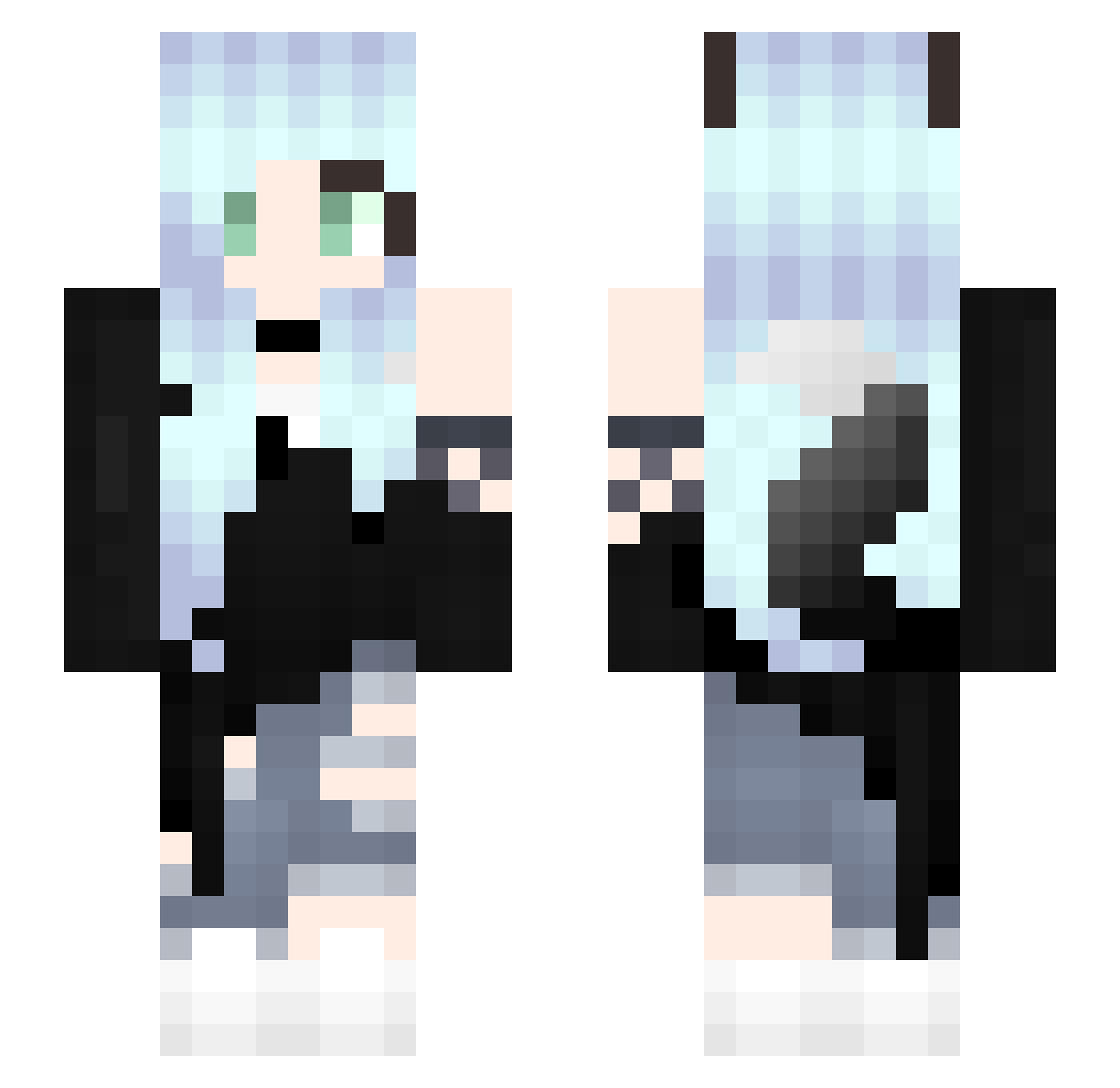
Current Minecraft skin of the player TheFireKingTR, loaded from the official Mojang API. Rotate the 3D model with your mouse or finger, then download the skin as a PNG file and use it in Minecraft: Bedrock Edition or Java Edition for free. When TheFireKingTR changes their skin, this page updates automatically and the old skin stays in the history below.
Other players with this skin (312)
TheFireKingTR was the 224th player we have seen with this skin, first spotted on 11.10.2026. The same skin was seen on these players. Open a nickname to see their current skin and skin history.
 roa778 Bad_losing Sang0720 TheprincessAnn77 KUROTO9150 RedPanda54 Lamial Lu_l3sh Babziol NerdyGirl3272 cowyow Minchan1510 tsuna22 Lety26 DeCgN Honeyhervi Jaeiana SakuraRosella Edith202 lostinmytoughts CosplayIsLife theraimbogirl shoopang KiNirvana HaRam1021 Lavalore LazyGabi TheAuroraWolf Kurayan Meep710 KrystianoEvo9 OrigamiLilith shun1012006 Baymax1112 NGC5197 F0XC4T PeechYT TwitchMeixVeeR Gatyse DuyDdayyy ponylikesgraps2 LyraRose Kail4823 Mary_Black_Kitty _Dum_Spiro_Buteo Antsman7621 AjaZa78 horon77 chanlin0130 mattermummy2267 jigusou Gandalfzzz aneu12345 Hutaba0329 Lirikonya Andreea17187 Catch8787 FoxieSamie NeKo_MeOw TBNRfrags8250
More Fox Ears Minecraft skins
How to install the TheFireKingTR skin
- Press the Download button above to save the skin as a PNG file.
- Minecraft: Bedrock Edition (PE): open the Dressing Room from the main menu (or tap your character → Edit Character), go to Classic Skins → Owned, press the + (new skin) button, choose the downloaded PNG and pick the Slim (Alex) model. Works on PC and mobile; consoles cannot import custom skins.
- Minecraft: Java Edition: open the Minecraft Launcher, go to the Skins tab, click New Skin, load the PNG, pick the Slim (Alex) model and press Save & Use. You can also upload it at minecraft.net → Profile → Change Skin.
The skin does not show up after import - what should I do?
Restart Minecraft and open the Dressing Room again - imported skins sometimes appear only after a restart. Also make sure you selected the imported skin and picked the Slim (Alex) model.
Which model should I choose, Classic or Slim?
This skin is designed for the Slim (Alex) model. If you pick the wrong model, the arms of the skin will look stretched or squeezed.
Is the skin of TheFireKingTR free to download?
Yes. Press Download, save the PNG file and use it in Minecraft: Bedrock Edition or Java Edition - no payment or registration needed. The skin also works on multiplayer servers and Realms.
More skins
Looking for more? Go back to all Minecraft skins and check the top skins of the week, month and all time, or find any player's skin by nickname.