
Tettix - Minecraft Skins & Skin History
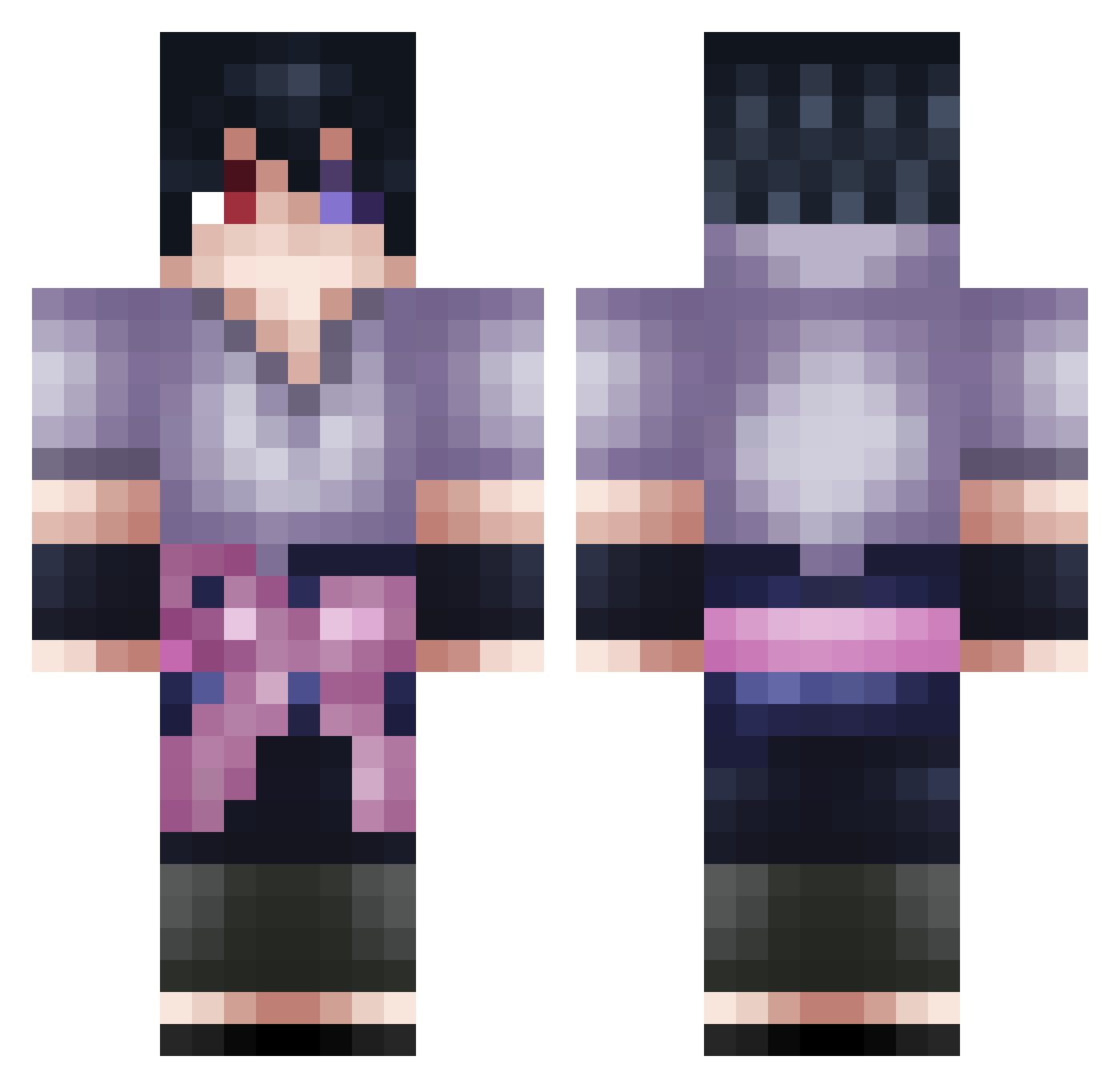
Current Minecraft skin of the player Tettix, loaded from the official Mojang API. Rotate the 3D model with your mouse or finger, then download the skin as a PNG file and use it in Minecraft: Bedrock Edition or Java Edition for free. When Tettix changes their skin, this page updates automatically and the old skin stays in the history below.
Other players with this skin (97)
Tettix was the 29th player we have seen with this skin, first spotted on 31.08.2026. The same skin was seen on these players. Open a nickname to see their current skin and skin history.
 AlexTheFireFist kerem9256 Mizy142 DEADNOTE_ CoreyDaBaker SretenCico KSenS iAnemone LovelyPoodle Mo_on_keys UnstoppableGamez C_Vernon_316 ConstiHasToSleep BIGMU66 LZBK Sasuke70 soliderbro zitis UchiihaSasuke Viyacornn frogger7474 Abo_atia fedthesnake Gubssxx SpexzyDaQT Alexbudda JLENGEND Kusy17 zbhy Douhue me_nouh Devil2056 sneax_og PotatoSouper M4rvy toto76200 Anyks chenwei_0813 KratosAfricano Scytexx Tributum azkgr
 Alpagamer _Giffas_ EluneoV3 Shaggy66 Santix_n goulpvp OurLegalAlien Arangers_ Summer_Sleep Voltayn Xqiqi_127
 Reolass PeakWinter5636 fancyer papapapy daiking1 Hashey_Sen mueralu
More Sasuke Uchiha Minecraft skins
See all 727 Sasuke Uchiha skins
How to install the Tettix skin
- Press the Download button above to save the skin as a PNG file.
- Minecraft: Bedrock Edition (PE): open the Dressing Room from the main menu (or tap your character → Edit Character), go to Classic Skins → Owned, press the + (new skin) button, choose the downloaded PNG and pick the Classic (Steve) model. Works on PC and mobile; consoles cannot import custom skins.
- Minecraft: Java Edition: open the Minecraft Launcher, go to the Skins tab, click New Skin, load the PNG, pick the Classic (Steve) model and press Save & Use. You can also upload it at minecraft.net → Profile → Change Skin.
The skin does not show up after import - what should I do?
Restart Minecraft and open the Dressing Room again - imported skins sometimes appear only after a restart. Also make sure you selected the imported skin and picked the Classic (Steve) model.
Which model should I choose, Classic or Slim?
This skin is designed for the Classic (Steve) model. If you pick the wrong model, the arms of the skin will look stretched or squeezed.
Is the skin of Tettix free to download?
Yes. Press Download, save the PNG file and use it in Minecraft: Bedrock Edition or Java Edition - no payment or registration needed. The skin also works on multiplayer servers and Realms.
More skins
Looking for more? Go back to all Minecraft skins and check the top skins of the week, month and all time, or find any player's skin by nickname.