
TeoNorde - Minecraft Skins & Skin History
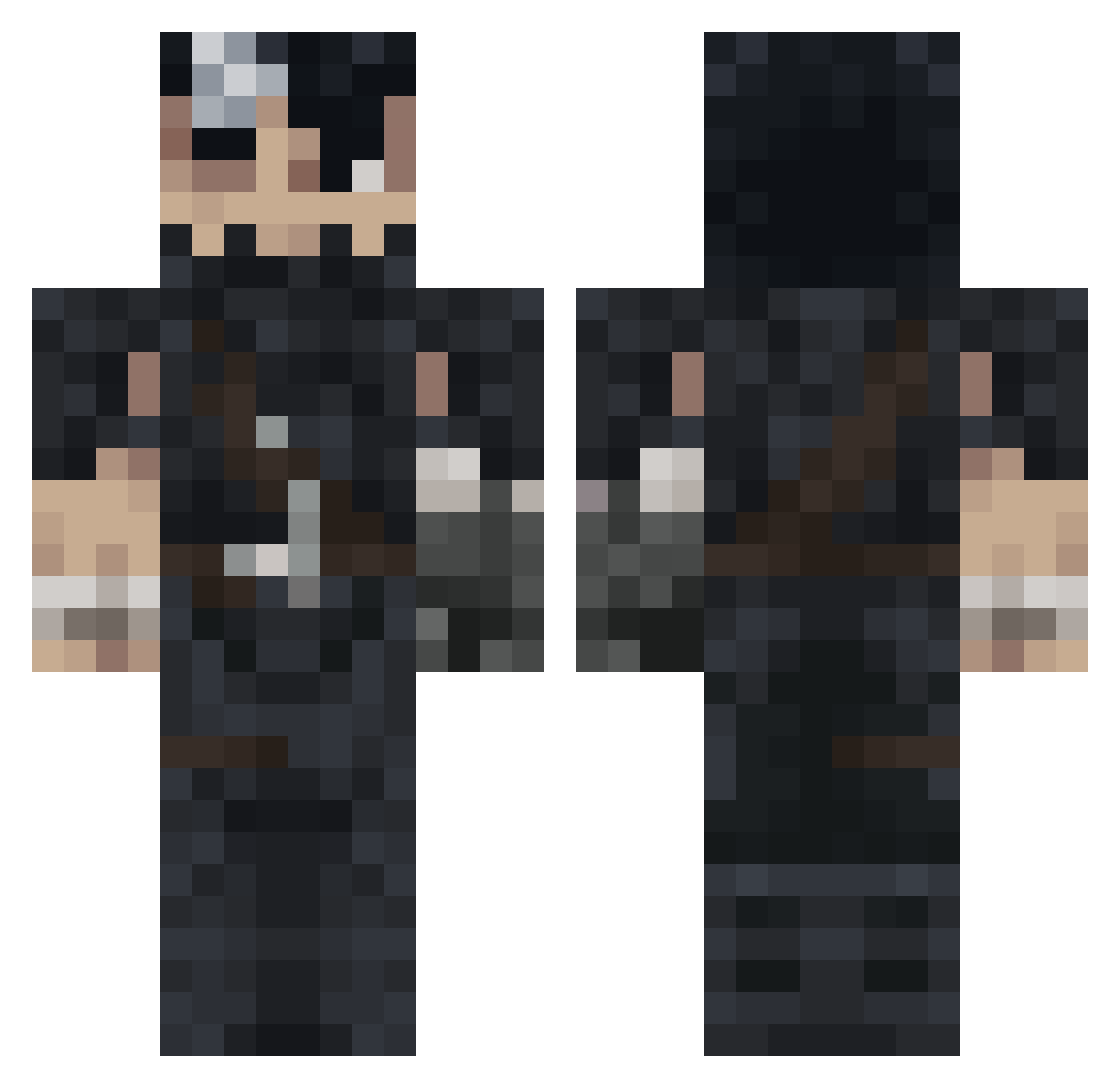
Current Minecraft skin of the player TeoNorde, loaded from the official Mojang API. Rotate the 3D model with your mouse or finger, then download the skin as a PNG file and use it in Minecraft: Bedrock Edition or Java Edition for free. When TeoNorde changes their skin, this page updates automatically and the old skin stays in the history below.
Other players with this skin (992)
TeoNorde was the 170th player we have seen with this skin, first spotted on 11.08.2026. The same skin was seen on these players. Open a nickname to see their current skin and skin history.
 K1MYx Petrinus9 JuiceHater99 FaQn2 ImpurestNinja phrofic Laggus itsblizzard Seniox1 Twuris Peudrokk
 ImKino_ monsterock hugommeira kadiryuguji HannyaMask1 blaster16 Storresis morten2389 supergracz132222 sony_pain_R despaired_ AceEditz Packhno22 kxsana Un1FooL Gopak DekadenZ__ MiniMacDon xeistsar MrNeito D2_L YAZEED119 bussolini45 dydytl iRauu27 xnxm2 egg1232 Kancsal anndyy999 ManIloveFideos19 K0renay Bazellll PotatoSlayer08 wow4iik lepanchero Tibas1999 Zokared UCM99 CerberusGx
 LilDvcx Lost_Haven P4T4T3 AllesLit CraftedGenius77 Taki_HD SatoshiGuts Naninoob JustMeFabio 13e4111
More Guts Minecraft skins
How to install the TeoNorde skin
- Press the Download button above to save the skin as a PNG file.
- Minecraft: Bedrock Edition (PE): open the Dressing Room from the main menu (or tap your character → Edit Character), go to Classic Skins → Owned, press the + (new skin) button, choose the downloaded PNG and pick the Classic (Steve) model. Works on PC and mobile; consoles cannot import custom skins.
- Minecraft: Java Edition: open the Minecraft Launcher, go to the Skins tab, click New Skin, load the PNG, pick the Classic (Steve) model and press Save & Use. You can also upload it at minecraft.net → Profile → Change Skin.
The skin does not show up after import - what should I do?
Restart Minecraft and open the Dressing Room again - imported skins sometimes appear only after a restart. Also make sure you selected the imported skin and picked the Classic (Steve) model.
Which model should I choose, Classic or Slim?
This skin is designed for the Classic (Steve) model. If you pick the wrong model, the arms of the skin will look stretched or squeezed.
Is the skin of TeoNorde free to download?
Yes. Press Download, save the PNG file and use it in Minecraft: Bedrock Edition or Java Edition - no payment or registration needed. The skin also works on multiplayer servers and Realms.
More skins
Looking for more? Go back to all Minecraft skins and check the top skins of the week, month and all time, or find any player's skin by nickname.