
Sweetie502 - Minecraft Skins & Skin History
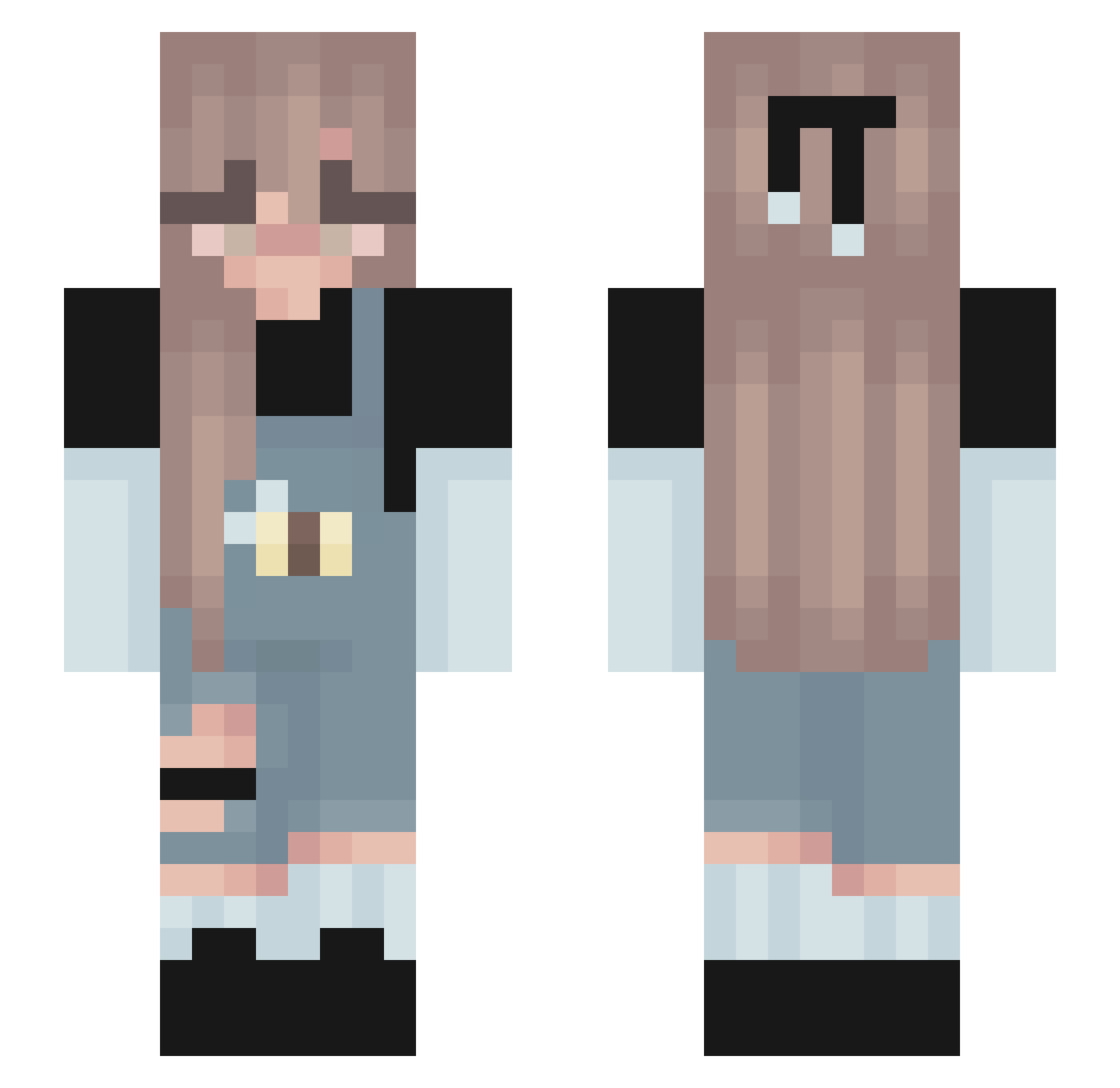
Current Minecraft skin of the player Sweetie502, loaded from the official Mojang API. Rotate the 3D model with your mouse or finger, then download the skin as a PNG file and use it in Minecraft: Bedrock Edition or Java Edition for free. When Sweetie502 changes their skin, this page updates automatically and the old skin stays in the history below.
Other players with this skin (139)
Sweetie502 was the 112th player we have seen with this skin, first spotted on 24.10.2026. The same skin was seen on these players. Open a nickname to see their current skin and skin history.
 Beggberry Zol1neQ VitorCarletti wolf_mily _ItsMaya_ Reagan169 _Speedyyy_ Mamzellesmi Glitch_bee pandaflip13 Annia210 MadrigalNugget Creepy_Crawler57 Grandcloth97 oyuncu_doe Axter_X rbennett0516 riggelz Blank404_ ChiaraBirba spaghettibee KwadratSmierdzi ewwandyuck drowsekk GeertjePeertje Rares12345 oMozaid SachaKawaiiii QueenKarli_ Niyyah QueenxJaicee BattleBugPlaysX Stalgrim XxTesxX Little_devil2611 Tqpioca zany_zany iris9111 luparaplu _Ya_Like_Jazz_ Zyehi tiffna canything LilMissGrim PrimeValux Cloudy_Zenitsu zlexile Gwen_44 NEMO000 Zanyzoo28 GabbyPopcorn GhostieBee ALA_DIN OnlyPoped _dumb_one_ Sodazoom Okhya Juli202 qtErinC Maddy_18
More Cute Minecraft skins
How to install the Sweetie502 skin
- Press the Download button above to save the skin as a PNG file.
- Minecraft: Bedrock Edition (PE): open the Dressing Room from the main menu (or tap your character → Edit Character), go to Classic Skins → Owned, press the + (new skin) button, choose the downloaded PNG and pick the Slim (Alex) model. Works on PC and mobile; consoles cannot import custom skins.
- Minecraft: Java Edition: open the Minecraft Launcher, go to the Skins tab, click New Skin, load the PNG, pick the Slim (Alex) model and press Save & Use. You can also upload it at minecraft.net → Profile → Change Skin.
The skin does not show up after import - what should I do?
Restart Minecraft and open the Dressing Room again - imported skins sometimes appear only after a restart. Also make sure you selected the imported skin and picked the Slim (Alex) model.
Which model should I choose, Classic or Slim?
This skin is designed for the Slim (Alex) model. If you pick the wrong model, the arms of the skin will look stretched or squeezed.
Is the skin of Sweetie502 free to download?
Yes. Press Download, save the PNG file and use it in Minecraft: Bedrock Edition or Java Edition - no payment or registration needed. The skin also works on multiplayer servers and Realms.
More skins
Looking for more? Go back to all Minecraft skins and check the top skins of the week, month and all time, or find any player's skin by nickname.