
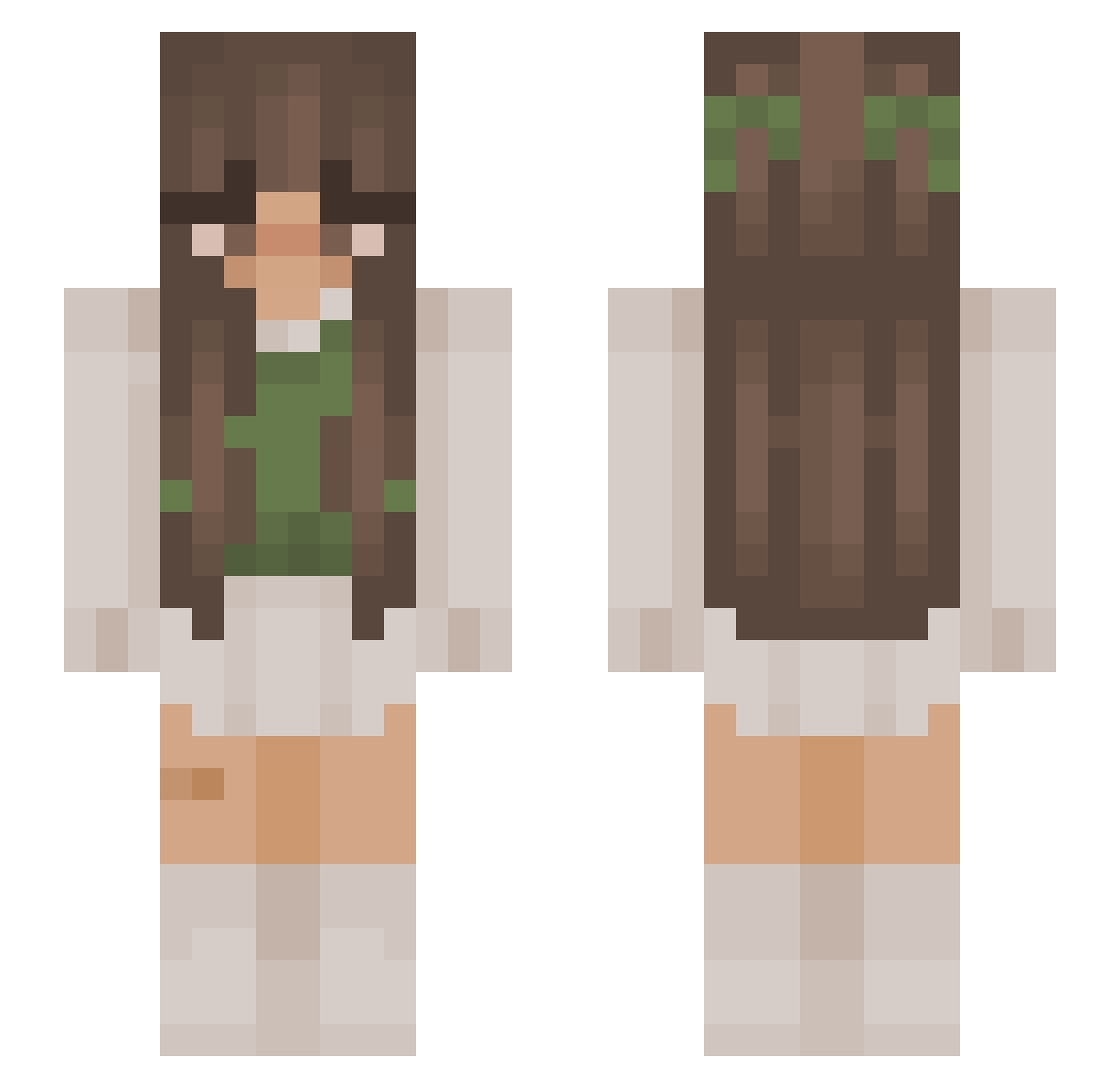
Current Minecraft skin of the player SuperPixieDust11, loaded from the official Mojang API. Rotate the 3D model with your mouse or finger, then download the skin as a PNG file and use it in Minecraft: Bedrock Edition or Java Edition for free. When SuperPixieDust11 changes their skin, this page updates automatically and the old skin stays in the history below.
Other players with this skin (822)
SuperPixieDust11 was the 403rd player we have seen with this skin, first spotted on 03.09.2026. The same skin was seen on these players. Open a nickname to see their current skin and skin history.
 lauraafilipa lesscalm Its_Paige_Mate Leanixer Gretiz Jrdynmarie Fairy1605 Glorix_ Ryuu_Raiden mcfindout SternchenSuppe Nutellabr2005 o65_kimi Julychennn pooshkie anikaistrash heyitzavery alanaminty sydondeez aliceEh1 geethawrkn kcboop amaya_nichole yelloes LightMia GuiltyFrogs Mackincheese69 Katrima JayPlayz815 MajaSlonecznik MediocreCorn518 Lissy7227 rohliksmaslem55 lanaa011 RainPixie gravityrose_ TekkenSeven Riri04 kiwik5333 miamxrie Aci81 Iestotoast_rps ffleurrr ris0610 Fronella Dzes00 Grzatonator krowisko Pomme_p Nicky101 Shea703 Suskaaaa amr9a brunette54321 Jeanny2201 Kaczka7904 Cesa____________ ConfuzedApplez keeleyeatscats AnziLotnik
More Cottagecore Minecraft skins
See all 5495 Cottagecore skins
How to install the SuperPixieDust11 skin
- Press the Download button above to save the skin as a PNG file.
- Minecraft: Bedrock Edition (PE): open the Dressing Room from the main menu (or tap your character → Edit Character), go to Classic Skins → Owned, press the + (new skin) button, choose the downloaded PNG and pick the Slim (Alex) model. Works on PC and mobile; consoles cannot import custom skins.
- Minecraft: Java Edition: open the Minecraft Launcher, go to the Skins tab, click New Skin, load the PNG, pick the Slim (Alex) model and press Save & Use. You can also upload it at minecraft.net → Profile → Change Skin.
The skin does not show up after import - what should I do?
Restart Minecraft and open the Dressing Room again - imported skins sometimes appear only after a restart. Also make sure you selected the imported skin and picked the Slim (Alex) model.
Which model should I choose, Classic or Slim?
This skin is designed for the Slim (Alex) model. If you pick the wrong model, the arms of the skin will look stretched or squeezed.
Is the skin of SuperPixieDust11 free to download?
Yes. Press Download, save the PNG file and use it in Minecraft: Bedrock Edition or Java Edition - no payment or registration needed. The skin also works on multiplayer servers and Realms.
More skins
Looking for more? Go back to all Minecraft skins and check the top skins of the week, month and all time, or find any player's skin by nickname.