
Summin0106 - Minecraft Skins & Skin History
Current Minecraft skin of the player Summin0106, loaded from the official Mojang API. Rotate the 3D model with your mouse or finger, then download the skin as a PNG file and use it in Minecraft: Bedrock Edition or Java Edition for free. When Summin0106 changes their skin, this page updates automatically and the old skin stays in the history below.
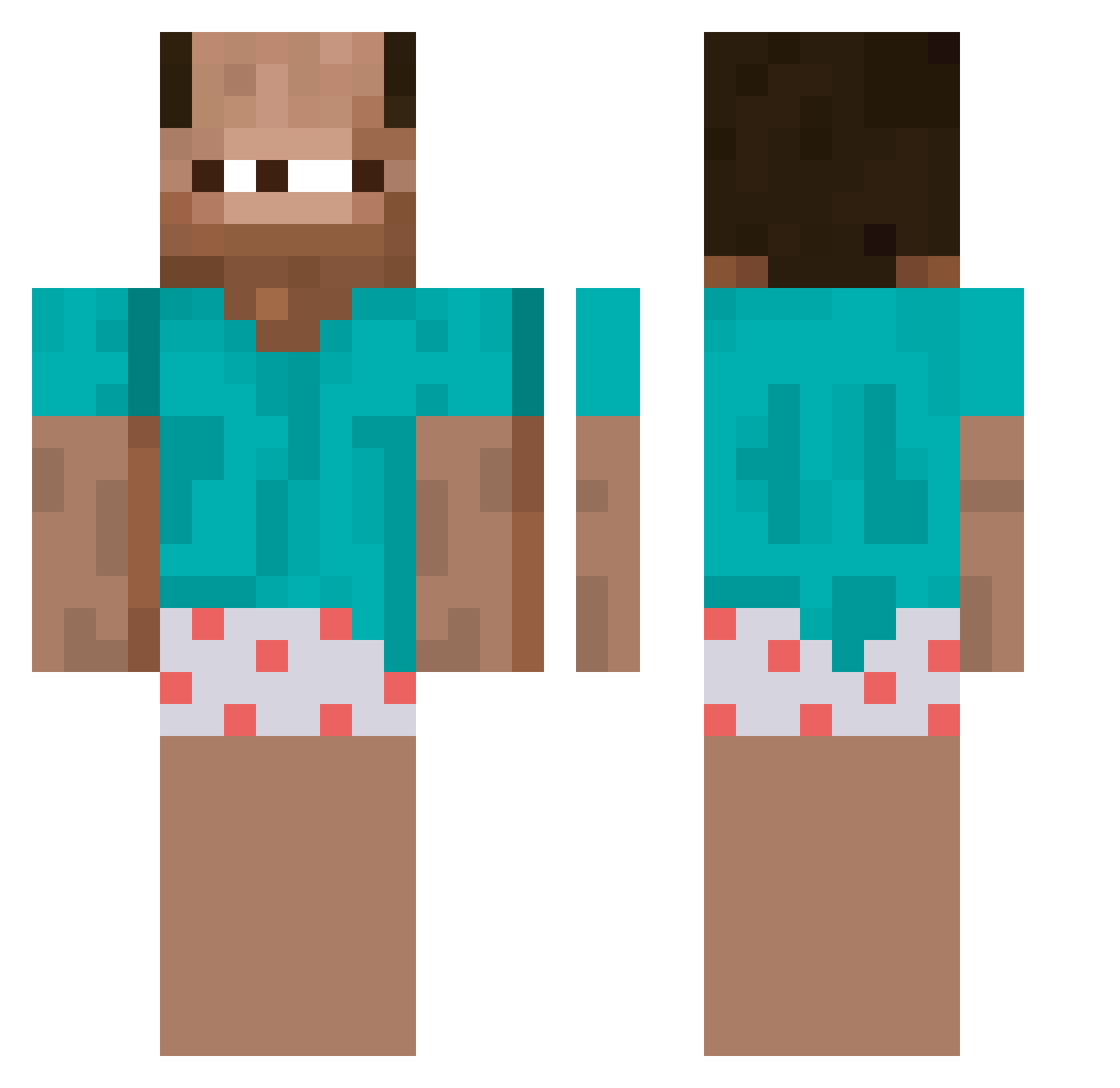
Other players with this skin (256)
Summin0106 was the 133rd player we have seen with this skin, first spotted on 10.09.2026. The same skin was seen on these players. Open a nickname to see their current skin and skin history.
 F2b_ bernardova7 cinnamongirlLDR jetasX1 korogu1
 Bastionice guapaflex zovgoida67 kiett HallelujahAlpaca Ocean_Vitse73 T3su chonglong123 BallsInUrMum JapaS12 Tajfuneiro
 Allgamer0210 tccKaio SlizzerRax_ cfg_exploiter M4FR1NH4R4F4 9dle jiha_jiha sorbet5 LatteGayLove smigielko Hotae cristo_drums Asseid SoftRock88464212 _Kobrata_ ElegantSine5478 IGames1233444 sigmaskibidigoon Tandems121 nousaba_admin xdwowgame123 SeMoBaZiDDong2 bilektugrul Terrawheel MathisNT MrET_ bolach4x ACStats Adb__ JakeLongg dupnyniszczyciel h4l4cz
 Epitonic otsuki_bomboclat Kapitan_Karmel gxn777 gpoice 6namz SpiderBart Super_Raketen Zoltgraal
 SO2019PABa Anrire Noodex
More Baba Minecraft skins
How to install the Summin0106 skin
- Press the Download button above to save the skin as a PNG file.
- Minecraft: Bedrock Edition (PE): open the Dressing Room from the main menu (or tap your character → Edit Character), go to Classic Skins → Owned, press the + (new skin) button, choose the downloaded PNG and pick the Classic (Steve) model. Works on PC and mobile; consoles cannot import custom skins.
- Minecraft: Java Edition: open the Minecraft Launcher, go to the Skins tab, click New Skin, load the PNG, pick the Classic (Steve) model and press Save & Use. You can also upload it at minecraft.net → Profile → Change Skin.
The skin does not show up after import - what should I do?
Restart Minecraft and open the Dressing Room again - imported skins sometimes appear only after a restart. Also make sure you selected the imported skin and picked the Classic (Steve) model.
Which model should I choose, Classic or Slim?
This skin is designed for the Classic (Steve) model. If you pick the wrong model, the arms of the skin will look stretched or squeezed.
Is the skin of Summin0106 free to download?
Yes. Press Download, save the PNG file and use it in Minecraft: Bedrock Edition or Java Edition - no payment or registration needed. The skin also works on multiplayer servers and Realms.
More skins
Looking for more? Go back to all Minecraft skins and check the top skins of the week, month and all time, or find any player's skin by nickname.