
SujetoMC - Minecraft Skins & Skin History
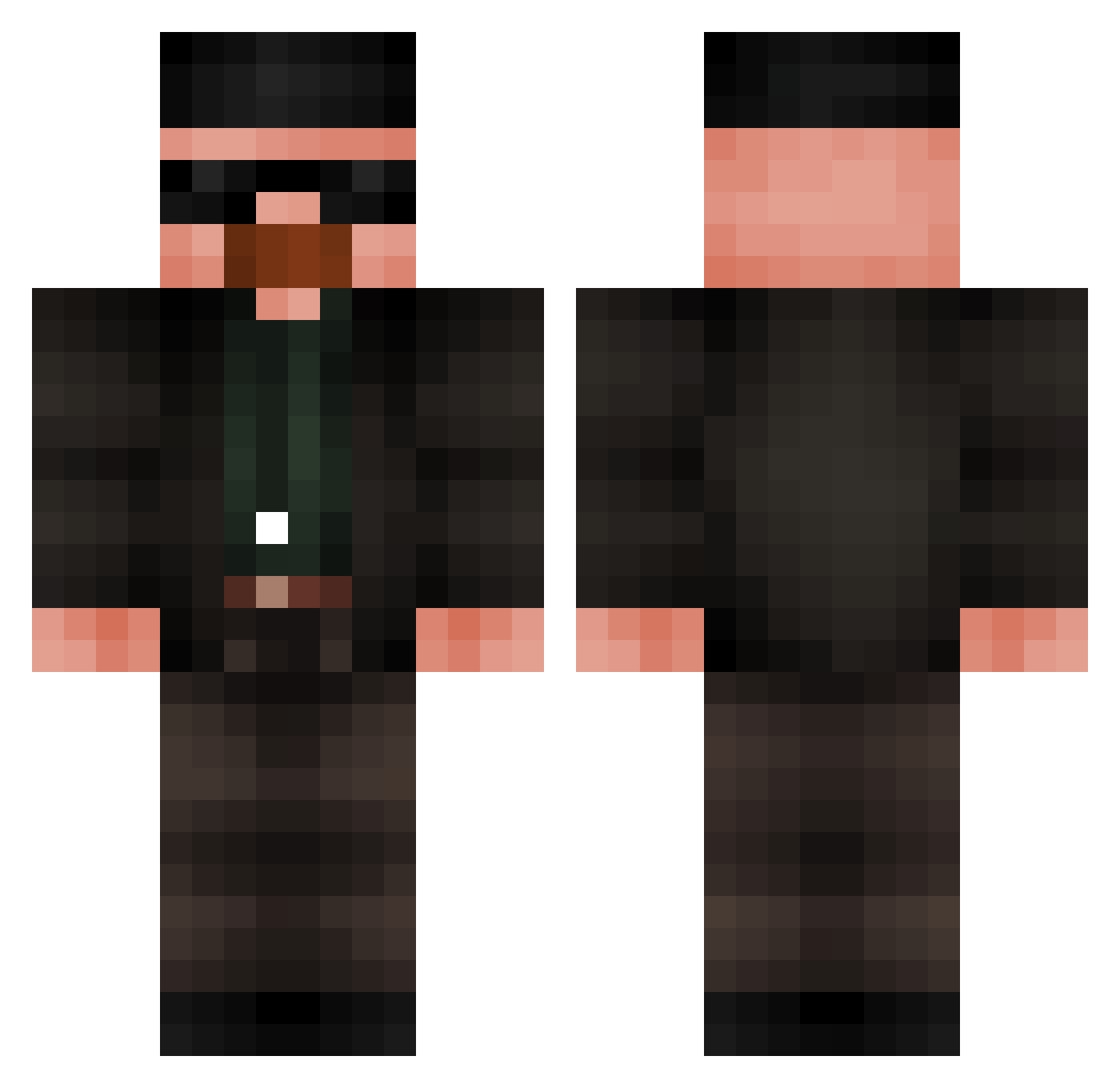
Current Minecraft skin of the player SujetoMC, loaded from the official Mojang API. Rotate the 3D model with your mouse or finger, then download the skin as a PNG file and use it in Minecraft: Bedrock Edition or Java Edition for free. When SujetoMC changes their skin, this page updates automatically and the old skin stays in the history below.
Other players with this skin (685)
SujetoMC was the 242nd player we have seen with this skin, first spotted on 01.09.2026. The same skin was seen on these players. Open a nickname to see their current skin and skin history.
 siqDELA KFafnir younesg COR0NEL BarrelBuckle514 Scarpu xX_milchshake_Xx tralaleotralala6 TOBA_69 Puzzler122 ALEJLONDOx1 baabz3 _Fungal OtavioPG Marvvin88 bigFlyingwhales
 OmarSukehiro_ bolo656 Baymen InsNDiza bajgielx oscarrgomez1 gaqw elikuj xJannosch ruve000 AdriXLI CursedCrocodile vincentipede thatandrew724 kyoto888 bycia43 brushem92 Canerayd Prawn_Nub55555 TacoDoggy5712 Yawarakai4 Estebanquito_ HarambitoGod Luger359 Xylorene TUKO699 NajenLOL Piter246 Remxx MicrosoftUser01 Fikaso chris674 IlPuZza P3TE2 GrantBal Tassadin NONAME2137 keeraqizzz Delimaet Ech0less CristianMilan13 rustes ZioMezzo Ximmis_palle
More Heisenberg Minecraft skins
How to install the SujetoMC skin
- Press the Download button above to save the skin as a PNG file.
- Minecraft: Bedrock Edition (PE): open the Dressing Room from the main menu (or tap your character → Edit Character), go to Classic Skins → Owned, press the + (new skin) button, choose the downloaded PNG and pick the Classic (Steve) model. Works on PC and mobile; consoles cannot import custom skins.
- Minecraft: Java Edition: open the Minecraft Launcher, go to the Skins tab, click New Skin, load the PNG, pick the Classic (Steve) model and press Save & Use. You can also upload it at minecraft.net → Profile → Change Skin.
The skin does not show up after import - what should I do?
Restart Minecraft and open the Dressing Room again - imported skins sometimes appear only after a restart. Also make sure you selected the imported skin and picked the Classic (Steve) model.
Which model should I choose, Classic or Slim?
This skin is designed for the Classic (Steve) model. If you pick the wrong model, the arms of the skin will look stretched or squeezed.
Is the skin of SujetoMC free to download?
Yes. Press Download, save the PNG file and use it in Minecraft: Bedrock Edition or Java Edition - no payment or registration needed. The skin also works on multiplayer servers and Realms.
More skins
Looking for more? Go back to all Minecraft skins and check the top skins of the week, month and all time, or find any player's skin by nickname.