
StyleLotus - Minecraft Skins & Skin History
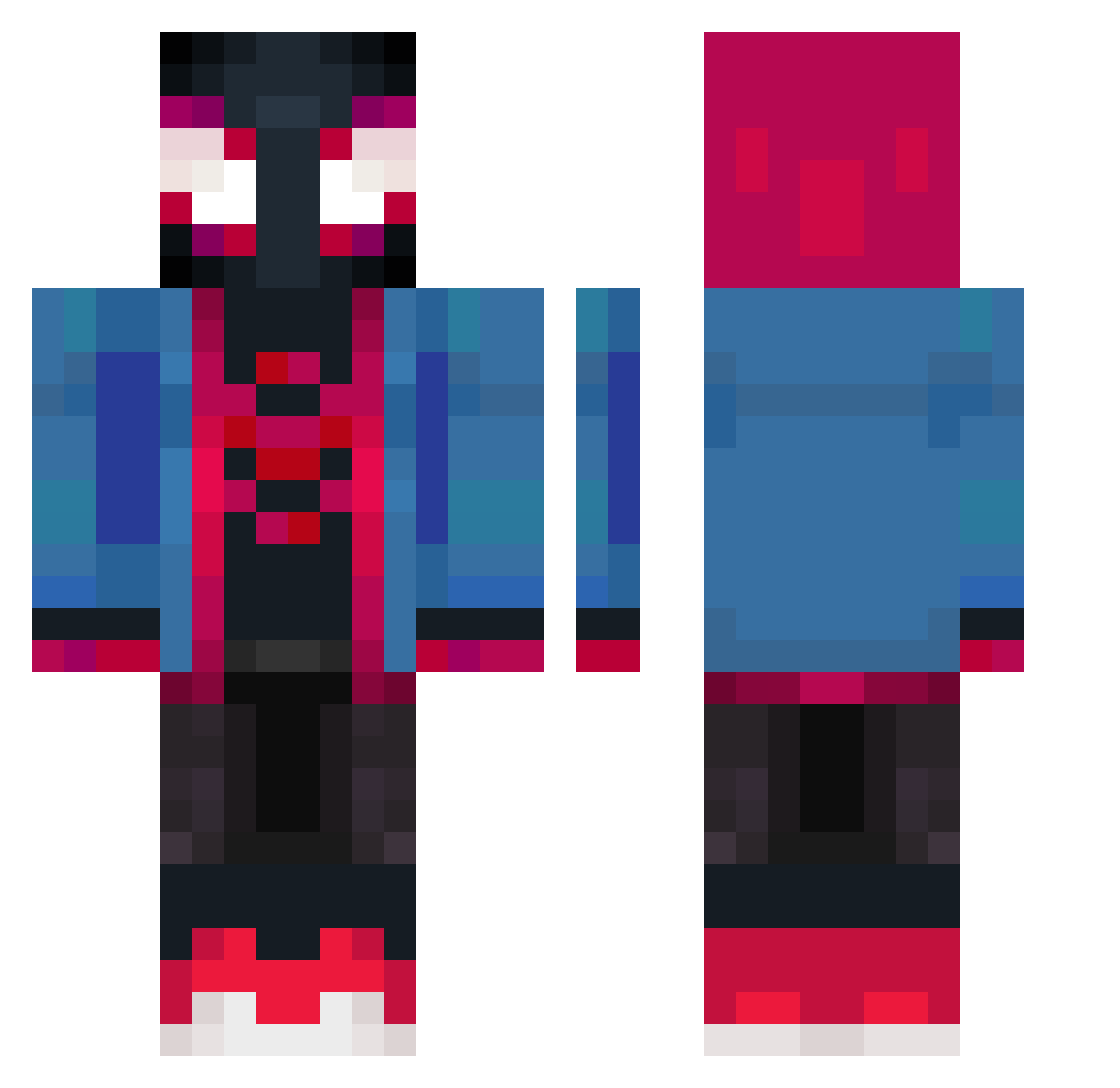
Current Minecraft skin of the player StyleLotus, loaded from the official Mojang API. Rotate the 3D model with your mouse or finger, then download the skin as a PNG file and use it in Minecraft: Bedrock Edition or Java Edition for free. When StyleLotus changes their skin, this page updates automatically and the old skin stays in the history below.
Other players with this skin (374)
StyleLotus was the 79th player we have seen with this skin, first spotted on 13.08.2026. The same skin was seen on these players. Open a nickname to see their current skin and skin history.
 szpicaaa RigbyTV05 myloriv kimmycc ErClovah Chenzr BNA2018 linvoi pickle_is_rodent CosyJuan BENT0Zmayoneso BrackG XBlackAttackX Vodkakng Yeiie11 Fihsi NotDvxk QAQ08 BlastyK Diogozin BubblyEagle dorawz_ taryop aoi_5150 uncivilly Navas_2003 Silvertim
 CrocodealerUwU SOMERSEN Acidv1 Henshii xBouchx GG__Gamer0907 gengus1 Ikaws hierbaby
 PrBartt XXqlevquXX JamieGoesCraft UrMomKaizen ThewsH YEET_ZBLAZ3 gustavo7333 Jona_TPS Lynchh69 Mich44444 IamAn0range D_Rampage Cooki21 Bobxon owenlikescandy jaylin222 blood_sport_ AntiJreams sosorio23 CafeElite1234 KaintLove KingZilla_ Shamon05 Benja8a303
More Miles Morales Minecraft skins
See all 233 Miles Morales skins
How to install the StyleLotus skin
- Press the Download button above to save the skin as a PNG file.
- Minecraft: Bedrock Edition (PE): open the Dressing Room from the main menu (or tap your character → Edit Character), go to Classic Skins → Owned, press the + (new skin) button, choose the downloaded PNG and pick the Classic (Steve) model. Works on PC and mobile; consoles cannot import custom skins.
- Minecraft: Java Edition: open the Minecraft Launcher, go to the Skins tab, click New Skin, load the PNG, pick the Classic (Steve) model and press Save & Use. You can also upload it at minecraft.net → Profile → Change Skin.
The skin does not show up after import - what should I do?
Restart Minecraft and open the Dressing Room again - imported skins sometimes appear only after a restart. Also make sure you selected the imported skin and picked the Classic (Steve) model.
Which model should I choose, Classic or Slim?
This skin is designed for the Classic (Steve) model. If you pick the wrong model, the arms of the skin will look stretched or squeezed.
Is the skin of StyleLotus free to download?
Yes. Press Download, save the PNG file and use it in Minecraft: Bedrock Edition or Java Edition - no payment or registration needed. The skin also works on multiplayer servers and Realms.
More skins
Looking for more? Go back to all Minecraft skins and check the top skins of the week, month and all time, or find any player's skin by nickname.