
Son_MeMo - Minecraft Skins & Skin History
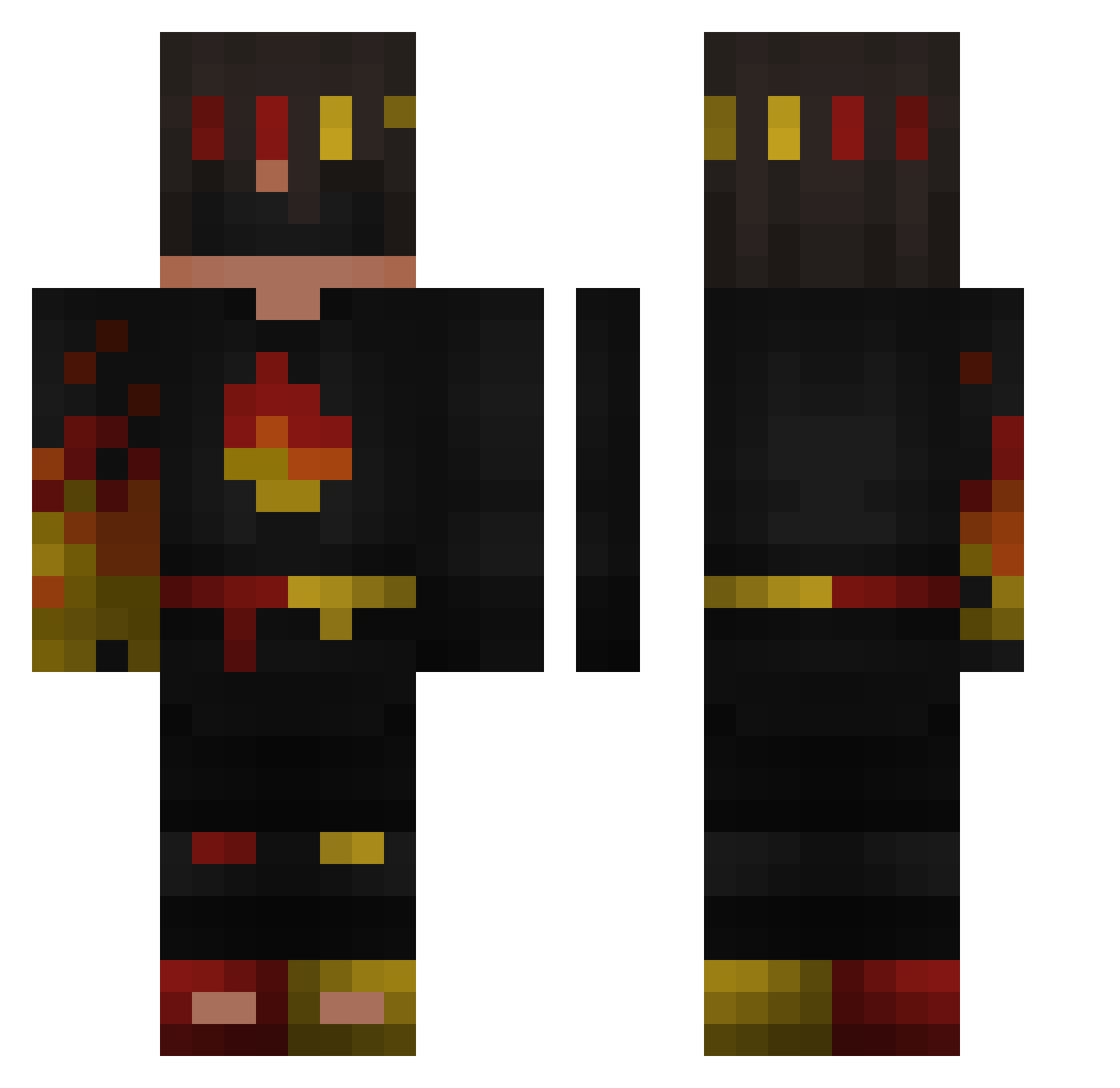
Current Minecraft skin of the player Son_MeMo, loaded from the official Mojang API. Rotate the 3D model with your mouse or finger, then download the skin as a PNG file and use it in Minecraft: Bedrock Edition or Java Edition for free. When Son_MeMo changes their skin, this page updates automatically and the old skin stays in the history below.
Other players with this skin (122)
Son_MeMo was the 88th player we have seen with this skin, first spotted on 29.09.2026. The same skin was seen on these players. Open a nickname to see their current skin and skin history.
 COCONUThi 101_El0 GrooMix MsyKing42 Skh0014 Domi_to_koks lalanai99 yousef2048 netherite4342 Dragoooon tecnodagger Lukrss_33 tylerw_13 FireJack1 Mr_Cheese_Bunny Drakkaplayz IronDave ConCalma_ Stereotype67 Maxleveldots KungFuCookie089 type0stay tiktokZyRo211 Zayaani Jacob_Daboss1 JarikKotLai _1mmortal MT_Stl3z GTR_SHADOW FLAMEFRAGS121212 kenjiett Davidones12 __FlameFragss___ Smoke1010 law3ndaxx XeroX2013 yummmmers NatiAlia Jervy24 PapasMini Dypsen VampireGatzby n3bulamc_ chris222j2 mmmmatey StrikerrrGOTYOU mati7_ benni0007 Seanswagger2010
 SargeShadow Lauritz22016 Tweemaksim TBF08 Yakush001 denjel1234 gamerjns3 chudy99 AllMightySins es6123 Blakesuper10
More Flames Minecraft skins
How to install the Son_MeMo skin
- Press the Download button above to save the skin as a PNG file.
- Minecraft: Bedrock Edition (PE): open the Dressing Room from the main menu (or tap your character → Edit Character), go to Classic Skins → Owned, press the + (new skin) button, choose the downloaded PNG and pick the Classic (Steve) model. Works on PC and mobile; consoles cannot import custom skins.
- Minecraft: Java Edition: open the Minecraft Launcher, go to the Skins tab, click New Skin, load the PNG, pick the Classic (Steve) model and press Save & Use. You can also upload it at minecraft.net → Profile → Change Skin.
The skin does not show up after import - what should I do?
Restart Minecraft and open the Dressing Room again - imported skins sometimes appear only after a restart. Also make sure you selected the imported skin and picked the Classic (Steve) model.
Which model should I choose, Classic or Slim?
This skin is designed for the Classic (Steve) model. If you pick the wrong model, the arms of the skin will look stretched or squeezed.
Is the skin of Son_MeMo free to download?
Yes. Press Download, save the PNG file and use it in Minecraft: Bedrock Edition or Java Edition - no payment or registration needed. The skin also works on multiplayer servers and Realms.
More skins
Looking for more? Go back to all Minecraft skins and check the top skins of the week, month and all time, or find any player's skin by nickname.