
Snake6theOG - Minecraft Skins & Skin History
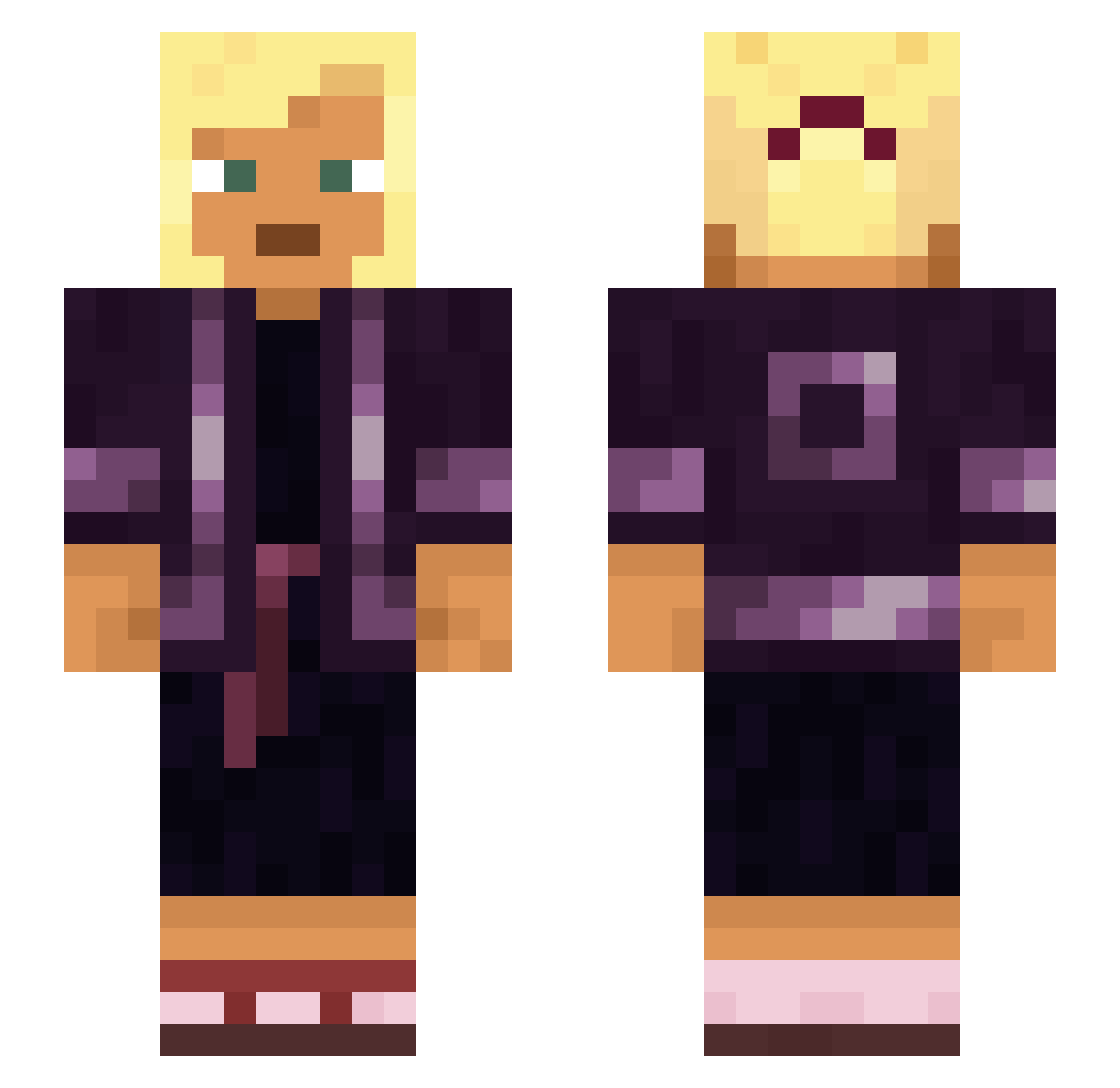
Current Minecraft skin of the player Snake6theOG, loaded from the official Mojang API. Rotate the 3D model with your mouse or finger, then download the skin as a PNG file and use it in Minecraft: Bedrock Edition or Java Edition for free. When Snake6theOG changes their skin, this page updates automatically and the old skin stays in the history below.
Other players with this skin (929)
Snake6theOG was the 829th player we have seen with this skin, first spotted on 25.10.2026. The same skin was seen on these players. Open a nickname to see their current skin and skin history.
 shineless RyanOMG Complexing Im_Yaseen_EGY Cougar282c Floryd7 Spindle Galavant Vasiform Targeted88 panful Siphonophora Bushido KeiKunStream Khepesh stademeister15 Artha FadedMoose69 SandPrince maggee Airwave Tienisch S0WILL Cornua MafaMaerc WireWalker Shokkadin Ghetis_ Fairways IchBinsKlaus Bolve K4wt cherubim Encephalotomy archent Tobybeautiful OxiDated LoffleCake Osama_Fun_Laden colorist trashy nshelton Pyridinium 06monke90 lampworker Griefing101 i7aziz yenite KSDER12 HeilHltler69 Shipment Recitative Perh DePeach Septembqr Ruddiest Oldmanlovescake ldots heily Madrigalist
More Asian Minecraft skins
How to install the Snake6theOG skin
- Press the Download button above to save the skin as a PNG file.
- Minecraft: Bedrock Edition (PE): open the Dressing Room from the main menu (or tap your character → Edit Character), go to Classic Skins → Owned, press the + (new skin) button, choose the downloaded PNG and pick the Slim (Alex) model. Works on PC and mobile; consoles cannot import custom skins.
- Minecraft: Java Edition: open the Minecraft Launcher, go to the Skins tab, click New Skin, load the PNG, pick the Slim (Alex) model and press Save & Use. You can also upload it at minecraft.net → Profile → Change Skin.
The skin does not show up after import - what should I do?
Restart Minecraft and open the Dressing Room again - imported skins sometimes appear only after a restart. Also make sure you selected the imported skin and picked the Slim (Alex) model.
Which model should I choose, Classic or Slim?
This skin is designed for the Slim (Alex) model. If you pick the wrong model, the arms of the skin will look stretched or squeezed.
Is the skin of Snake6theOG free to download?
Yes. Press Download, save the PNG file and use it in Minecraft: Bedrock Edition or Java Edition - no payment or registration needed. The skin also works on multiplayer servers and Realms.
More skins
Looking for more? Go back to all Minecraft skins and check the top skins of the week, month and all time, or find any player's skin by nickname.