
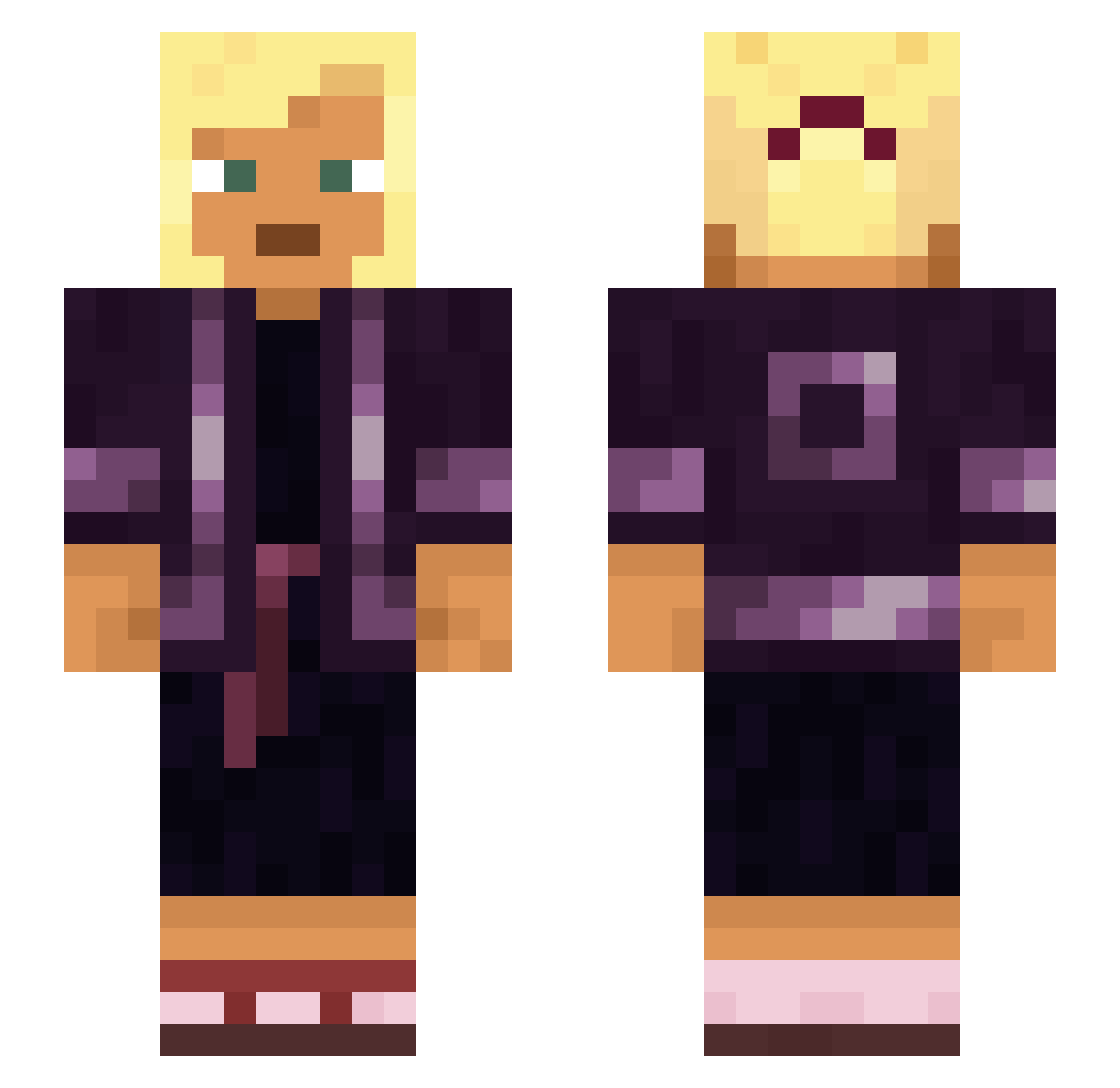
Current Minecraft skin of the player SmurkWrld, loaded from the official Mojang API. Rotate the 3D model with your mouse or finger, then download the skin as a PNG file and use it in Minecraft: Bedrock Edition or Java Edition for free. When SmurkWrld changes their skin, this page updates automatically and the old skin stays in the history below.
Other players with this skin (764)
SmurkWrld was the 209th player we have seen with this skin, first spotted on 17.08.2026. The same skin was seen on these players. Open a nickname to see their current skin and skin history.
 EXPLORATIONS PPH Diocesan 090101_ condog FelipeV774 SuperMagnificent Ringleaders BlackBartek50 JeffreyEpstien moulins eddish Miniature Reparteeist Spilled_Lead dog_eater Brinjaul Hypochloric HEARTBURNING lithos Cy4ata_Ag4ta_ skirling Fetis STELLIFORM imaginal HaremFactor_69 Aguamiel
 lextheminer2010 coproduct Artemision Decrescence Lmitris CALOTIN dyllandry Darklight720 synodical Ana1nyt3rror Mycetozoa hakone_ Foresbi Subcoastal Assdestroyer00 Dockmaster PSYCHOSURGERY Mayoress Kyroneax
 Catarrin OutRide Westy deaconed Piskajopi212 Myxstrix Aquino locomote
 smith01_ Underlook microelectronic Simplest darteuh Wafflez13
More Asian Minecraft skins
How to install the SmurkWrld skin
- Press the Download button above to save the skin as a PNG file.
- Minecraft: Bedrock Edition (PE): open the Dressing Room from the main menu (or tap your character → Edit Character), go to Classic Skins → Owned, press the + (new skin) button, choose the downloaded PNG and pick the Slim (Alex) model. Works on PC and mobile; consoles cannot import custom skins.
- Minecraft: Java Edition: open the Minecraft Launcher, go to the Skins tab, click New Skin, load the PNG, pick the Slim (Alex) model and press Save & Use. You can also upload it at minecraft.net → Profile → Change Skin.
The skin does not show up after import - what should I do?
Restart Minecraft and open the Dressing Room again - imported skins sometimes appear only after a restart. Also make sure you selected the imported skin and picked the Slim (Alex) model.
Which model should I choose, Classic or Slim?
This skin is designed for the Slim (Alex) model. If you pick the wrong model, the arms of the skin will look stretched or squeezed.
Is the skin of SmurkWrld free to download?
Yes. Press Download, save the PNG file and use it in Minecraft: Bedrock Edition or Java Edition - no payment or registration needed. The skin also works on multiplayer servers and Realms.
More skins
Looking for more? Go back to all Minecraft skins and check the top skins of the week, month and all time, or find any player's skin by nickname.