
SkullShot - Minecraft Skins & Skin History
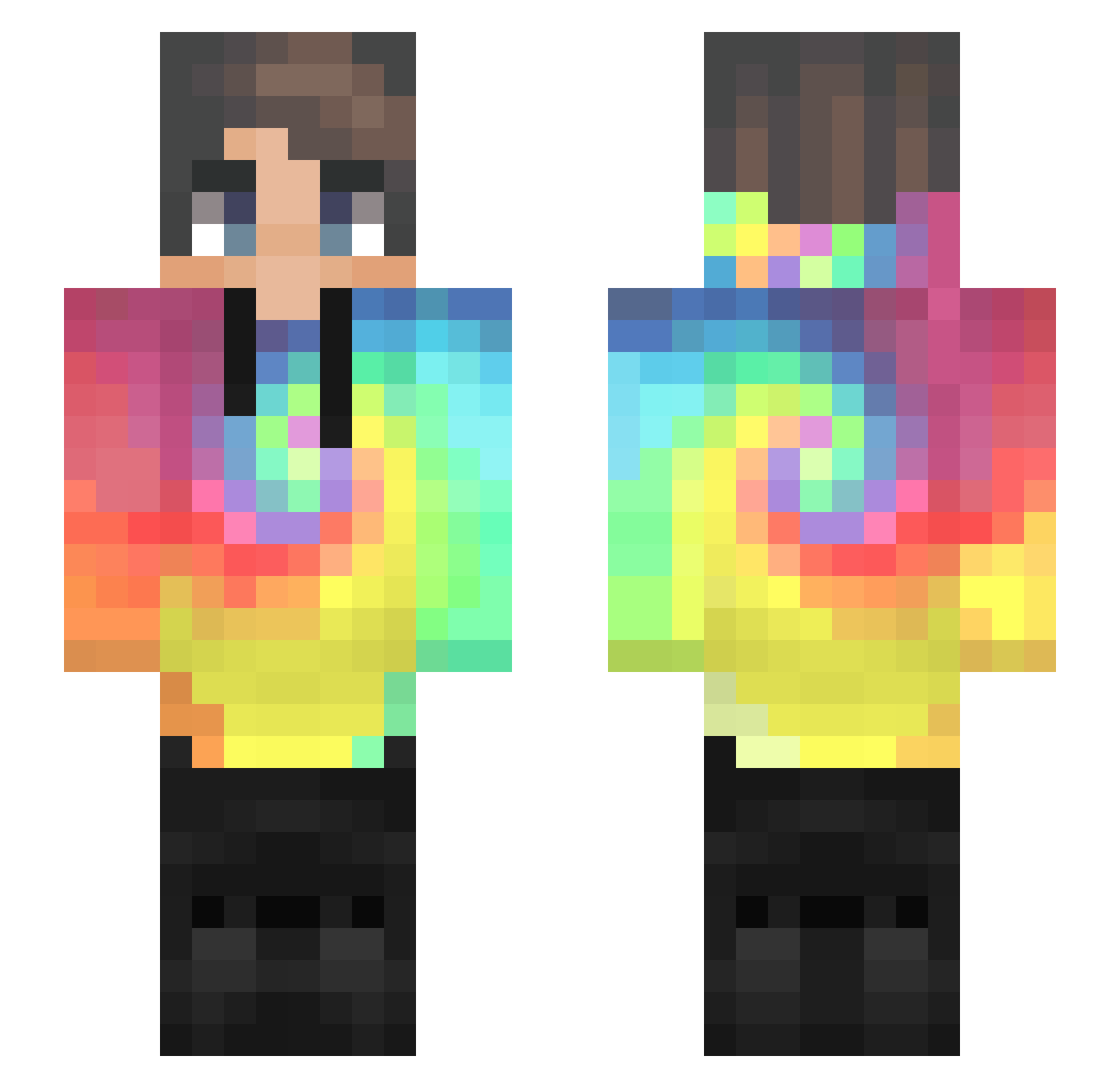
Current Minecraft skin of the player SkullShot, loaded from the official Mojang API. Rotate the 3D model with your mouse or finger, then download the skin as a PNG file and use it in Minecraft: Bedrock Edition or Java Edition for free. When SkullShot changes their skin, this page updates automatically and the old skin stays in the history below.
Other players with this skin (435)
SkullShot was the 64th player we have seen with this skin, first spotted on 07.08.2026. The same skin was seen on these players. Open a nickname to see their current skin and skin history.
 FireGod6 Ba_As_Kids rcox100 Solo_End Joacozup12 MInnox reptilianforest GrexSK Santatrio iNickko Inflexity yallbugginimgood Laopi8901 ChristianClauss Averos nunuwawillumpu5 PiePiey Unokey18 Renight77 jamesdaoud21 KyLo_Fable552157 ssdxdt gamer6700k K00NARM wofe0311 ExrayTheGun owfa12 greenday0102 seremnateba JPan007 Prechor MS_64 regly_zander EvXD Queer_Buffet FazeWoodall24 115ms xXxSnajper qdxqdx12 Amrqi 5AN71T_1172 DYMEK20 Mansif AsukaKyra Crazy_RM Curt2023 oatsoce conflitz alexandermcdizz lnich13 C_Lianpen ziomalus277 tore999992 SkittleMines CubecrafterYT timpann03 lscq Marconino KevinTurkeyBacon Scorpy_YT
How to install the SkullShot skin
- Press the Download button above to save the skin as a PNG file.
- Minecraft: Bedrock Edition (PE): open the Dressing Room from the main menu (or tap your character → Edit Character), go to Classic Skins → Owned, press the + (new skin) button, choose the downloaded PNG and pick the Slim (Alex) model. Works on PC and mobile; consoles cannot import custom skins.
- Minecraft: Java Edition: open the Minecraft Launcher, go to the Skins tab, click New Skin, load the PNG, pick the Slim (Alex) model and press Save & Use. You can also upload it at minecraft.net → Profile → Change Skin.
The skin does not show up after import - what should I do?
Restart Minecraft and open the Dressing Room again - imported skins sometimes appear only after a restart. Also make sure you selected the imported skin and picked the Slim (Alex) model.
Which model should I choose, Classic or Slim?
This skin is designed for the Slim (Alex) model. If you pick the wrong model, the arms of the skin will look stretched or squeezed.
Is the skin of SkullShot free to download?
Yes. Press Download, save the PNG file and use it in Minecraft: Bedrock Edition or Java Edition - no payment or registration needed. The skin also works on multiplayer servers and Realms.
More skins
Looking for more? Go back to all Minecraft skins and check the top skins of the week, month and all time, or find any player's skin by nickname.