
SkqlarMom - Minecraft Skins & Skin History
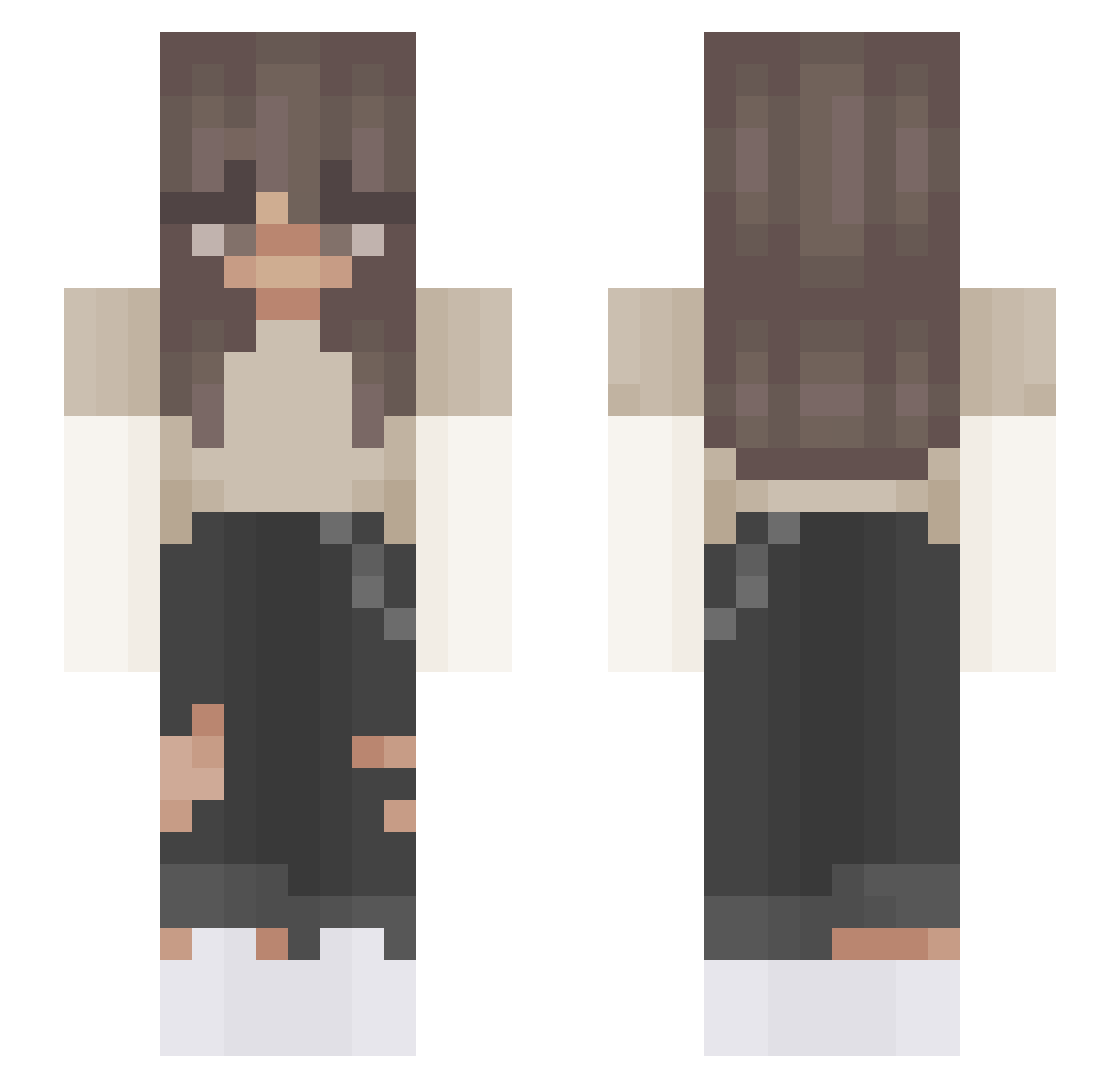
Current Minecraft skin of the player SkqlarMom, loaded from the official Mojang API. Rotate the 3D model with your mouse or finger, then download the skin as a PNG file and use it in Minecraft: Bedrock Edition or Java Edition for free. When SkqlarMom changes their skin, this page updates automatically and the old skin stays in the history below.
Other players with this skin (408)
SkqlarMom was the 365th player we have seen with this skin, first spotted on 23.10.2026. The same skin was seen on these players. Open a nickname to see their current skin and skin history.
 Madss522 sleepyillusion Sosotheater saranat06 Emmyemmsa Goldiron_Maria Ivvanovna Oliwciaa26 HeyItsPercy angiemal2008 onlyy4me Maajeczkaa juliaweasley genuineowner HSBH Melina457 Elliara SocialPlaysYT_MC Anniskool YH_Sherry_ Evitaaaaa Sxraf fouadshah2 gl_tch_ chwenotcheww kikimarche CookieBrookie purplebear93072 WoldyDoubleG supercar2005 gracieemma Llamaramagalaxy Emiiily_ daisyluvsu Anika11 MariannaPro1013 vcadaisy Matolcia MarMar112218 Vanessa_567 CristinaMM95 olciaa__ Licor Ketchupcam Giuuly_ viicckkii Rehanna cheeburgr peculiarflowers alaia_person PinguinhaT55 Twitch_YNP chimmy00 skylar829 xXsivertXx mqccas __Emilia__1 LILUGAMER McClarkie123 123Dolphins
More Grunge Minecraft skins
How to install the SkqlarMom skin
- Press the Download button above to save the skin as a PNG file.
- Minecraft: Bedrock Edition (PE): open the Dressing Room from the main menu (or tap your character → Edit Character), go to Classic Skins → Owned, press the + (new skin) button, choose the downloaded PNG and pick the Slim (Alex) model. Works on PC and mobile; consoles cannot import custom skins.
- Minecraft: Java Edition: open the Minecraft Launcher, go to the Skins tab, click New Skin, load the PNG, pick the Slim (Alex) model and press Save & Use. You can also upload it at minecraft.net → Profile → Change Skin.
The skin does not show up after import - what should I do?
Restart Minecraft and open the Dressing Room again - imported skins sometimes appear only after a restart. Also make sure you selected the imported skin and picked the Slim (Alex) model.
Which model should I choose, Classic or Slim?
This skin is designed for the Slim (Alex) model. If you pick the wrong model, the arms of the skin will look stretched or squeezed.
Is the skin of SkqlarMom free to download?
Yes. Press Download, save the PNG file and use it in Minecraft: Bedrock Edition or Java Edition - no payment or registration needed. The skin also works on multiplayer servers and Realms.
More skins
Looking for more? Go back to all Minecraft skins and check the top skins of the week, month and all time, or find any player's skin by nickname.