
SilverX2009 - Minecraft Skins & Skin History
Current Minecraft skin of the player SilverX2009, loaded from the official Mojang API. Rotate the 3D model with your mouse or finger, then download the skin as a PNG file and use it in Minecraft: Bedrock Edition or Java Edition for free. When SilverX2009 changes their skin, this page updates automatically and the old skin stays in the history below.
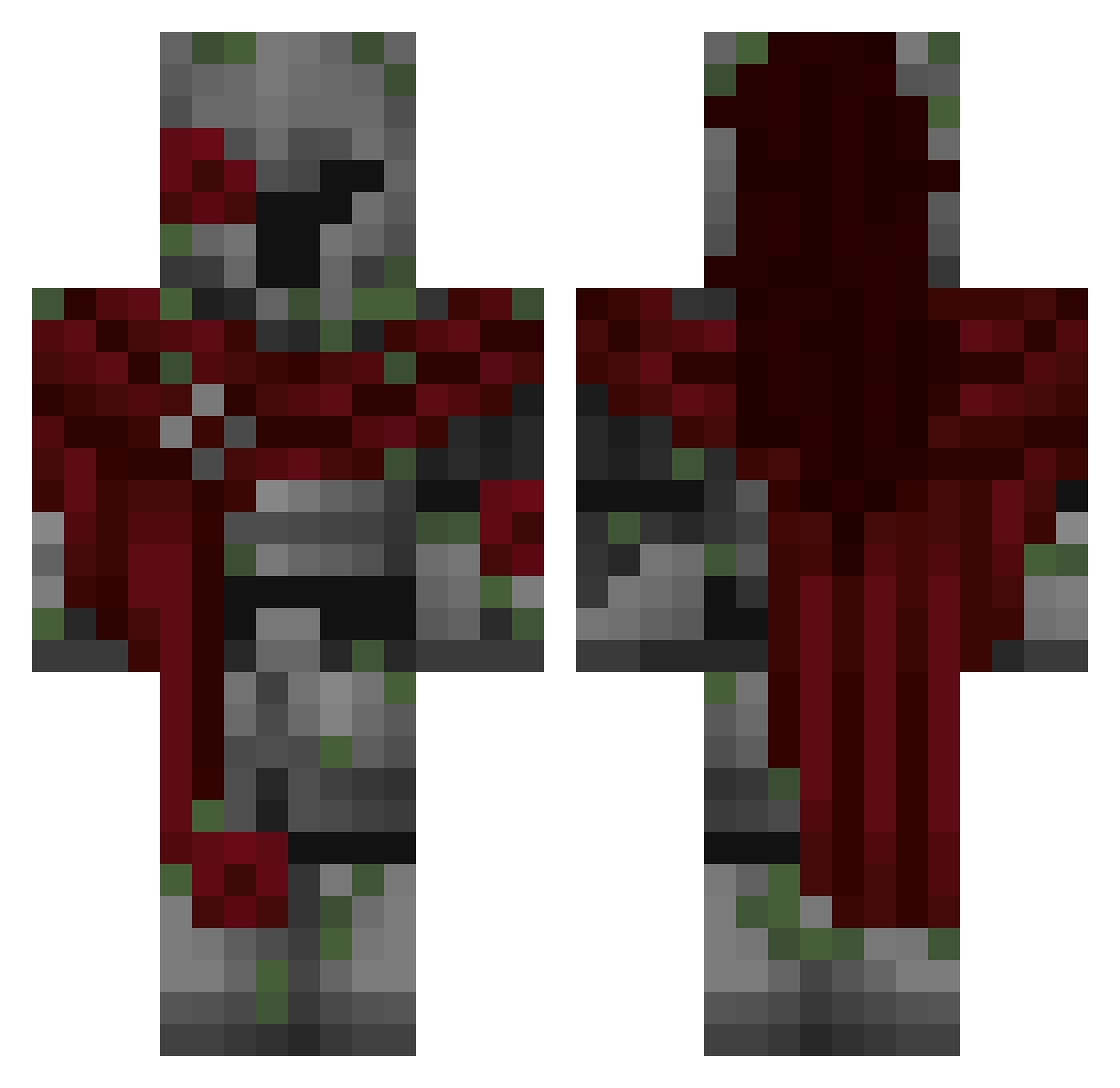
Other players with this skin (309)
SilverX2009 was the 157th player we have seen with this skin, first spotted on 13.09.2026. The same skin was seen on these players. Open a nickname to see their current skin and skin history.
 munataNGG DeadlyKitten567 _FR0ST_BYT3_ KarmaSucks21 kopfstur0 Siwy_opa Wixy85 pajaro2008 TomTom65609 BlackkHearth Actually_Mika LOGZ_Y f1ddles __Kosmos PlnkLemon MackJoshua softruin Phantom97567 i5Yuu Worm_Attack6 XXXTentacionYUH gabriballs Judeisthedudepro KaytGhost nesern_1482 Benkyoshi SuperRubyy mqidenless BlitzBreaker37 Keith924 johnbrz
 Starfaall
 _KawaBomba incognital22 ItsYaBoyJunior spachejneziti AzeraCar ImposingOsprey Alphzer VERL7 TheStupidDucky Irothious OxedPixel uranus0710 YTZetto rip_hunter13 WoopZap sigma112244 BlackJ3suss kingsht Pe7A NXTLith
 Ryanyayaya Olek_759
 killercross8899 SimSense LittleHatcher1 Gusty748 y0oklez Banished0ne
More Mossy Minecraft skins
How to install the SilverX2009 skin
- Press the Download button above to save the skin as a PNG file.
- Minecraft: Bedrock Edition (PE): open the Dressing Room from the main menu (or tap your character → Edit Character), go to Classic Skins → Owned, press the + (new skin) button, choose the downloaded PNG and pick the Classic (Steve) model. Works on PC and mobile; consoles cannot import custom skins.
- Minecraft: Java Edition: open the Minecraft Launcher, go to the Skins tab, click New Skin, load the PNG, pick the Classic (Steve) model and press Save & Use. You can also upload it at minecraft.net → Profile → Change Skin.
The skin does not show up after import - what should I do?
Restart Minecraft and open the Dressing Room again - imported skins sometimes appear only after a restart. Also make sure you selected the imported skin and picked the Classic (Steve) model.
Which model should I choose, Classic or Slim?
This skin is designed for the Classic (Steve) model. If you pick the wrong model, the arms of the skin will look stretched or squeezed.
Is the skin of SilverX2009 free to download?
Yes. Press Download, save the PNG file and use it in Minecraft: Bedrock Edition or Java Edition - no payment or registration needed. The skin also works on multiplayer servers and Realms.
More skins
Looking for more? Go back to all Minecraft skins and check the top skins of the week, month and all time, or find any player's skin by nickname.