
SilverSage8 - Minecraft Skins & Skin History
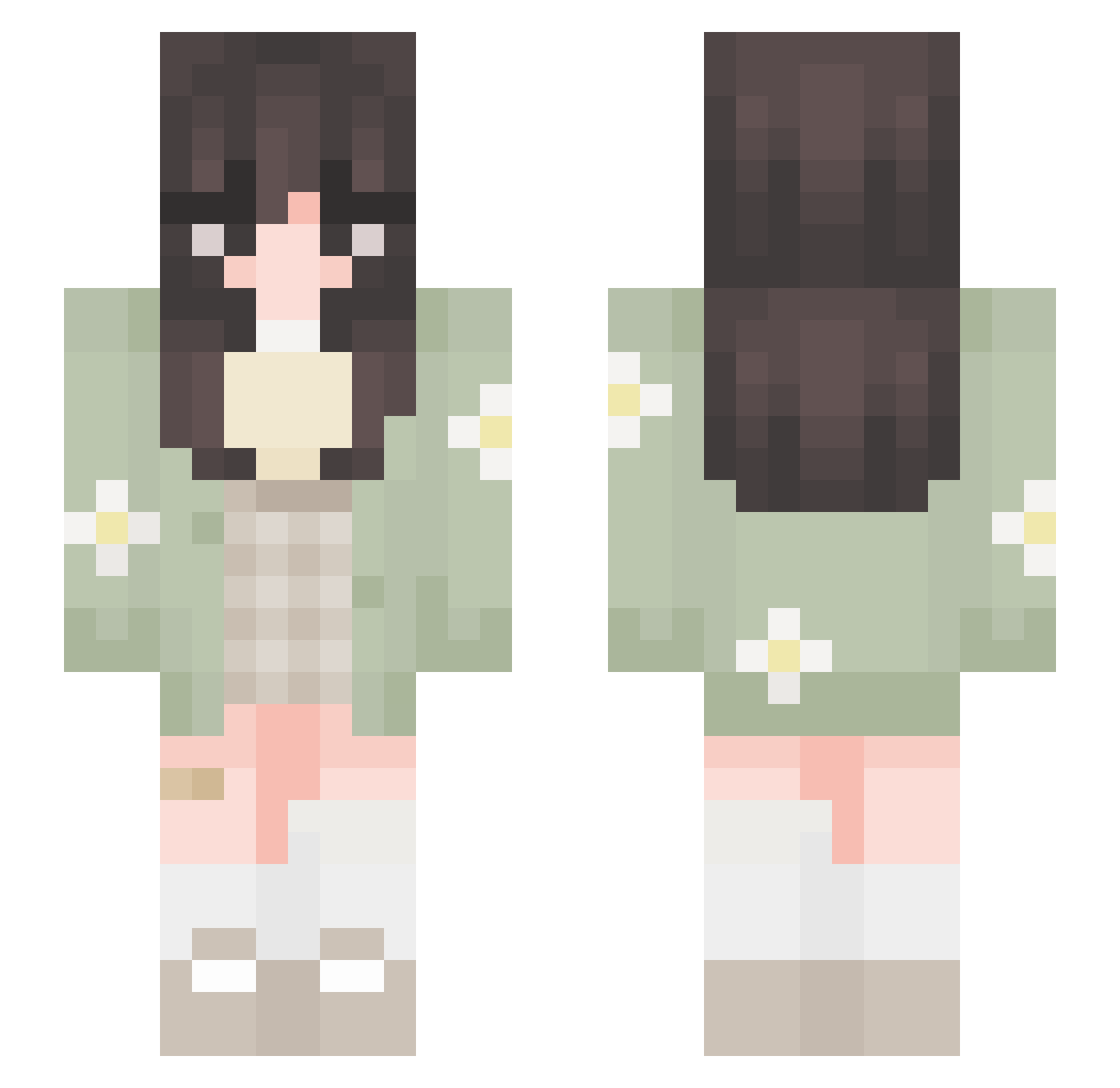
Current Minecraft skin of the player SilverSage8, loaded from the official Mojang API. Rotate the 3D model with your mouse or finger, then download the skin as a PNG file and use it in Minecraft: Bedrock Edition or Java Edition for free. When SilverSage8 changes their skin, this page updates automatically and the old skin stays in the history below.
Other players with this skin (652)
SilverSage8 was the 528th player we have seen with this skin, first spotted on 15.10.2026. The same skin was seen on these players. Open a nickname to see their current skin and skin history.
 Wishchuii bayleaf99 blueeehead lihvia Kioto_ jupikyo SEDZZZZ Dani_Pengu BooMai isabelgracie Pikyuuu celeryclinton miss_bunmi LilMitz Vanilx _issaa hallokirby maxi_54625 dustnashes Kass1312 luvulotts mauveki Caeth1 catfriendss paerlie anxietylol00 joannechan yuechao Green_11 FuRin1014 Maybe2579 Haybeanz torsikud sulkyven alessia444 toomi_32 imLudy _Kora_ rozeqt Blueberrybun Juciferz WanderingSage0 mooshumii Kaelena SweetOtter006 0Elysia leylanight sxabrixna jesiscaa GrilledMagikarp iiChibii yukifuyu Andarellaa FeelsMadMan Gennnx tatakoyaki kiwi_buns lValeriee sapphurn jvane16
More Daisy Minecraft skins
How to install the SilverSage8 skin
- Press the Download button above to save the skin as a PNG file.
- Minecraft: Bedrock Edition (PE): open the Dressing Room from the main menu (or tap your character → Edit Character), go to Classic Skins → Owned, press the + (new skin) button, choose the downloaded PNG and pick the Slim (Alex) model. Works on PC and mobile; consoles cannot import custom skins.
- Minecraft: Java Edition: open the Minecraft Launcher, go to the Skins tab, click New Skin, load the PNG, pick the Slim (Alex) model and press Save & Use. You can also upload it at minecraft.net → Profile → Change Skin.
The skin does not show up after import - what should I do?
Restart Minecraft and open the Dressing Room again - imported skins sometimes appear only after a restart. Also make sure you selected the imported skin and picked the Slim (Alex) model.
Which model should I choose, Classic or Slim?
This skin is designed for the Slim (Alex) model. If you pick the wrong model, the arms of the skin will look stretched or squeezed.
Is the skin of SilverSage8 free to download?
Yes. Press Download, save the PNG file and use it in Minecraft: Bedrock Edition or Java Edition - no payment or registration needed. The skin also works on multiplayer servers and Realms.
More skins
Looking for more? Go back to all Minecraft skins and check the top skins of the week, month and all time, or find any player's skin by nickname.