
Shogun_CJ - Minecraft Skins & Skin History
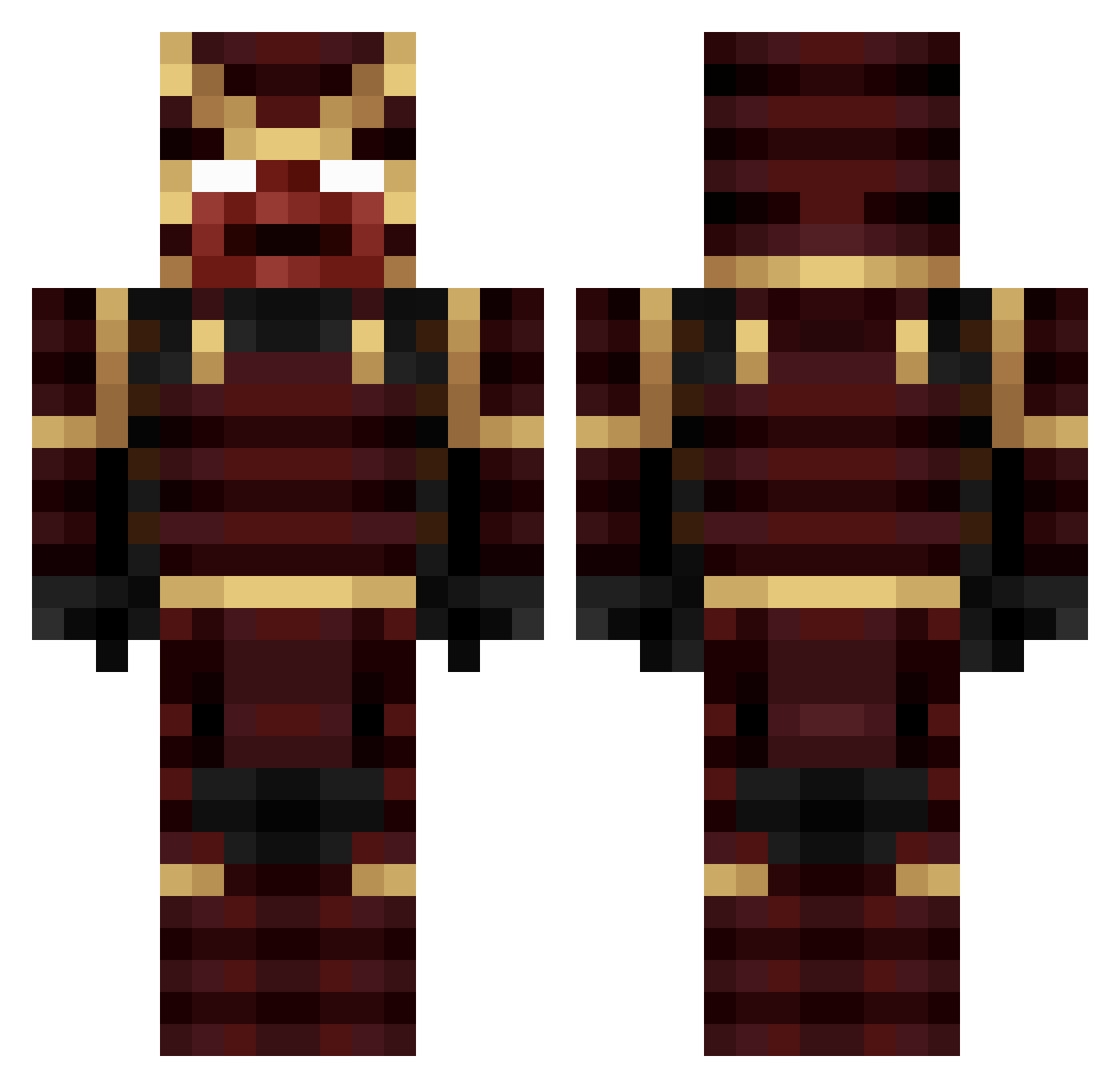
Current Minecraft skin of the player Shogun_CJ, loaded from the official Mojang API. Rotate the 3D model with your mouse or finger, then download the skin as a PNG file and use it in Minecraft: Bedrock Edition or Java Edition for free. When Shogun_CJ changes their skin, this page updates automatically and the old skin stays in the history below.
Other players with this skin (255)
Shogun_CJ was the 111th player we have seen with this skin, first spotted on 11.09.2026. The same skin was seen on these players. Open a nickname to see their current skin and skin history.
 ixvneko GhostsKiller242 Konrads1991 MakkiEA floppy_off NookShasty AkemiKei iTzHoster Maxi_Roux nothardtotype Cromlech Rosaryo_ RandomDaimyo Budoski DrogFakeTF Orhun0 The_BreadBandit MCminer110 Dima_08 vinn_mobile KaizenExe_ NakiriAyane JPR_ Rookie_PvP Apelite Exodus870 Wuschu20 modifiedcrow FossiGamer Borg_Dumag DoddiKing05 Cadiux crazyflower68 Jickre Jeiyo Feufelin Lifeistooshort2 blands0 Biriculiro Pyce01 Pandemoniacal ItzSaar_GG _TheBigBoy_ Zambak WildMan ikuJeep WartefacT Kanjevac danihilg zuuuuummmmm killamanshanks CrimzonSamurai lensmann1409 Neirukk Kuryutake Pherks GraftedExoSkele veloci8080 FrenchStalker TheCrazyWarrior
More Juggernaut Minecraft skins
How to install the Shogun_CJ skin
- Press the Download button above to save the skin as a PNG file.
- Minecraft: Bedrock Edition (PE): open the Dressing Room from the main menu (or tap your character → Edit Character), go to Classic Skins → Owned, press the + (new skin) button, choose the downloaded PNG and pick the Classic (Steve) model. Works on PC and mobile; consoles cannot import custom skins.
- Minecraft: Java Edition: open the Minecraft Launcher, go to the Skins tab, click New Skin, load the PNG, pick the Classic (Steve) model and press Save & Use. You can also upload it at minecraft.net → Profile → Change Skin.
The skin does not show up after import - what should I do?
Restart Minecraft and open the Dressing Room again - imported skins sometimes appear only after a restart. Also make sure you selected the imported skin and picked the Classic (Steve) model.
Which model should I choose, Classic or Slim?
This skin is designed for the Classic (Steve) model. If you pick the wrong model, the arms of the skin will look stretched or squeezed.
Is the skin of Shogun_CJ free to download?
Yes. Press Download, save the PNG file and use it in Minecraft: Bedrock Edition or Java Edition - no payment or registration needed. The skin also works on multiplayer servers and Realms.
More skins
Looking for more? Go back to all Minecraft skins and check the top skins of the week, month and all time, or find any player's skin by nickname.