
Shido_91 - Minecraft Skins & Skin History
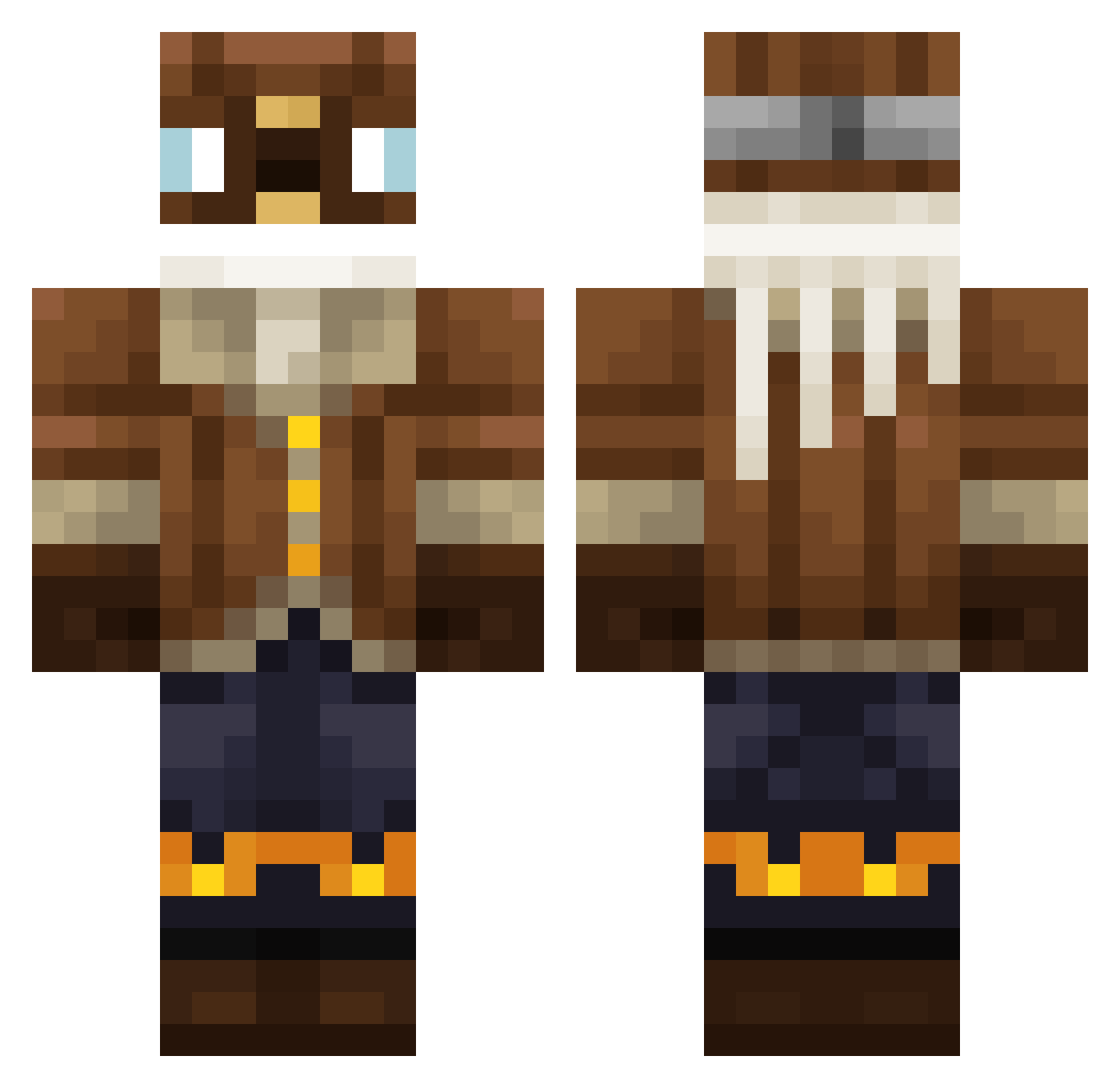
Current Minecraft skin of the player Shido_91, loaded from the official Mojang API. Rotate the 3D model with your mouse or finger, then download the skin as a PNG file and use it in Minecraft: Bedrock Edition or Java Edition for free. When Shido_91 changes their skin, this page updates automatically and the old skin stays in the history below.
Other players with this skin (295)
Shido_91 was the 138th player we have seen with this skin, first spotted on 04.09.2026. The same skin was seen on these players. Open a nickname to see their current skin and skin history.
 Addl0l OhZmax wrldz jceasar9 AdriansBruder JoaoPipous Sagattarius jUwUne04 Jonmon1 KaForLozz Lopin_tk Alanadlh VZ7X MovableCanoe339 Geenastie FiercePaws Vanishhed xGonzah_
 Binnen Danrod1 vrp_fam OneAccountRandom
 Ceglowka_ The_Sloth_0308 GALERICISAHIN19 MrLemiks Fried_Rat_Samich bernardogamer3 nrkdm Kreapt BritZue Aar_arb _JC3 6b_Hyperion cybereczek noahfnk IVERSEN_MC B0berKurva RRlevi YGTH flowy6 HayatoYasu
 Marchielo Choukuay Trenchancy Makarron94 IDFFIGHTER123
 SuperGryphon Umbr3onGx Jolt645 PolskiDziadowiec YajatKaul JavaJockey MarineAwesome26
 Wuschel110 Casslar GomboCombo FinlayKennedy CharlieDrawwws GreatBike
More Aviator Minecraft skins
How to install the Shido_91 skin
- Press the Download button above to save the skin as a PNG file.
- Minecraft: Bedrock Edition (PE): open the Dressing Room from the main menu (or tap your character → Edit Character), go to Classic Skins → Owned, press the + (new skin) button, choose the downloaded PNG and pick the Classic (Steve) model. Works on PC and mobile; consoles cannot import custom skins.
- Minecraft: Java Edition: open the Minecraft Launcher, go to the Skins tab, click New Skin, load the PNG, pick the Classic (Steve) model and press Save & Use. You can also upload it at minecraft.net → Profile → Change Skin.
The skin does not show up after import - what should I do?
Restart Minecraft and open the Dressing Room again - imported skins sometimes appear only after a restart. Also make sure you selected the imported skin and picked the Classic (Steve) model.
Which model should I choose, Classic or Slim?
This skin is designed for the Classic (Steve) model. If you pick the wrong model, the arms of the skin will look stretched or squeezed.
Is the skin of Shido_91 free to download?
Yes. Press Download, save the PNG file and use it in Minecraft: Bedrock Edition or Java Edition - no payment or registration needed. The skin also works on multiplayer servers and Realms.
More skins
Looking for more? Go back to all Minecraft skins and check the top skins of the week, month and all time, or find any player's skin by nickname.