
Sc3nt_ - Minecraft Skins & Skin History
Current Minecraft skin of the player Sc3nt_, loaded from the official Mojang API. Rotate the 3D model with your mouse or finger, then download the skin as a PNG file and use it in Minecraft: Bedrock Edition or Java Edition for free. When Sc3nt_ changes their skin, this page updates automatically and the old skin stays in the history below.
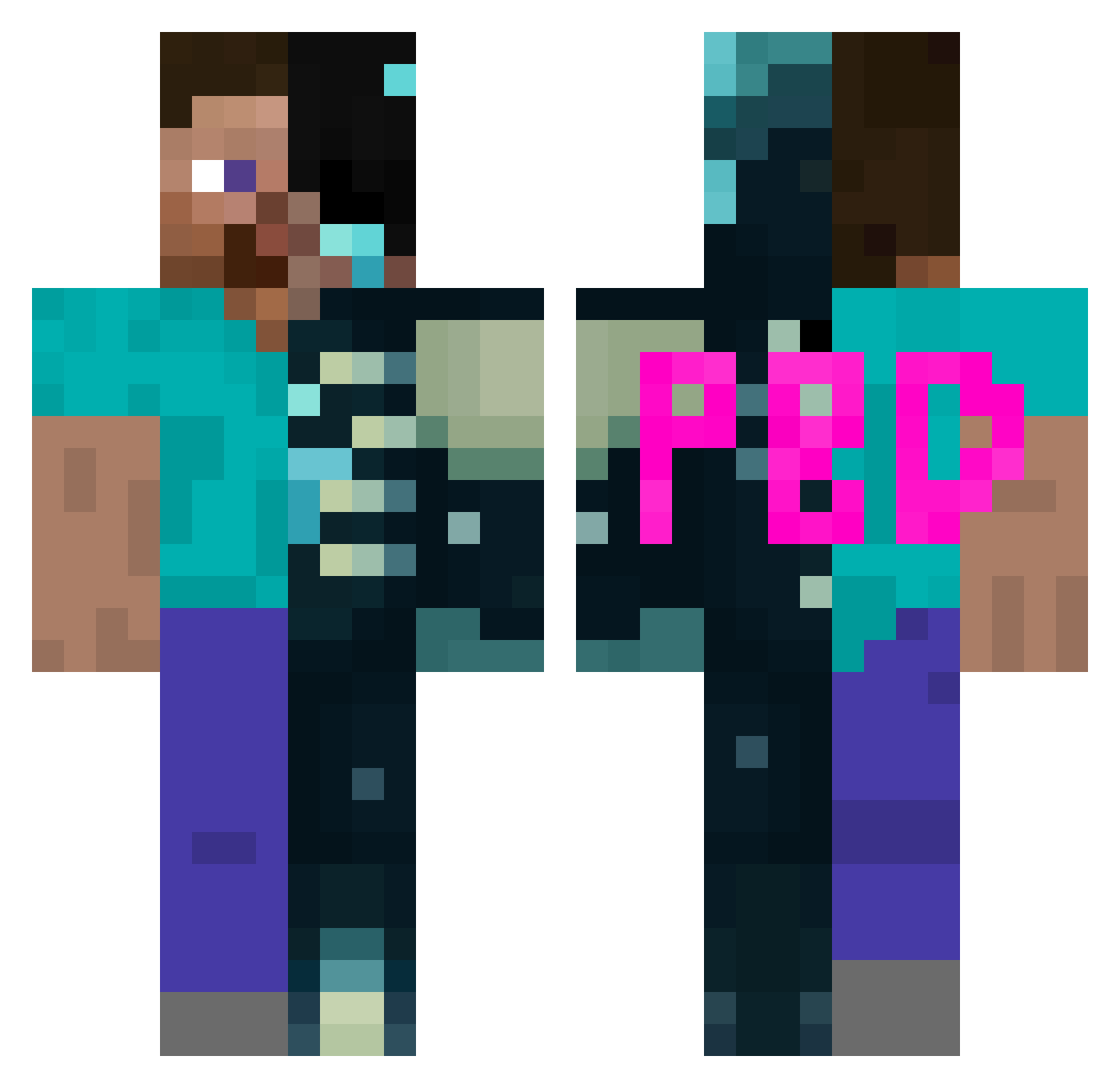
Other players with this skin (113)
Sc3nt_ was the 53rd player we have seen with this skin, first spotted on 06.09.2026. The same skin was seen on these players. Open a nickname to see their current skin and skin history.
 Itzrealmeee D3rlord3_ Just_mandzo JOHNWICK78 uychimbe Itz_Only I1zRealMe Arceus_xyz BlockOfGras Cl7x_ ItsTakenOK ItzM4ximus Ninjaboryss _Nemos_od_xBabcI KabirTheGoat kkkwk mogalts_v5nt5 Hirschbaer Demon1203 vbogojevic LadosakJr max1301 nokatah Fl4meFrags_ Auyeungkwokyi kziroal LinhFoxchiUwU AllKrystiano Emoryz2112 ItzRealMeh Domsimus NZ_ZILLA CarvedDarko
 LungeWhy Suffixxy Kxnerpyyy eslam78 anastasis33 Xeqor lostangelic_ Brain_30000 InfamousPrestige brrrr44
 Backwards280 ksbud 2YanissR Matkipowy RegionalFear SonnImCrinee Dauntless77 Aple_1234 lukyyxpr 1259k ahberry BLACKvoid072 nephilim2016 1Kumash r3dra Re3zyy GhostThunder_29
More Half And Half Minecraft skins
See all 100 Half And Half skins
How to install the Sc3nt_ skin
- Press the Download button above to save the skin as a PNG file.
- Minecraft: Bedrock Edition (PE): open the Dressing Room from the main menu (or tap your character → Edit Character), go to Classic Skins → Owned, press the + (new skin) button, choose the downloaded PNG and pick the Classic (Steve) model. Works on PC and mobile; consoles cannot import custom skins.
- Minecraft: Java Edition: open the Minecraft Launcher, go to the Skins tab, click New Skin, load the PNG, pick the Classic (Steve) model and press Save & Use. You can also upload it at minecraft.net → Profile → Change Skin.
The skin does not show up after import - what should I do?
Restart Minecraft and open the Dressing Room again - imported skins sometimes appear only after a restart. Also make sure you selected the imported skin and picked the Classic (Steve) model.
Which model should I choose, Classic or Slim?
This skin is designed for the Classic (Steve) model. If you pick the wrong model, the arms of the skin will look stretched or squeezed.
Is the skin of Sc3nt_ free to download?
Yes. Press Download, save the PNG file and use it in Minecraft: Bedrock Edition or Java Edition - no payment or registration needed. The skin also works on multiplayer servers and Realms.
More skins
Looking for more? Go back to all Minecraft skins and check the top skins of the week, month and all time, or find any player's skin by nickname.