
Saizyyyyyyyy - Minecraft Skins & Skin History
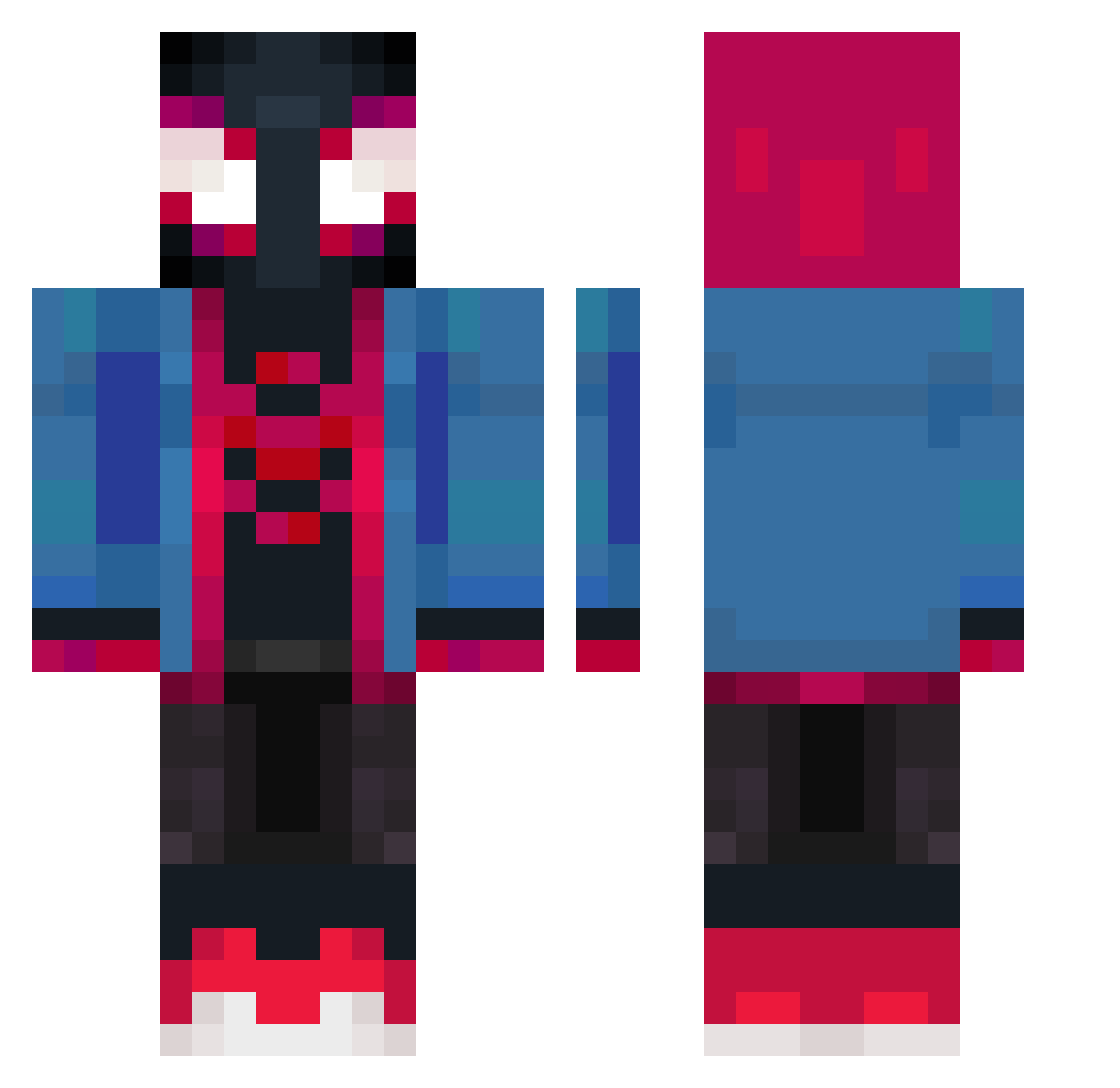
Current Minecraft skin of the player Saizyyyyyyyy, loaded from the official Mojang API. Rotate the 3D model with your mouse or finger, then download the skin as a PNG file and use it in Minecraft: Bedrock Edition or Java Edition for free. When Saizyyyyyyyy changes their skin, this page updates automatically and the old skin stays in the history below.
Other players with this skin (358)
Saizyyyyyyyy was the 300th player we have seen with this skin, first spotted on 06.10.2026. The same skin was seen on these players. Open a nickname to see their current skin and skin history.
 Kakashi87320 Daggox miguel_2908 ZenKozx Drox117 AlexJ59 ferpumes_ iBadVlr HeavensFall BenBen0209 juanitonieve Eilln GERENTTE MiniChifruit_MC naohaferrolhos Angelpibee Sierra271 Danyael034 Nekomamutchi Leopoulin VineStrokeS Paprika_Reborn miguelzasso IVV0 Bodom19 Kitirito2407 Sochilo321 kingston12444 GodzillaN markeymarc808 Luizppk KuroNeko401 aleexnaavarroo TawReoSS Balles7 aAuttentik rxfrxctxon indian_farmr Gx_in angelmixer sEllEriTo TH3_GANG_PLAY3R_ Brook171 muchos07 mtsrzcz votcho Steffenerkul GenasisV kingdrakos zArbez TheHawiskle xAbes9 Whosjay49 Sunbvrnn TupapushinoXYW Balabezooo Seiif raromagedon Dauntlessum5 Laura_Dabrowska
More Miles Morales Minecraft skins
See all 226 Miles Morales skins
How to install the Saizyyyyyyyy skin
- Press the Download button above to save the skin as a PNG file.
- Minecraft: Bedrock Edition (PE): open the Dressing Room from the main menu (or tap your character → Edit Character), go to Classic Skins → Owned, press the + (new skin) button, choose the downloaded PNG and pick the Classic (Steve) model. Works on PC and mobile; consoles cannot import custom skins.
- Minecraft: Java Edition: open the Minecraft Launcher, go to the Skins tab, click New Skin, load the PNG, pick the Classic (Steve) model and press Save & Use. You can also upload it at minecraft.net → Profile → Change Skin.
The skin does not show up after import - what should I do?
Restart Minecraft and open the Dressing Room again - imported skins sometimes appear only after a restart. Also make sure you selected the imported skin and picked the Classic (Steve) model.
Which model should I choose, Classic or Slim?
This skin is designed for the Classic (Steve) model. If you pick the wrong model, the arms of the skin will look stretched or squeezed.
Is the skin of Saizyyyyyyyy free to download?
Yes. Press Download, save the PNG file and use it in Minecraft: Bedrock Edition or Java Edition - no payment or registration needed. The skin also works on multiplayer servers and Realms.
More skins
Looking for more? Go back to all Minecraft skins and check the top skins of the week, month and all time, or find any player's skin by nickname.