
Saft0511 - Minecraft Skins & Skin History
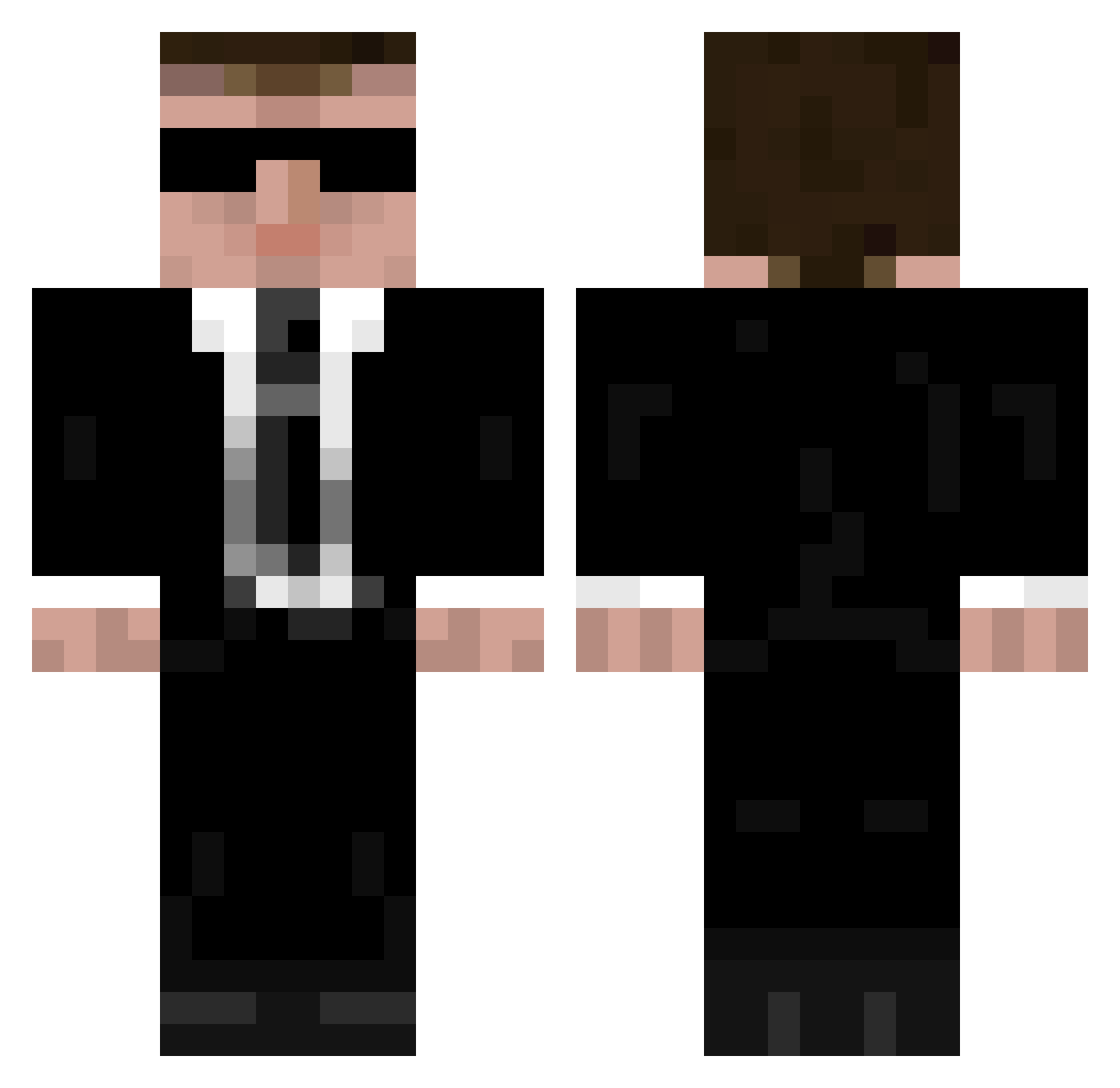
Current Minecraft skin of the player Saft0511, loaded from the official Mojang API. Rotate the 3D model with your mouse or finger, then download the skin as a PNG file and use it in Minecraft: Bedrock Edition or Java Edition for free. When Saft0511 changes their skin, this page updates automatically and the old skin stays in the history below.
Other players with this skin (335)
Saft0511 was the 31st player we have seen with this skin, first spotted on 03.08.2026. The same skin was seen on these players. Open a nickname to see their current skin and skin history.
 daaixianzun_wuyu ElitusMaximus Stuart1989 Ydnor TheCIAKilledJFK JohnJoin GamerSof OscarBaby Paulberger123 xATTO1 panevesht Woeliebadmuts Craftlimo denizkeless Liqyou RageBachus kissgun123 IkariDan jamespondafk larry8247 noobstey
 Flakey770 kainker Caecid _Jascha_ Masterwillty Quecksilberengel PatrykLODZ Acephoenix456 jerembond Garalk TedIsRad BeAKawUy Kilimanjaro_Nasu SpiderMaverick SNITZEL1234 CaptainNovacane Eurus716 akathe1st poppe2525 probablyporkchop Poitard akichi0912 gorkygorbachev freefall9027 Frans_Willem Deimosian ThrustsTV freakyfrog188 ArcherDOrcA Hines54 N0edel mipipimi CuordiBurro ly_olx7t_1031 Gunnrix Solitude44 HaroDxD Waqar_ August2315
More Agent Minecraft skins
How to install the Saft0511 skin
- Press the Download button above to save the skin as a PNG file.
- Minecraft: Bedrock Edition (PE): open the Dressing Room from the main menu (or tap your character → Edit Character), go to Classic Skins → Owned, press the + (new skin) button, choose the downloaded PNG and pick the Classic (Steve) model. Works on PC and mobile; consoles cannot import custom skins.
- Minecraft: Java Edition: open the Minecraft Launcher, go to the Skins tab, click New Skin, load the PNG, pick the Classic (Steve) model and press Save & Use. You can also upload it at minecraft.net → Profile → Change Skin.
The skin does not show up after import - what should I do?
Restart Minecraft and open the Dressing Room again - imported skins sometimes appear only after a restart. Also make sure you selected the imported skin and picked the Classic (Steve) model.
Which model should I choose, Classic or Slim?
This skin is designed for the Classic (Steve) model. If you pick the wrong model, the arms of the skin will look stretched or squeezed.
Is the skin of Saft0511 free to download?
Yes. Press Download, save the PNG file and use it in Minecraft: Bedrock Edition or Java Edition - no payment or registration needed. The skin also works on multiplayer servers and Realms.
More skins
Looking for more? Go back to all Minecraft skins and check the top skins of the week, month and all time, or find any player's skin by nickname.