
SHARKBAlT - Minecraft Skins & Skin History
Current Minecraft skin of the player SHARKBAlT, loaded from the official Mojang API. Rotate the 3D model with your mouse or finger, then download the skin as a PNG file and use it in Minecraft: Bedrock Edition or Java Edition for free. When SHARKBAlT changes their skin, this page updates automatically and the old skin stays in the history below.
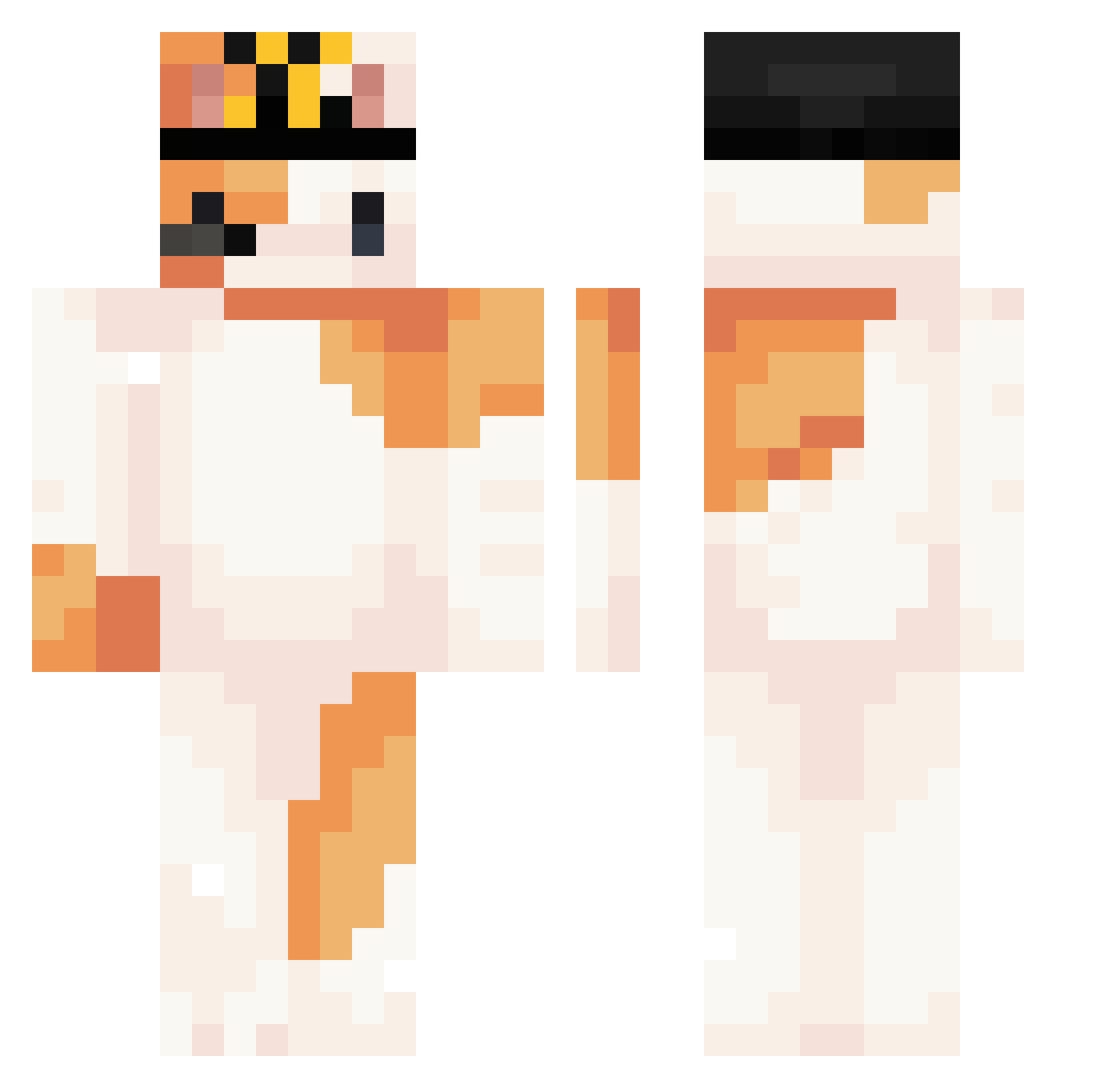
Other players with this skin (297)
SHARKBAlT was the 118th player we have seen with this skin, first spotted on 06.09.2026. The same skin was seen on these players. Open a nickname to see their current skin and skin history.
 Hopps3Original linearcone Artemorus Uki_1mm WideningElk NEVELNET SCJCY GorgeLT lukers101 CBSN 3RRT5 apdamanera300 airspell ZIN9029 andreuxue wvictor01 MoMovo Kotowska GorgeLP LyeenG
 Celexaa wjsalsw Cattoun zitao696969 sebaf04 KUSHZOON Rabbit6677 Mrsarmanle nabnabnabs Pawsler camiilop Okulnik Deniz_Dragonfire pagoD26 smoketheamerican Ku8ir32 oxidemars Kymppp TESSSSSSSSSSS J_Bongsuk 64xx IMHERO101 Felixx2201 Red_Flute ItsNagiMC Selenetic mortyculiao _ZiemniaczeK_ DecentBunny grapeBurger moonxbae shiny002 zetapee Xiaomm6723 pOo_oOq_ L3ty hynoe Magical_Reed _coldchilli_ PrettyComfi
More Calico Cat Minecraft skins
How to install the SHARKBAlT skin
- Press the Download button above to save the skin as a PNG file.
- Minecraft: Bedrock Edition (PE): open the Dressing Room from the main menu (or tap your character → Edit Character), go to Classic Skins → Owned, press the + (new skin) button, choose the downloaded PNG and pick the Classic (Steve) model. Works on PC and mobile; consoles cannot import custom skins.
- Minecraft: Java Edition: open the Minecraft Launcher, go to the Skins tab, click New Skin, load the PNG, pick the Classic (Steve) model and press Save & Use. You can also upload it at minecraft.net → Profile → Change Skin.
The skin does not show up after import - what should I do?
Restart Minecraft and open the Dressing Room again - imported skins sometimes appear only after a restart. Also make sure you selected the imported skin and picked the Classic (Steve) model.
Which model should I choose, Classic or Slim?
This skin is designed for the Classic (Steve) model. If you pick the wrong model, the arms of the skin will look stretched or squeezed.
Is the skin of SHARKBAlT free to download?
Yes. Press Download, save the PNG file and use it in Minecraft: Bedrock Edition or Java Edition - no payment or registration needed. The skin also works on multiplayer servers and Realms.
More skins
Looking for more? Go back to all Minecraft skins and check the top skins of the week, month and all time, or find any player's skin by nickname.