
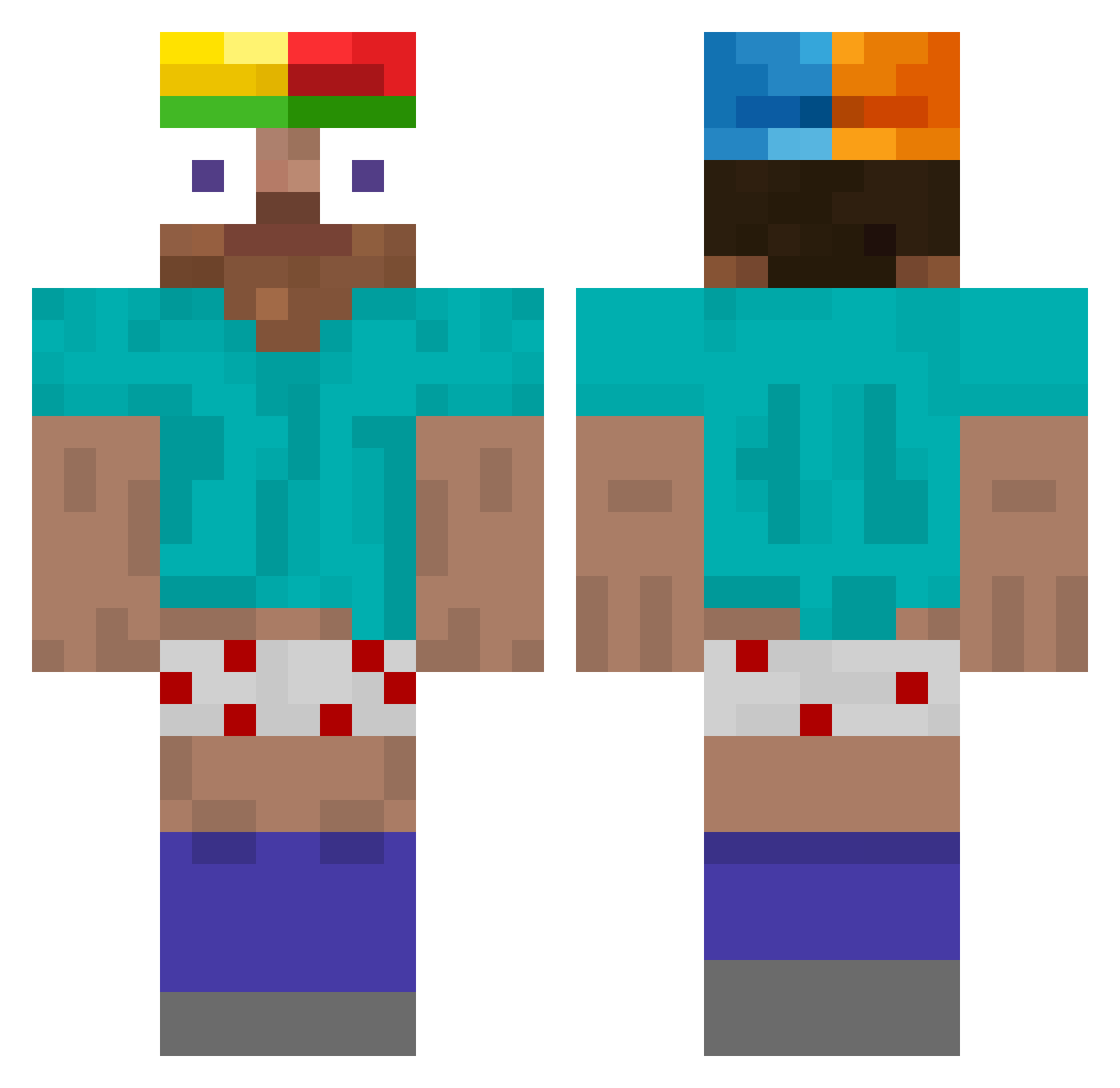
Current Minecraft skin of the player Ryanhond, loaded from the official Mojang API. Rotate the 3D model with your mouse or finger, then download the skin as a PNG file and use it in Minecraft: Bedrock Edition or Java Edition for free. When Ryanhond changes their skin, this page updates automatically and the old skin stays in the history below.
Other players with this skin (58)
Ryanhond was the 23rd player we have seen with this skin, first spotted on 01.09.2026. The same skin was seen on these players. Open a nickname to see their current skin and skin history.
 pmsa zeranstorm1 zgOn69 seolyx termosz lincolnBUROWS
 elpepito4321 J1nZia Chaqil YoxsenMC funnyvalenting White_cat010 d2donutt
 Tonyinthavong Gaspatjo Kasmin_ kyteq FlanChoco Lululustucru22
 zennIsHere
 PaulinoG
 2MWM Epico_09
 Lini9176 louxiiy Da1kness
 Filip201_
 ducsuytinh
 Corper2
 murhaus oldmanjeffy Mhoang_2611 Jblinksi xZiemniaks
 mysteve478
 ZEYAD773 sqammiee JIGO14 dumdum7228 Arabshxrk RedstoneGod Kenechiro _7211_ BILLY_FR_ Leechanyoung123 kofolaCZ ZeninJoey godofwar10901 Jlaluz Japis2 Bakano18 IHaveNoJob 8wLx nolmzz goddawng AlessioZigo paprot3czka061 LesterRomeeee
More Funny Minecraft skins
How to install the Ryanhond skin
- Press the Download button above to save the skin as a PNG file.
- Minecraft: Bedrock Edition (PE): open the Dressing Room from the main menu (or tap your character → Edit Character), go to Classic Skins → Owned, press the + (new skin) button, choose the downloaded PNG and pick the Classic (Steve) model. Works on PC and mobile; consoles cannot import custom skins.
- Minecraft: Java Edition: open the Minecraft Launcher, go to the Skins tab, click New Skin, load the PNG, pick the Classic (Steve) model and press Save & Use. You can also upload it at minecraft.net → Profile → Change Skin.
The skin does not show up after import - what should I do?
Restart Minecraft and open the Dressing Room again - imported skins sometimes appear only after a restart. Also make sure you selected the imported skin and picked the Classic (Steve) model.
Which model should I choose, Classic or Slim?
This skin is designed for the Classic (Steve) model. If you pick the wrong model, the arms of the skin will look stretched or squeezed.
Is the skin of Ryanhond free to download?
Yes. Press Download, save the PNG file and use it in Minecraft: Bedrock Edition or Java Edition - no payment or registration needed. The skin also works on multiplayer servers and Realms.
More skins
Looking for more? Go back to all Minecraft skins and check the top skins of the week, month and all time, or find any player's skin by nickname.