
Russian_Ground - Minecraft Skins & Skin History
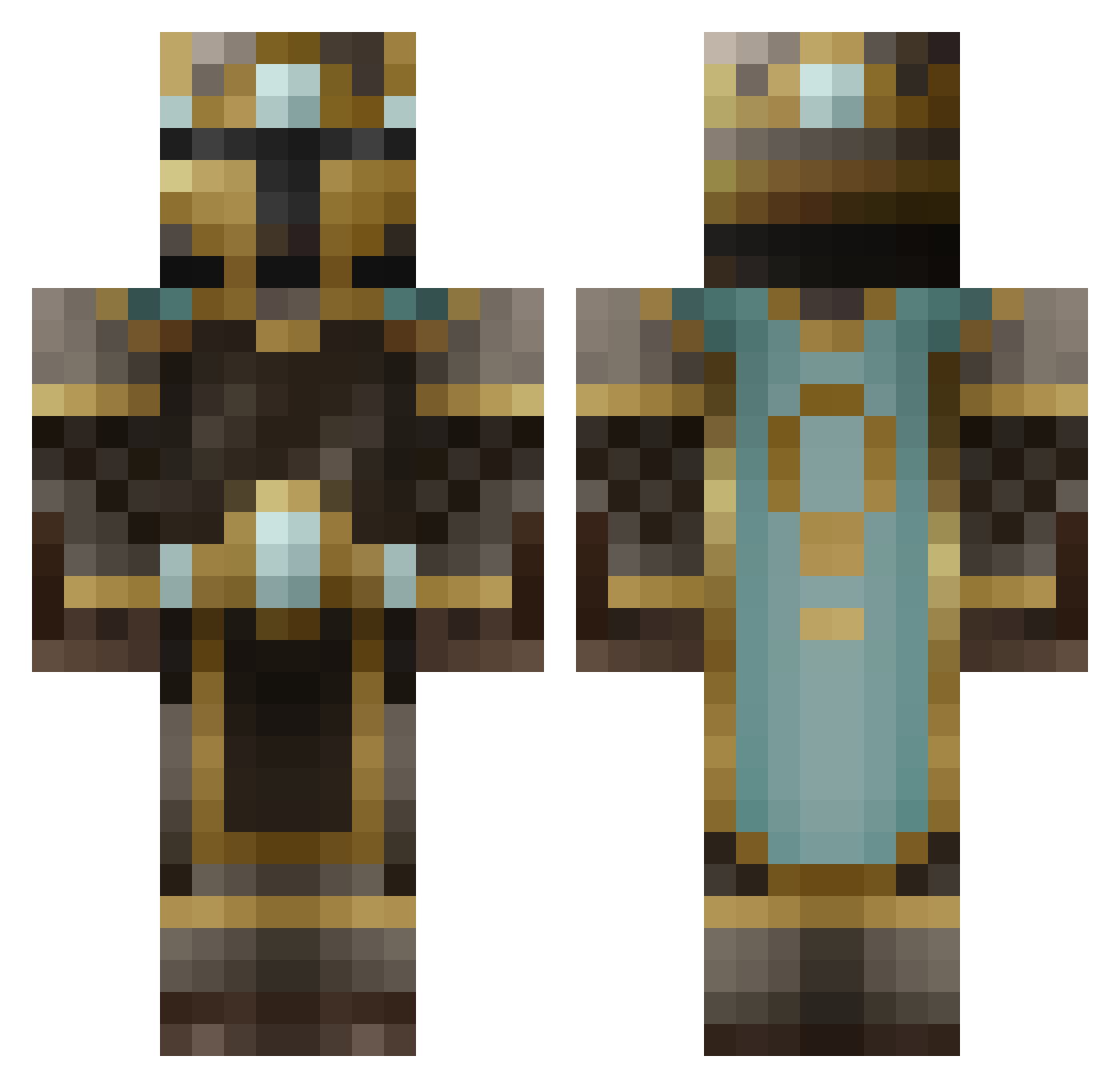
Current Minecraft skin of the player Russian_Ground, loaded from the official Mojang API. Rotate the 3D model with your mouse or finger, then download the skin as a PNG file and use it in Minecraft: Bedrock Edition or Java Edition for free. When Russian_Ground changes their skin, this page updates automatically and the old skin stays in the history below.
Other players with this skin (629)
Russian_Ground was the 582nd player we have seen with this skin, first spotted on 05.11.2026. The same skin was seen on these players. Open a nickname to see their current skin and skin history.
 Auriq Knight91011 RetroMonk3y ChefToast whickedshell ArchAngel55 Eli_Isaac10 Stevebeast1 Mitothee snurrefix Unearthly_Entity JustEnoughTV Neribus Space_Cake013 robotguy1337 KingBryan MarkusMan Xx_ebola_xX OliverMKing Nitrovox iggy5301 smitywerbenjager Jok4ward filszcz1505 ScottMatt1 The_Stim Barnsten Kogwar TheMadnesso BooM84 Mactastic96 MLG508 MarkusAG Tyriama blackout183 themusician23 Torkmeat ArchaicBeatZ Teedo000 tongkokong KingMech Starkiller412 Krech Night_hawk12 TronCatt MrGravityCat ZenoTheGreat Phyr0nic rostatbrod BenDur Opotiki HerpinDerpin Rotas Dratlni Ferydor TheRedChocobo knightclan Au_Gold bitzer25 Joshfurtado
More King Minecraft skins
How to install the Russian_Ground skin
- Press the Download button above to save the skin as a PNG file.
- Minecraft: Bedrock Edition (PE): open the Dressing Room from the main menu (or tap your character → Edit Character), go to Classic Skins → Owned, press the + (new skin) button, choose the downloaded PNG and pick the Classic (Steve) model. Works on PC and mobile; consoles cannot import custom skins.
- Minecraft: Java Edition: open the Minecraft Launcher, go to the Skins tab, click New Skin, load the PNG, pick the Classic (Steve) model and press Save & Use. You can also upload it at minecraft.net → Profile → Change Skin.
The skin does not show up after import - what should I do?
Restart Minecraft and open the Dressing Room again - imported skins sometimes appear only after a restart. Also make sure you selected the imported skin and picked the Classic (Steve) model.
Which model should I choose, Classic or Slim?
This skin is designed for the Classic (Steve) model. If you pick the wrong model, the arms of the skin will look stretched or squeezed.
Is the skin of Russian_Ground free to download?
Yes. Press Download, save the PNG file and use it in Minecraft: Bedrock Edition or Java Edition - no payment or registration needed. The skin also works on multiplayer servers and Realms.
More skins
Looking for more? Go back to all Minecraft skins and check the top skins of the week, month and all time, or find any player's skin by nickname.