
RoroCheetah - Minecraft Skins & Skin History
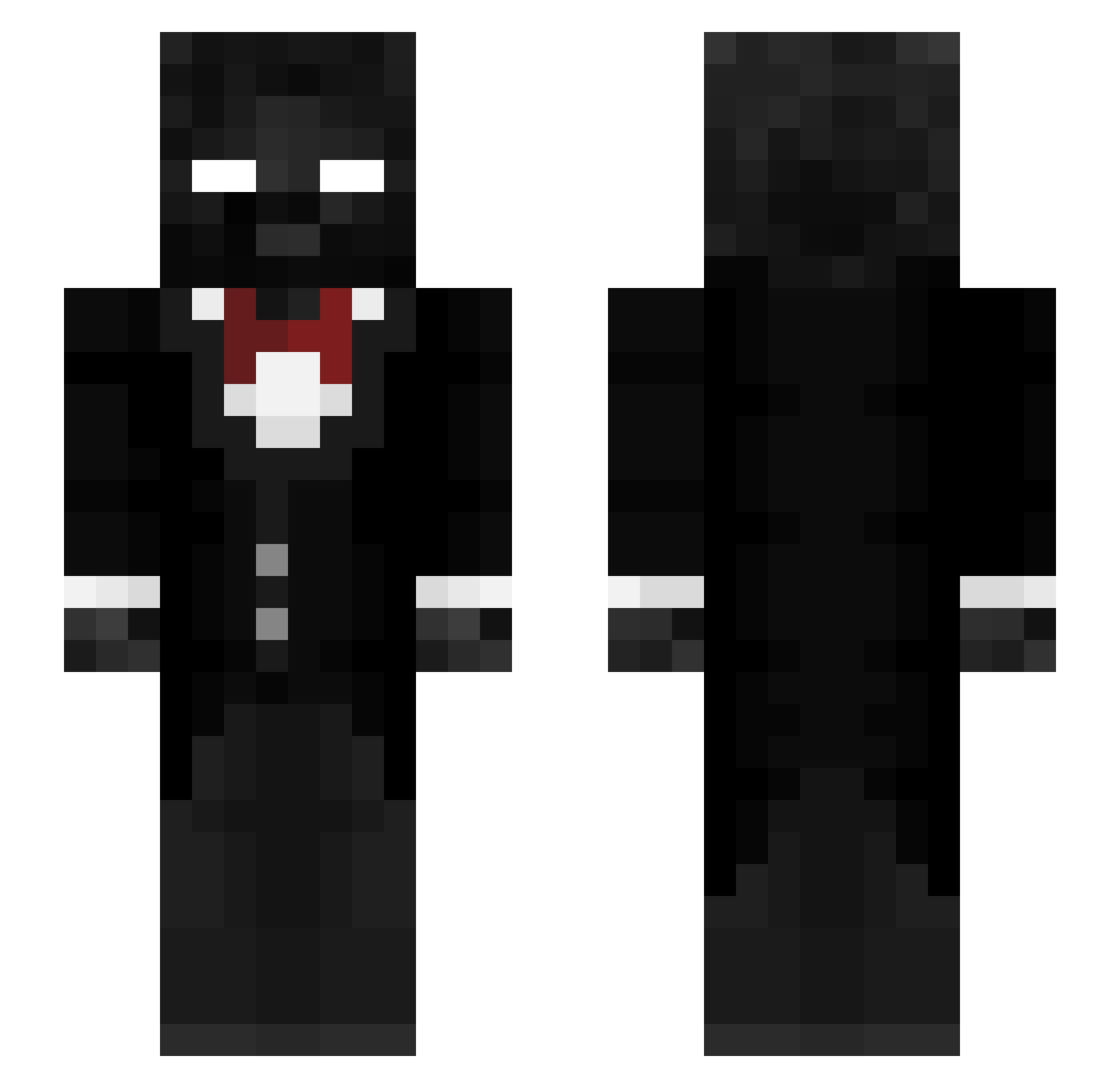
Current Minecraft skin of the player RoroCheetah, loaded from the official Mojang API. Rotate the 3D model with your mouse or finger, then download the skin as a PNG file and use it in Minecraft: Bedrock Edition or Java Edition for free. When RoroCheetah changes their skin, this page updates automatically and the old skin stays in the history below.
Other players with this skin (283)
RoroCheetah was the 158th player we have seen with this skin, first spotted on 20.09.2026. The same skin was seen on these players. Open a nickname to see their current skin and skin history.
 iTzNever1 _melonn_ swifty201012 The13lackPanther BroncoBash Anakin_736 Galaxylion2011 Ragister PersonaZ2 The10ThDoctor020 Blade0613 NazWars0 lightplumes snaxes3 Darlumarer KaosBoys Emilios_670 _Taikuri ApexAlexz ACEGOCRAZY Hvper 28Savage05 snowaintscared Archendor FAZEVICTORAX june_32006 mobest1an Josiah_potato LonellyWay Kastumi14 Oblitorator4976 Topsi13 J87JRC bluefang11 madrou2011 Alm0DIF paul_dilett MathiasD03 Ultra_gavi_YT Striker0934 mytx7821 xXXkillkolxxx jctheduke RobinVerseveld gamer1991x Milk_JD R1sk_CXF LTCheesee TKYHR Fllem fireplace_4 beanser1 __STAT1C__ EnderFred29 DrDsRspect BogPlaysMine Classicgaming_ s7x_
 Antonix0 mgxxx
How to install the RoroCheetah skin
- Press the Download button above to save the skin as a PNG file.
- Minecraft: Bedrock Edition (PE): open the Dressing Room from the main menu (or tap your character → Edit Character), go to Classic Skins → Owned, press the + (new skin) button, choose the downloaded PNG and pick the Slim (Alex) model. Works on PC and mobile; consoles cannot import custom skins.
- Minecraft: Java Edition: open the Minecraft Launcher, go to the Skins tab, click New Skin, load the PNG, pick the Slim (Alex) model and press Save & Use. You can also upload it at minecraft.net → Profile → Change Skin.
The skin does not show up after import - what should I do?
Restart Minecraft and open the Dressing Room again - imported skins sometimes appear only after a restart. Also make sure you selected the imported skin and picked the Slim (Alex) model.
Which model should I choose, Classic or Slim?
This skin is designed for the Slim (Alex) model. If you pick the wrong model, the arms of the skin will look stretched or squeezed.
Is the skin of RoroCheetah free to download?
Yes. Press Download, save the PNG file and use it in Minecraft: Bedrock Edition or Java Edition - no payment or registration needed. The skin also works on multiplayer servers and Realms.
More skins
Looking for more? Go back to all Minecraft skins and check the top skins of the week, month and all time, or find any player's skin by nickname.