
Rjwu - Minecraft Skins & Skin History
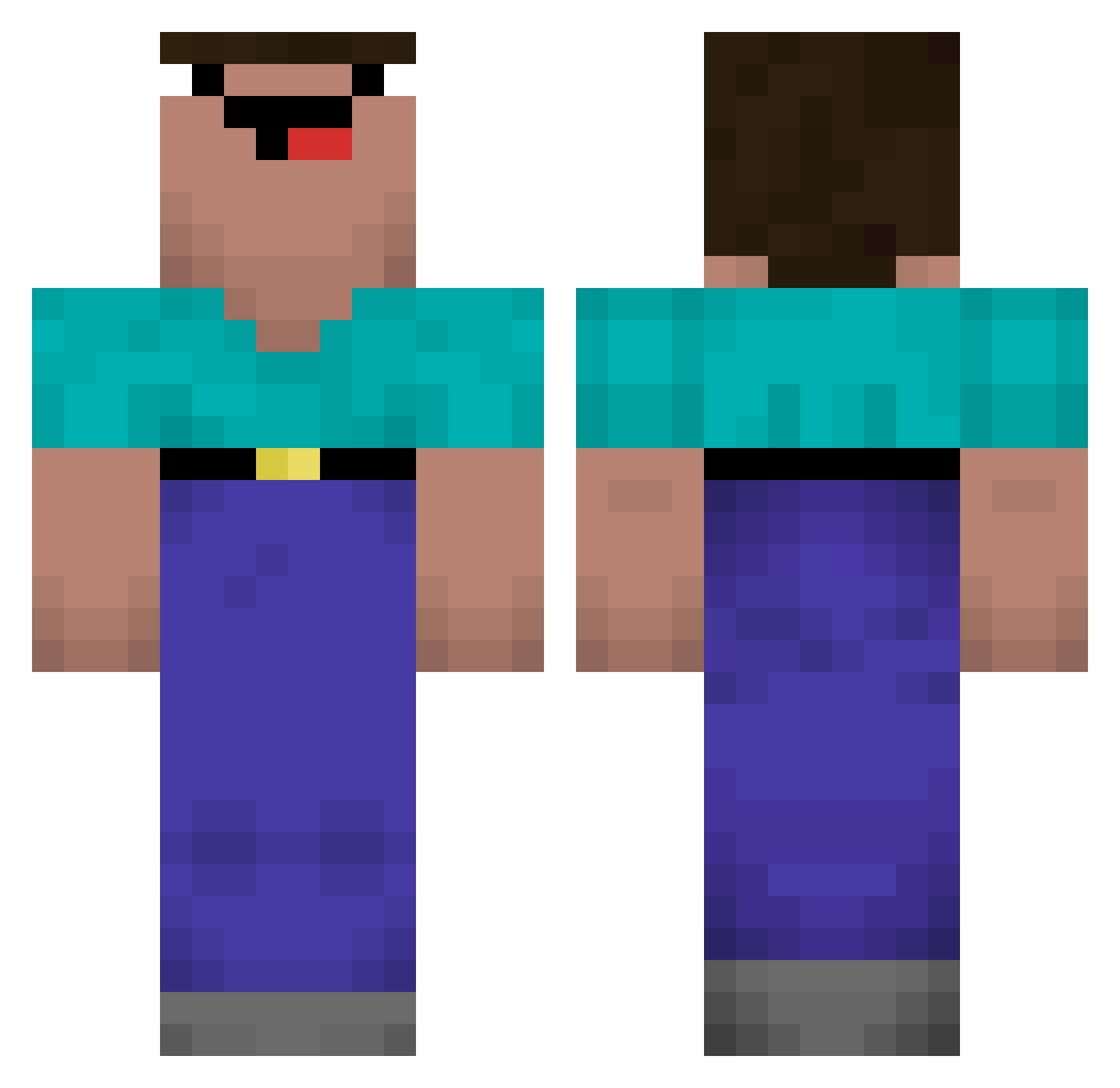
Current Minecraft skin of the player Rjwu, loaded from the official Mojang API. Rotate the 3D model with your mouse or finger, then download the skin as a PNG file and use it in Minecraft: Bedrock Edition or Java Edition for free. When Rjwu changes their skin, this page updates automatically and the old skin stays in the history below.
Other players with this skin (569)
Rjwu was the 496th player we have seen with this skin, first spotted on 22.10.2026. The same skin was seen on these players. Open a nickname to see their current skin and skin history.
 Fremd_gehen69 N3BR SrGamer M3ZAA Xeyans mungeeee Jurovai_skladka tuoasty akaimk LimmkorvenYT Kayleb_00 Emil_Wipprich VasteFellow Sam_Johnsons Vendovskiy DugTrio_YT DONAIREz serakira monkey_9487 Stanvzak Fr0tt4 norman7305 TheGreatAil nemesis10123 friedvoll Ciqnez OOOOMGGGGG theshimon MicahChristenson superxoke jojobouler LilNugget_12 kindredcc Rommaliss EnderfishKiller4 Omri06 xiaoyun10 Ygkizilays Akelwolf Serxgio dingdongga shyprincess228 Eimeko yuyudie ElPapux01 botcalled31 Dinosaur5Legend2 Porcaria Gunner513 Afroschiss MyvOrigami BaseIQ koray_31 botondnq aronatom MandezzSpartan __Limpan___ Jonas_5678 LuckeraYT Rss0
More Classic Minecraft skins
How to install the Rjwu skin
- Press the Download button above to save the skin as a PNG file.
- Minecraft: Bedrock Edition (PE): open the Dressing Room from the main menu (or tap your character → Edit Character), go to Classic Skins → Owned, press the + (new skin) button, choose the downloaded PNG and pick the Classic (Steve) model. Works on PC and mobile; consoles cannot import custom skins.
- Minecraft: Java Edition: open the Minecraft Launcher, go to the Skins tab, click New Skin, load the PNG, pick the Classic (Steve) model and press Save & Use. You can also upload it at minecraft.net → Profile → Change Skin.
The skin does not show up after import - what should I do?
Restart Minecraft and open the Dressing Room again - imported skins sometimes appear only after a restart. Also make sure you selected the imported skin and picked the Classic (Steve) model.
Which model should I choose, Classic or Slim?
This skin is designed for the Classic (Steve) model. If you pick the wrong model, the arms of the skin will look stretched or squeezed.
Is the skin of Rjwu free to download?
Yes. Press Download, save the PNG file and use it in Minecraft: Bedrock Edition or Java Edition - no payment or registration needed. The skin also works on multiplayer servers and Realms.
More skins
Looking for more? Go back to all Minecraft skins and check the top skins of the week, month and all time, or find any player's skin by nickname.