
Riad_Huh - Minecraft Skins & Skin History
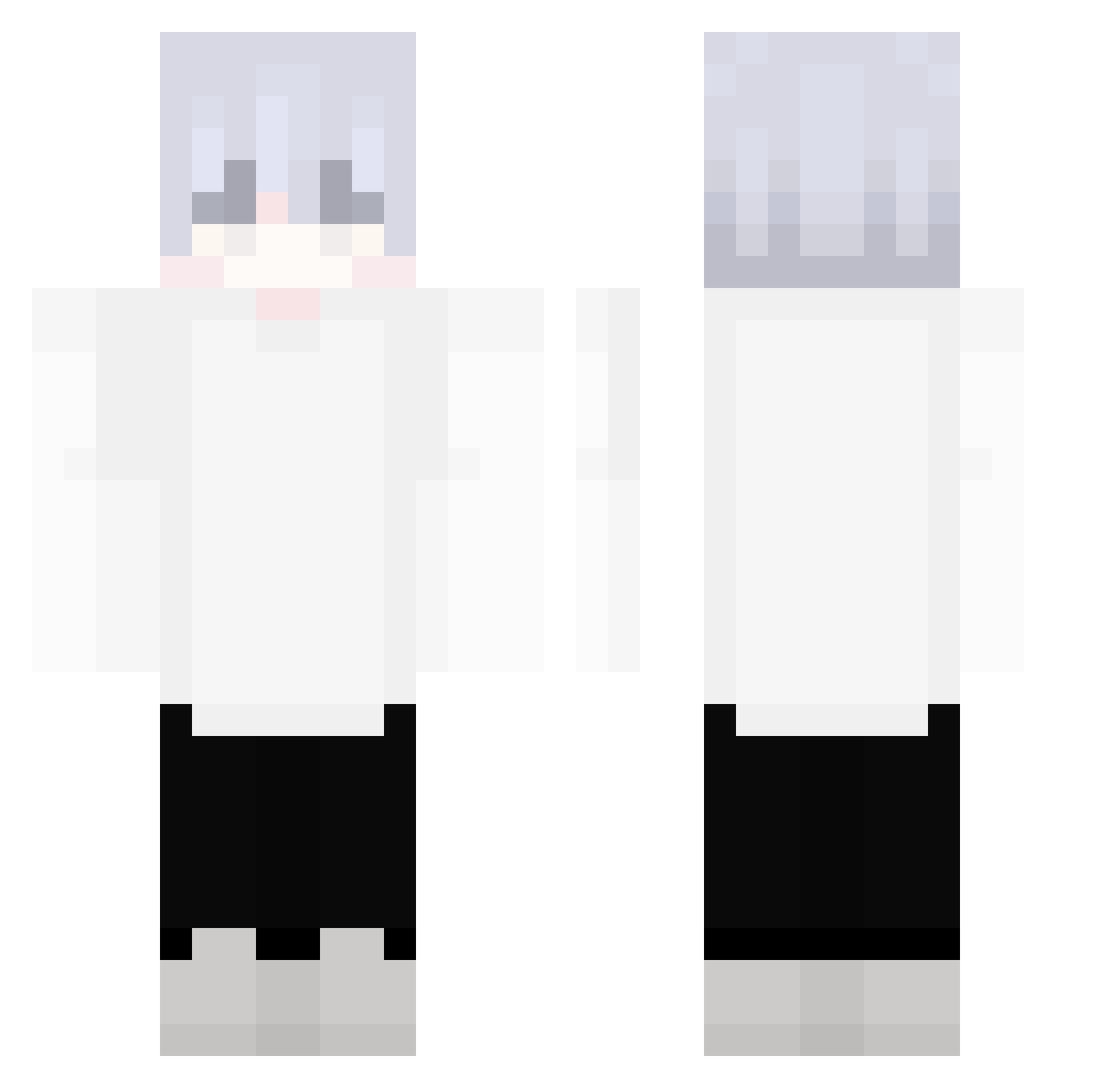
Current Minecraft skin of the player Riad_Huh, loaded from the official Mojang API. Rotate the 3D model with your mouse or finger, then download the skin as a PNG file and use it in Minecraft: Bedrock Edition or Java Edition for free. When Riad_Huh changes their skin, this page updates automatically and the old skin stays in the history below.
Other players with this skin (335)
Riad_Huh was the 297th player we have seen with this skin, first spotted on 30.10.2026. The same skin was seen on these players. Open a nickname to see their current skin and skin history.
 Casio6 eau2077 NemoAo BigManInCharge astratom ASRUSE Dark_Kenny TheSlayerYO Aventu_ Flenixqt Supremelama Lxkas247 Clice nanm23 Long_Evening 81ue_ ElRodri117 __ThePunisher__ White_empty 2xSuki sam_roozen SpiritBlack Ghost543211 _kamina Mttaluer ImNextLevel taromochi000 TheHarman _4nj0_ Feat_Mon NotBarti Chocolate3388 n0cternaII DARKSOUL1263 Aloe4 zaza_puffa oKenjii Lanafin_ Gullying LY_LOVER DrYuan fxlxrd LuLInMc Zackiiy KLLLDEI _Sammito_ Lin428 akram_mhl Kentach xiaowai0526 lllaaalll KathrineGaming z4kh Ruinnnn Padneem TT_0611 Mikebyy poawjkd Ccs_kings 287ms
More Anime Minecraft skins
How to install the Riad_Huh skin
- Press the Download button above to save the skin as a PNG file.
- Minecraft: Bedrock Edition (PE): open the Dressing Room from the main menu (or tap your character → Edit Character), go to Classic Skins → Owned, press the + (new skin) button, choose the downloaded PNG and pick the Classic (Steve) model. Works on PC and mobile; consoles cannot import custom skins.
- Minecraft: Java Edition: open the Minecraft Launcher, go to the Skins tab, click New Skin, load the PNG, pick the Classic (Steve) model and press Save & Use. You can also upload it at minecraft.net → Profile → Change Skin.
The skin does not show up after import - what should I do?
Restart Minecraft and open the Dressing Room again - imported skins sometimes appear only after a restart. Also make sure you selected the imported skin and picked the Classic (Steve) model.
Which model should I choose, Classic or Slim?
This skin is designed for the Classic (Steve) model. If you pick the wrong model, the arms of the skin will look stretched or squeezed.
Is the skin of Riad_Huh free to download?
Yes. Press Download, save the PNG file and use it in Minecraft: Bedrock Edition or Java Edition - no payment or registration needed. The skin also works on multiplayer servers and Realms.
More skins
Looking for more? Go back to all Minecraft skins and check the top skins of the week, month and all time, or find any player's skin by nickname.