
RazzeGamer - Minecraft Skins & Skin History
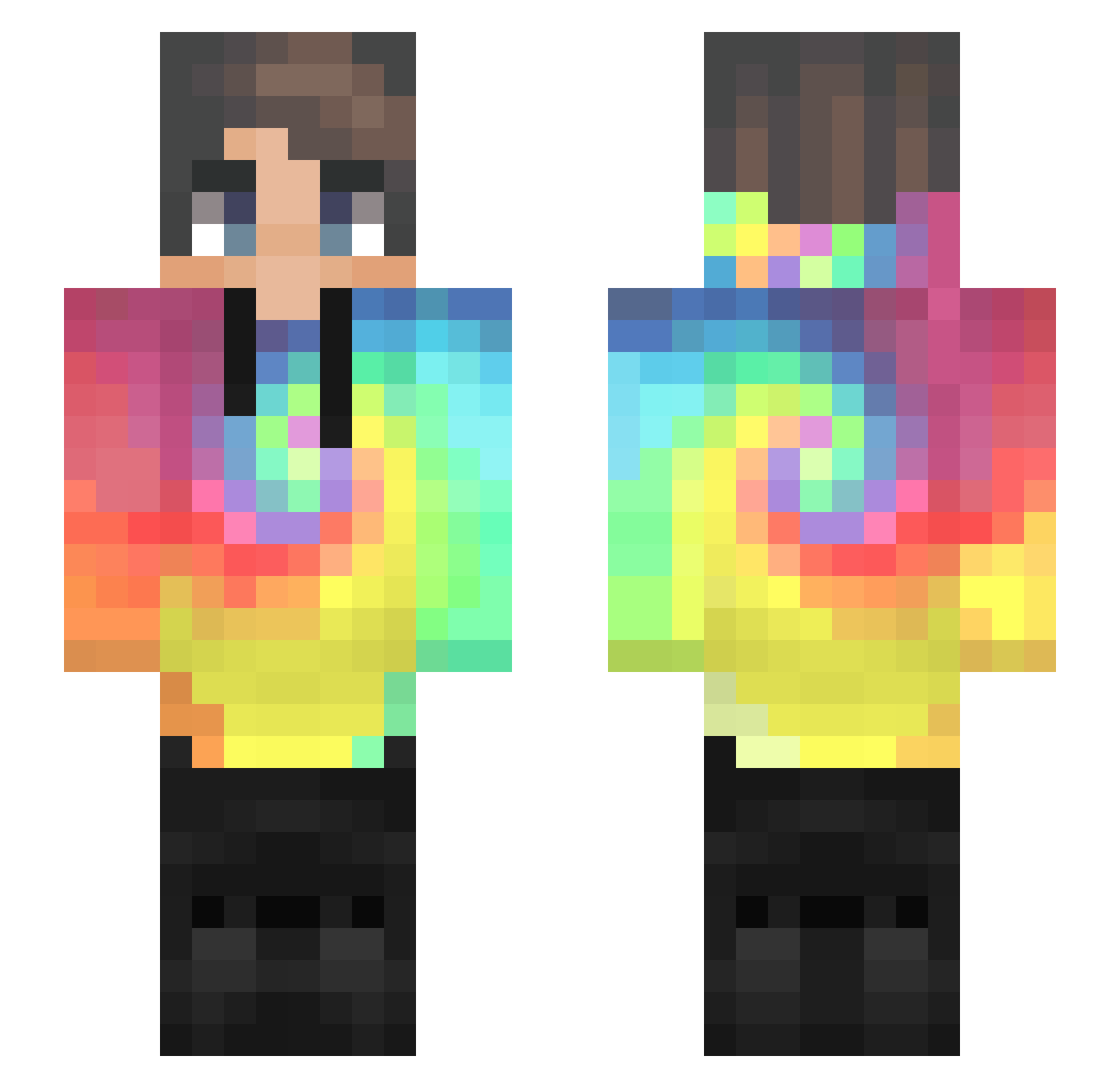
Current Minecraft skin of the player RazzeGamer, loaded from the official Mojang API. Rotate the 3D model with your mouse or finger, then download the skin as a PNG file and use it in Minecraft: Bedrock Edition or Java Edition for free. When RazzeGamer changes their skin, this page updates automatically and the old skin stays in the history below.
Other players with this skin (435)
RazzeGamer was the 401st player we have seen with this skin, first spotted on 19.10.2026. The same skin was seen on these players. Open a nickname to see their current skin and skin history.
 HJiaJun ReedRucker ItzChoosee gwerty Richko Morbidwinds XxErikpro23xX TieDyes jorgecs96 BZHLH Shaine65 Ulan_top obby13 ThatFosterKid 486Subaru valentincamarata RogerThat7 Tonyxox ItsDamixn Urraka9 Crxcked__ _Nikoland_ stelios056s Just_Pan JediBran ingridmizu Redrosak LenaW0402 musacoleta HelloGoodLuck Blankiin_ SirFluffyPanda Maximi_i Justin2006W Moriyti Puddin_Punch joystxck yooheee Hubertynoski1 FTOHOMX BartFid kiwi12151 Bonecrafter LethargicShip OldJinno Pan_NiemowaYT angeloox _QingShan_ SPACE999s spnkvelnkk dfnao we_butter young_wulpix forever__yy joshm01 AndrewPlays24 ly_nEP3m_0303 Ern1M Mohanraj yoke1221
How to install the RazzeGamer skin
- Press the Download button above to save the skin as a PNG file.
- Minecraft: Bedrock Edition (PE): open the Dressing Room from the main menu (or tap your character → Edit Character), go to Classic Skins → Owned, press the + (new skin) button, choose the downloaded PNG and pick the Slim (Alex) model. Works on PC and mobile; consoles cannot import custom skins.
- Minecraft: Java Edition: open the Minecraft Launcher, go to the Skins tab, click New Skin, load the PNG, pick the Slim (Alex) model and press Save & Use. You can also upload it at minecraft.net → Profile → Change Skin.
The skin does not show up after import - what should I do?
Restart Minecraft and open the Dressing Room again - imported skins sometimes appear only after a restart. Also make sure you selected the imported skin and picked the Slim (Alex) model.
Which model should I choose, Classic or Slim?
This skin is designed for the Slim (Alex) model. If you pick the wrong model, the arms of the skin will look stretched or squeezed.
Is the skin of RazzeGamer free to download?
Yes. Press Download, save the PNG file and use it in Minecraft: Bedrock Edition or Java Edition - no payment or registration needed. The skin also works on multiplayer servers and Realms.
More skins
Looking for more? Go back to all Minecraft skins and check the top skins of the week, month and all time, or find any player's skin by nickname.