
Ravi0lie - Minecraft Skins & Skin History
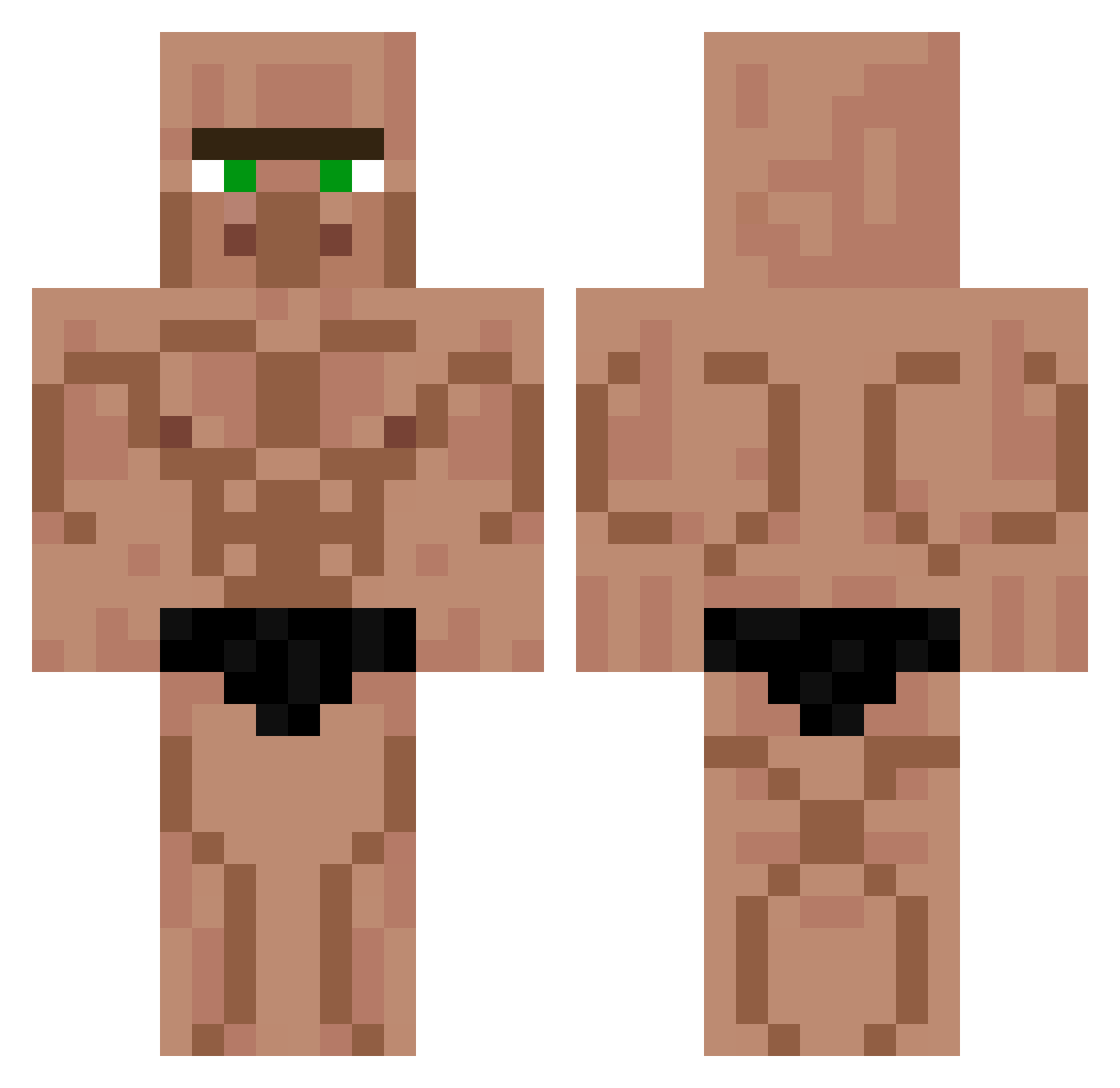
Current Minecraft skin of the player Ravi0lie, loaded from the official Mojang API. Rotate the 3D model with your mouse or finger, then download the skin as a PNG file and use it in Minecraft: Bedrock Edition or Java Edition for free. When Ravi0lie changes their skin, this page updates automatically and the old skin stays in the history below.
Other players with this skin (426)
Ravi0lie was the 403rd player we have seen with this skin, first spotted on 26.10.2026. The same skin was seen on these players. Open a nickname to see their current skin and skin history.
 Francine86 Millerblitz DaddyDeVito666 QuitTalking yoguylogangsta KimYeonWoo1013 hinjushi BlueNinjaRage SrMando10 mplampla_sta SPA1D3 poco_x3pro No__JJang MOSnotMOSS CzlowiekLasu12PL Moudde FreshBio shonelo DionDam Caseinyourface 360Banana Pixel_Penguin10 Vespaaa ComradeBench yeahzrx ProShuffle Energeticjojo11 wgbossman teichfishyrr lucaslovesveigar JayHawk LeoK15 VXTXNNN Mochaugraal kanata220223 TheBlackMonke169 Stevie_Potato Pechanix Boubouchka Rafael_Delas TU70 bevi76 TKTAB MiNt65 Leon1974 luix00uk Z1tes TheSconex airjuans75 FPH_Gaming buster56 ABDULHKEM Polyxene Mart1Ro Cacout p1p_ Tyabin3125 ElliP99 Leno117 LittleRemus
More Muscle Minecraft skins
How to install the Ravi0lie skin
- Press the Download button above to save the skin as a PNG file.
- Minecraft: Bedrock Edition (PE): open the Dressing Room from the main menu (or tap your character → Edit Character), go to Classic Skins → Owned, press the + (new skin) button, choose the downloaded PNG and pick the Classic (Steve) model. Works on PC and mobile; consoles cannot import custom skins.
- Minecraft: Java Edition: open the Minecraft Launcher, go to the Skins tab, click New Skin, load the PNG, pick the Classic (Steve) model and press Save & Use. You can also upload it at minecraft.net → Profile → Change Skin.
The skin does not show up after import - what should I do?
Restart Minecraft and open the Dressing Room again - imported skins sometimes appear only after a restart. Also make sure you selected the imported skin and picked the Classic (Steve) model.
Which model should I choose, Classic or Slim?
This skin is designed for the Classic (Steve) model. If you pick the wrong model, the arms of the skin will look stretched or squeezed.
Is the skin of Ravi0lie free to download?
Yes. Press Download, save the PNG file and use it in Minecraft: Bedrock Edition or Java Edition - no payment or registration needed. The skin also works on multiplayer servers and Realms.
More skins
Looking for more? Go back to all Minecraft skins and check the top skins of the week, month and all time, or find any player's skin by nickname.