
RTMSMC34 - Minecraft Skins & Skin History
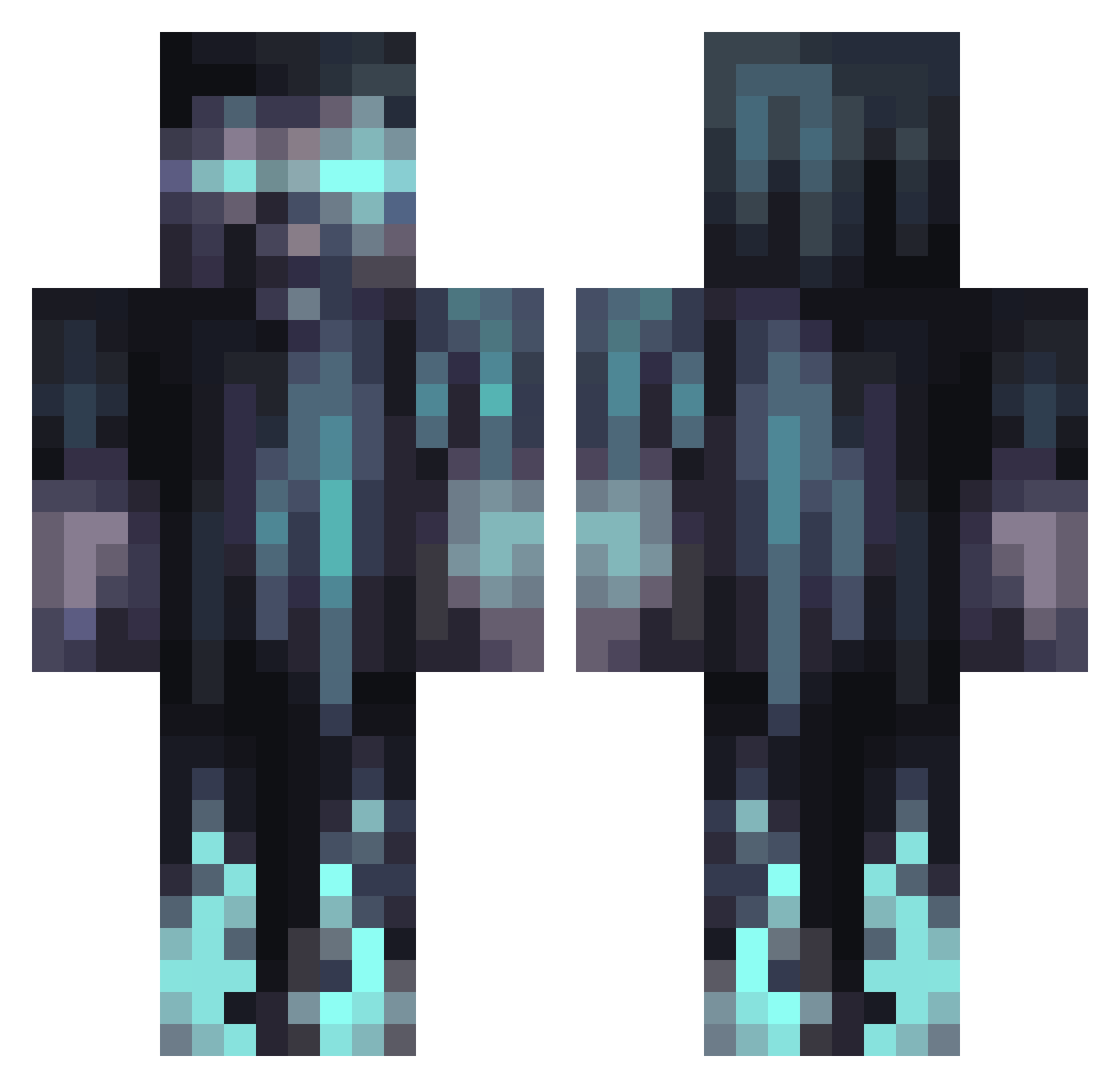
Current Minecraft skin of the player RTMSMC34, loaded from the official Mojang API. Rotate the 3D model with your mouse or finger, then download the skin as a PNG file and use it in Minecraft: Bedrock Edition or Java Edition for free. When RTMSMC34 changes their skin, this page updates automatically and the old skin stays in the history below.
Other players with this skin (1066)
RTMSMC34 was the 150th player we have seen with this skin, first spotted on 10.08.2026. The same skin was seen on these players. Open a nickname to see their current skin and skin history.
 Shadow_8208 wuffed MaverickAadi Mcdonut007 BoweryLoki ozzybulll JosefEXE BigMouthh poustopaido13 BananaOPancake ChamucoRSK SadgeLuck jobobnr1 makubas stamurathan Anubis6840
 soulcollector83 Marsal2002 EmaTKA1234
 BOBOS18 Lordasking Jcooldumb gianniyakelb MasterNomis1 mehulrocks Yanis180408 Ansonko123 JackRobot Yas1n04 Nopefish763 CURUCUCU
 SANTNO waluxs Jace200923 paperperson20309 Zavino2 Florian_1328 D1MRA1N _Yester HMill MHB0710 Peanut_335 Just_Bricked timklei Son0fAsia EquiNoxX123 TrusticGolf73 Nigi_ Saber760 luisedr23 zatorbeck TheSjonnie_ DeadlySuperS sinisterxbeats rimuru1244 PhattAlbert CazouXZ Soytuhombre MRLIGHTSKIN101 JojoGranny
More Warden Minecraft skins
How to install the RTMSMC34 skin
- Press the Download button above to save the skin as a PNG file.
- Minecraft: Bedrock Edition (PE): open the Dressing Room from the main menu (or tap your character → Edit Character), go to Classic Skins → Owned, press the + (new skin) button, choose the downloaded PNG and pick the Classic (Steve) model. Works on PC and mobile; consoles cannot import custom skins.
- Minecraft: Java Edition: open the Minecraft Launcher, go to the Skins tab, click New Skin, load the PNG, pick the Classic (Steve) model and press Save & Use. You can also upload it at minecraft.net → Profile → Change Skin.
The skin does not show up after import - what should I do?
Restart Minecraft and open the Dressing Room again - imported skins sometimes appear only after a restart. Also make sure you selected the imported skin and picked the Classic (Steve) model.
Which model should I choose, Classic or Slim?
This skin is designed for the Classic (Steve) model. If you pick the wrong model, the arms of the skin will look stretched or squeezed.
Is the skin of RTMSMC34 free to download?
Yes. Press Download, save the PNG file and use it in Minecraft: Bedrock Edition or Java Edition - no payment or registration needed. The skin also works on multiplayer servers and Realms.
More skins
Looking for more? Go back to all Minecraft skins and check the top skins of the week, month and all time, or find any player's skin by nickname.