
PressAltF4ToHack - Minecraft Skins & Skin History
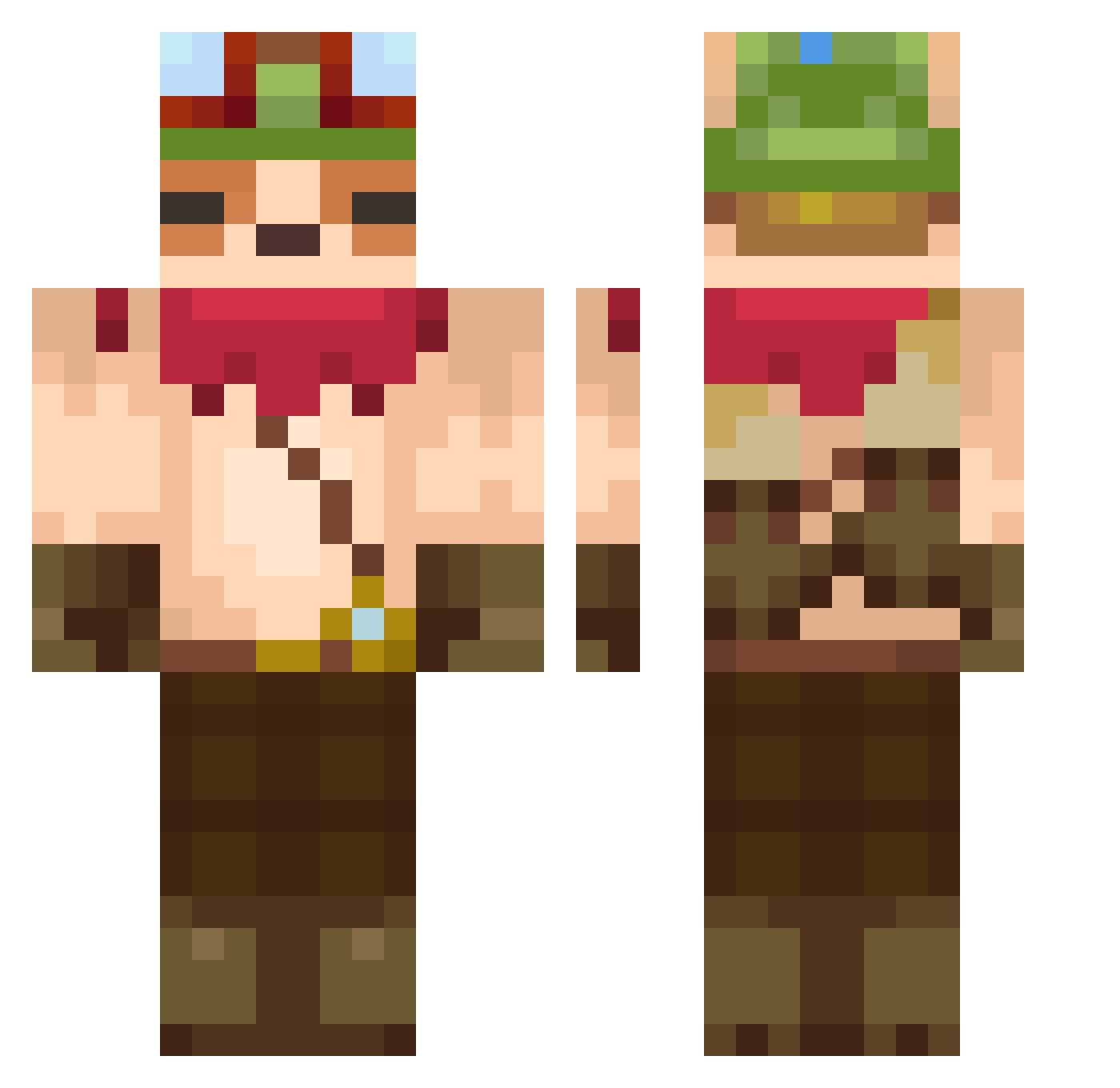
Current Minecraft skin of the player PressAltF4ToHack, loaded from the official Mojang API. Rotate the 3D model with your mouse or finger, then download the skin as a PNG file and use it in Minecraft: Bedrock Edition or Java Edition for free. When PressAltF4ToHack changes their skin, this page updates automatically and the old skin stays in the history below.
Other players with this skin (607)
PressAltF4ToHack was the 256th player we have seen with this skin, first spotted on 12.09.2026. The same skin was seen on these players. Open a nickname to see their current skin and skin history.
 AdilhanEmin1 Minionice Siri_Ha Impostorulsus69 pochitamo LordMashuu picklednose odeon22 Sala2124 RoadRangerX xTarou I_Wizzihh_I U_HH_U victorazo12 JoonSteegheerr Manuueh sakasu03 Jan0502 uwustonks Orsumi Leaf44 jjasperbo TeemoMainOfc tihomoff Jejitas lMikado Aaronplayer ZeroProxie TabouretOblique Fargrim GUCHI725 Lanonymec Kleyar chalkkoi SamberPlayz oOGameCrafterOo FuxyLia AvePalta Ulaantek GOD_dfkc wengya tuew1 kleepy__ xcamiloOwO Lashi4 Joaquin_Fields Untouchable361 chaerr428 Lindenberg420 BBooYoYoTan Ludwigz Sorikuu Yazz14010 lss0805 od_eagle Ismol_8 KindnessSANGHYON Snazno TheArborlyRabbit topraymond
More Bandana Minecraft skins
How to install the PressAltF4ToHack skin
- Press the Download button above to save the skin as a PNG file.
- Minecraft: Bedrock Edition (PE): open the Dressing Room from the main menu (or tap your character → Edit Character), go to Classic Skins → Owned, press the + (new skin) button, choose the downloaded PNG and pick the Classic (Steve) model. Works on PC and mobile; consoles cannot import custom skins.
- Minecraft: Java Edition: open the Minecraft Launcher, go to the Skins tab, click New Skin, load the PNG, pick the Classic (Steve) model and press Save & Use. You can also upload it at minecraft.net → Profile → Change Skin.
The skin does not show up after import - what should I do?
Restart Minecraft and open the Dressing Room again - imported skins sometimes appear only after a restart. Also make sure you selected the imported skin and picked the Classic (Steve) model.
Which model should I choose, Classic or Slim?
This skin is designed for the Classic (Steve) model. If you pick the wrong model, the arms of the skin will look stretched or squeezed.
Is the skin of PressAltF4ToHack free to download?
Yes. Press Download, save the PNG file and use it in Minecraft: Bedrock Edition or Java Edition - no payment or registration needed. The skin also works on multiplayer servers and Realms.
More skins
Looking for more? Go back to all Minecraft skins and check the top skins of the week, month and all time, or find any player's skin by nickname.