
Premiamus - Minecraft Skins & Skin History
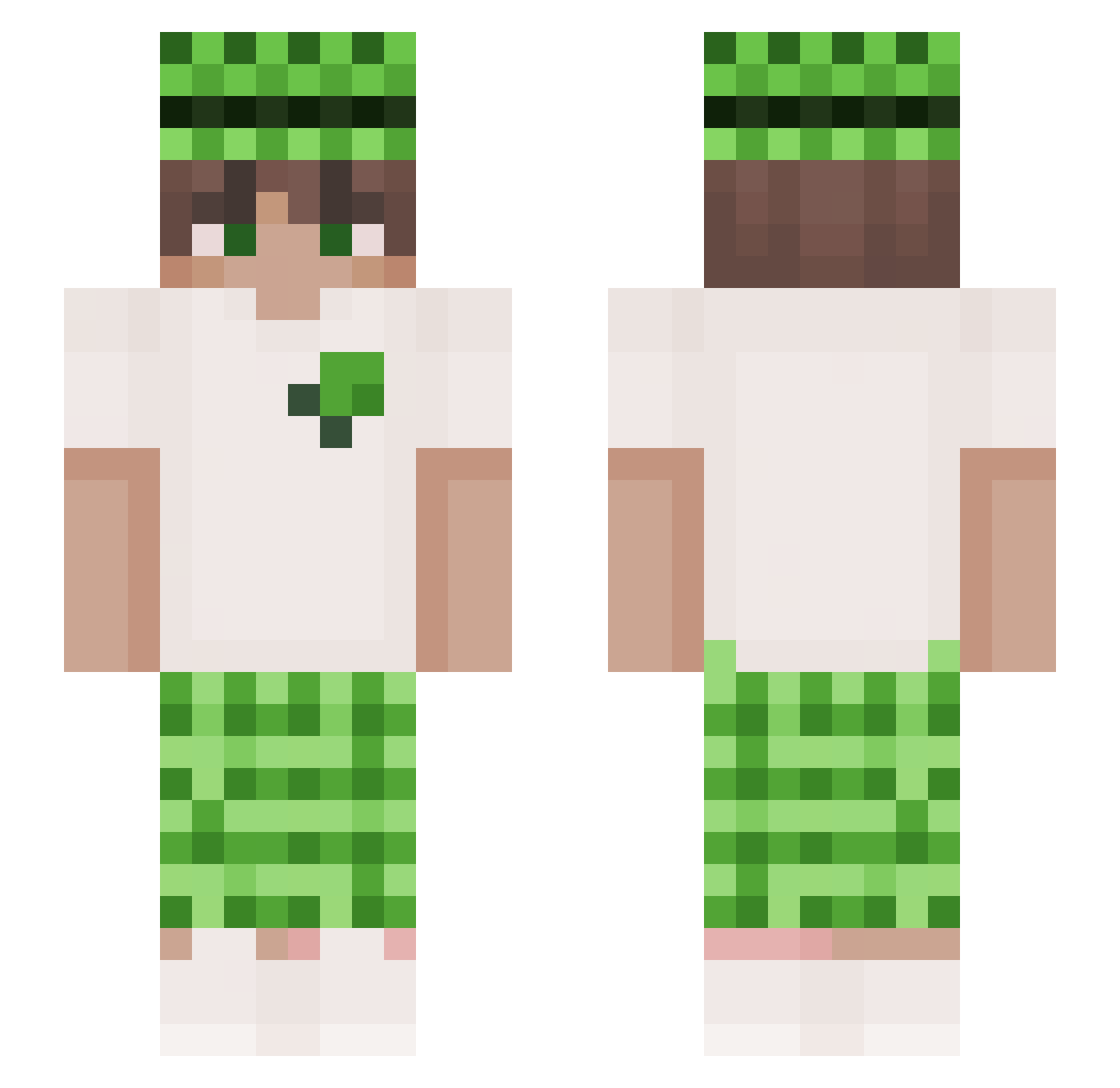
Current Minecraft skin of the player Premiamus, loaded from the official Mojang API. Rotate the 3D model with your mouse or finger, then download the skin as a PNG file and use it in Minecraft: Bedrock Edition or Java Edition for free. When Premiamus changes their skin, this page updates automatically and the old skin stays in the history below.
Other players with this skin (242)
Premiamus was the 194th player we have seen with this skin, first spotted on 01.11.2026. The same skin was seen on these players. Open a nickname to see their current skin and skin history.
 Vormexx Belds042 ChrisNaruto Terry__X ADRIAN1691 unuw lukitas234 fameCIN LO1RY zloiro hyeongchul amiiiii_ tightknit moosbauer420 Shaa Luiz_Corsa Neto_SAN shanchuan233 NETGO WexzNN YotamR bestte astroworth AntoniOFFICIAL Limon441 ZECA_PINTO56 Akke999999 spoutch4939 Domas88 erenerennn kaerune_ Pulse000 luisandres14 wjot NutellaTM Qing_Qingzi giulianooo Thzzzin lycan1k Max1234599 michelxd KAPI0015 Meakesd 7ead WYA1314 gapekwtf mingye11 CreeperAtomico GzunicoBW ORDUOYUNTR Kyt_0 Lao_bai_ ItzzPapr0tka Szymanski053 papuJere korbowod emanuelle05 Uraniumzxz Angel1gR Yodamon_PL
More Plaid Minecraft skins
How to install the Premiamus skin
- Press the Download button above to save the skin as a PNG file.
- Minecraft: Bedrock Edition (PE): open the Dressing Room from the main menu (or tap your character → Edit Character), go to Classic Skins → Owned, press the + (new skin) button, choose the downloaded PNG and pick the Slim (Alex) model. Works on PC and mobile; consoles cannot import custom skins.
- Minecraft: Java Edition: open the Minecraft Launcher, go to the Skins tab, click New Skin, load the PNG, pick the Slim (Alex) model and press Save & Use. You can also upload it at minecraft.net → Profile → Change Skin.
The skin does not show up after import - what should I do?
Restart Minecraft and open the Dressing Room again - imported skins sometimes appear only after a restart. Also make sure you selected the imported skin and picked the Slim (Alex) model.
Which model should I choose, Classic or Slim?
This skin is designed for the Slim (Alex) model. If you pick the wrong model, the arms of the skin will look stretched or squeezed.
Is the skin of Premiamus free to download?
Yes. Press Download, save the PNG file and use it in Minecraft: Bedrock Edition or Java Edition - no payment or registration needed. The skin also works on multiplayer servers and Realms.
More skins
Looking for more? Go back to all Minecraft skins and check the top skins of the week, month and all time, or find any player's skin by nickname.