
Pinquin_ - Minecraft Skins & Skin History
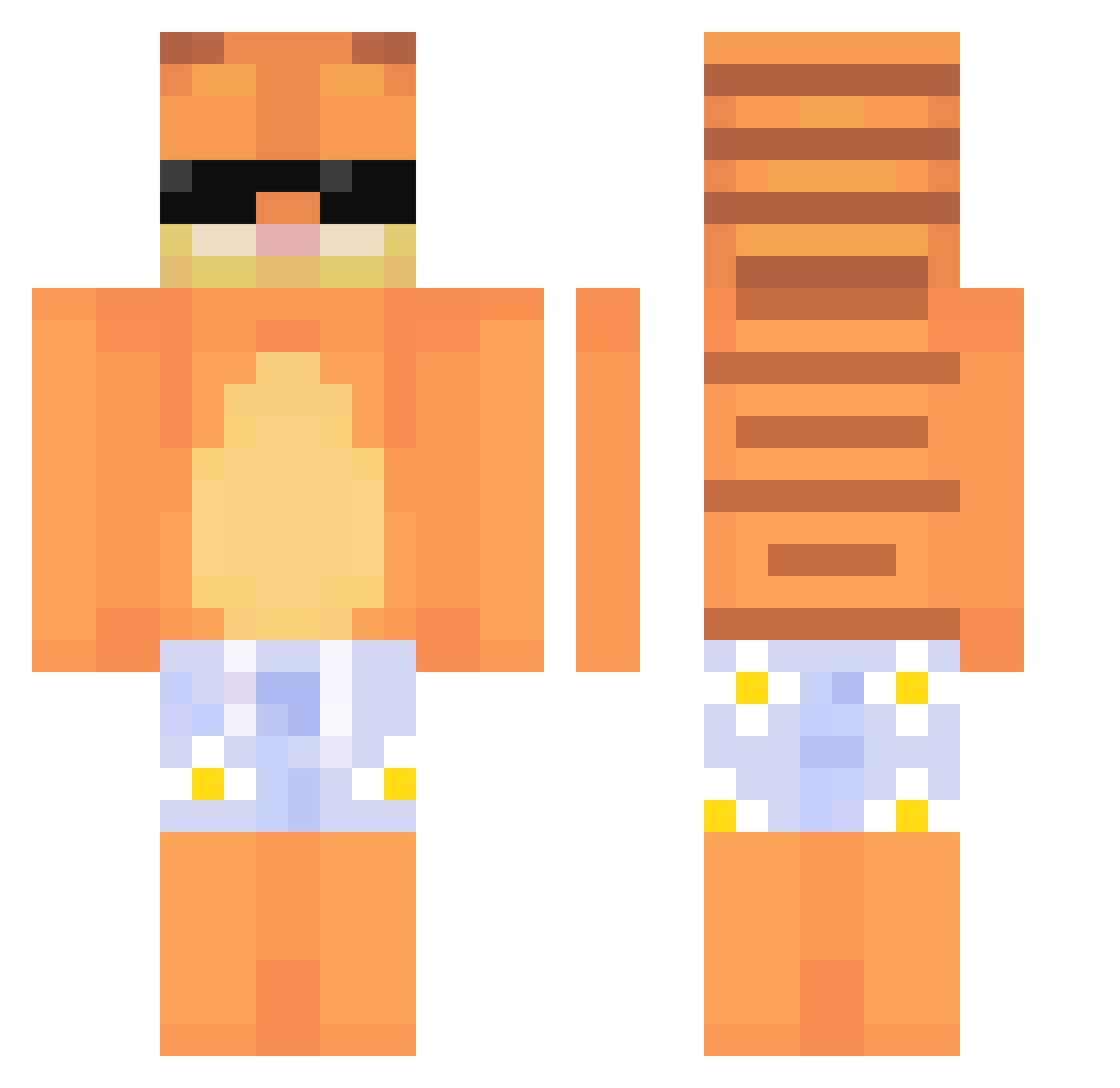
Current Minecraft skin of the player Pinquin_, loaded from the official Mojang API. Rotate the 3D model with your mouse or finger, then download the skin as a PNG file and use it in Minecraft: Bedrock Edition or Java Edition for free. When Pinquin_ changes their skin, this page updates automatically and the old skin stays in the history below.
Other players with this skin (637)
Pinquin_ was the 248th player we have seen with this skin, first spotted on 05.09.2026. The same skin was seen on these players. Open a nickname to see their current skin and skin history.
 Tinyniko2010 Isaac72816 natisnais Guxz_15 bananJD78 Kacpirasque Mancha1 C_0guh D_nho Rxinford3 BEcill Lassardo havze0_ jupiteraWHOREa DeNlck ky0nix _pch farqdaddy minecraft1916
 zondarisback Mynox0501 Gaobai07 exaas EightSay Nnuae Oopss59 MeepoMike sukersegirl Wyvernz0 Domaszka Jpsshui LUCAS_FZ saefira noyaho RubricMango6 yDr3yX MatyBartra_27 _Gunbreaker SantaF3 Matysek_jz jakerug Itamarshmello19 JOTTA98 sukomele Bocianeczek TurqoizePizza aww0 bob8780 quexsy Chonga Taglun13 flux1_ Panda_bifleur Conilino113 LeaAntonia SHIRO0212 VincentFloyd Alpaca8138 Lxnny_Fox ninghmm
More Garfield Minecraft skins
How to install the Pinquin_ skin
- Press the Download button above to save the skin as a PNG file.
- Minecraft: Bedrock Edition (PE): open the Dressing Room from the main menu (or tap your character → Edit Character), go to Classic Skins → Owned, press the + (new skin) button, choose the downloaded PNG and pick the Classic (Steve) model. Works on PC and mobile; consoles cannot import custom skins.
- Minecraft: Java Edition: open the Minecraft Launcher, go to the Skins tab, click New Skin, load the PNG, pick the Classic (Steve) model and press Save & Use. You can also upload it at minecraft.net → Profile → Change Skin.
The skin does not show up after import - what should I do?
Restart Minecraft and open the Dressing Room again - imported skins sometimes appear only after a restart. Also make sure you selected the imported skin and picked the Classic (Steve) model.
Which model should I choose, Classic or Slim?
This skin is designed for the Classic (Steve) model. If you pick the wrong model, the arms of the skin will look stretched or squeezed.
Is the skin of Pinquin_ free to download?
Yes. Press Download, save the PNG file and use it in Minecraft: Bedrock Edition or Java Edition - no payment or registration needed. The skin also works on multiplayer servers and Realms.
More skins
Looking for more? Go back to all Minecraft skins and check the top skins of the week, month and all time, or find any player's skin by nickname.