
PiSuL - Minecraft Skins & Skin History
Current Minecraft skin of the player PiSuL, loaded from the official Mojang API. Rotate the 3D model with your mouse or finger, then download the skin as a PNG file and use it in Minecraft: Bedrock Edition or Java Edition for free. When PiSuL changes their skin, this page updates automatically and the old skin stays in the history below.
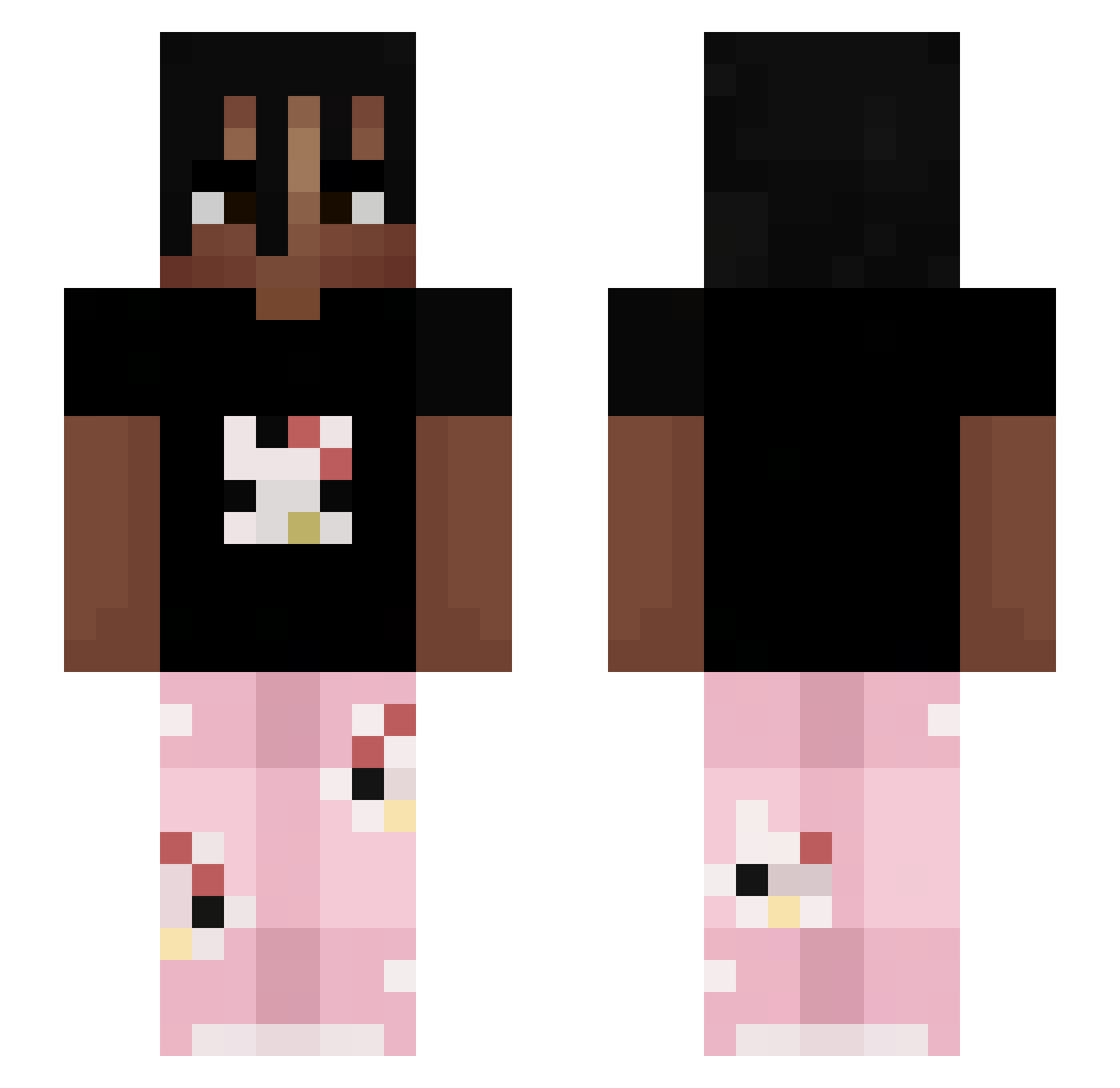
Other players with this skin (324)
PiSuL was the 279th player we have seen with this skin, first spotted on 06.11.2026. The same skin was seen on these players. Open a nickname to see their current skin and skin history.
 _Olowek2211 Hipster886 chirimoyaq IsaacRG15 JayTooa IPaZoo realhxyz ZaFt1Ng Jaikiel bonsko_whsvr samuwx lucaad20 TalkingBen_99 Kyxbii MUSKIECIKKK mqtk0 zizon_ziho KUSPICE Futur3Nova Kefan itz_Ninjapvp 4fcv KVISLEH SamueleC02 Kws21 Wielolybek eminfkocak LazyPerdi Dealah brennanlol Nerixu MarianGoogle RappSnitchK FlossingBulb141 xposev2 cosmxzeatsapples cernobilejsvet DylanMP4 Clxra_ MacacoFeliz7 nicototte2 candaly13 avxsds zmvtii PibbleSlayer27 PsyR3VO DealerKnight mlodykas V1perkq Abr_zen Simi44 myawr kreaxleet verteilt TulioPaPu Sebi4321 Laattan mikey2k Astrall52 Besser_er
More Juice WRLD Minecraft skins
How to install the PiSuL skin
- Press the Download button above to save the skin as a PNG file.
- Minecraft: Bedrock Edition (PE): open the Dressing Room from the main menu (or tap your character → Edit Character), go to Classic Skins → Owned, press the + (new skin) button, choose the downloaded PNG and pick the Slim (Alex) model. Works on PC and mobile; consoles cannot import custom skins.
- Minecraft: Java Edition: open the Minecraft Launcher, go to the Skins tab, click New Skin, load the PNG, pick the Slim (Alex) model and press Save & Use. You can also upload it at minecraft.net → Profile → Change Skin.
The skin does not show up after import - what should I do?
Restart Minecraft and open the Dressing Room again - imported skins sometimes appear only after a restart. Also make sure you selected the imported skin and picked the Slim (Alex) model.
Which model should I choose, Classic or Slim?
This skin is designed for the Slim (Alex) model. If you pick the wrong model, the arms of the skin will look stretched or squeezed.
Is the skin of PiSuL free to download?
Yes. Press Download, save the PNG file and use it in Minecraft: Bedrock Edition or Java Edition - no payment or registration needed. The skin also works on multiplayer servers and Realms.
More skins
Looking for more? Go back to all Minecraft skins and check the top skins of the week, month and all time, or find any player's skin by nickname.