
PeterGrill03 - Minecraft Skins & Skin History
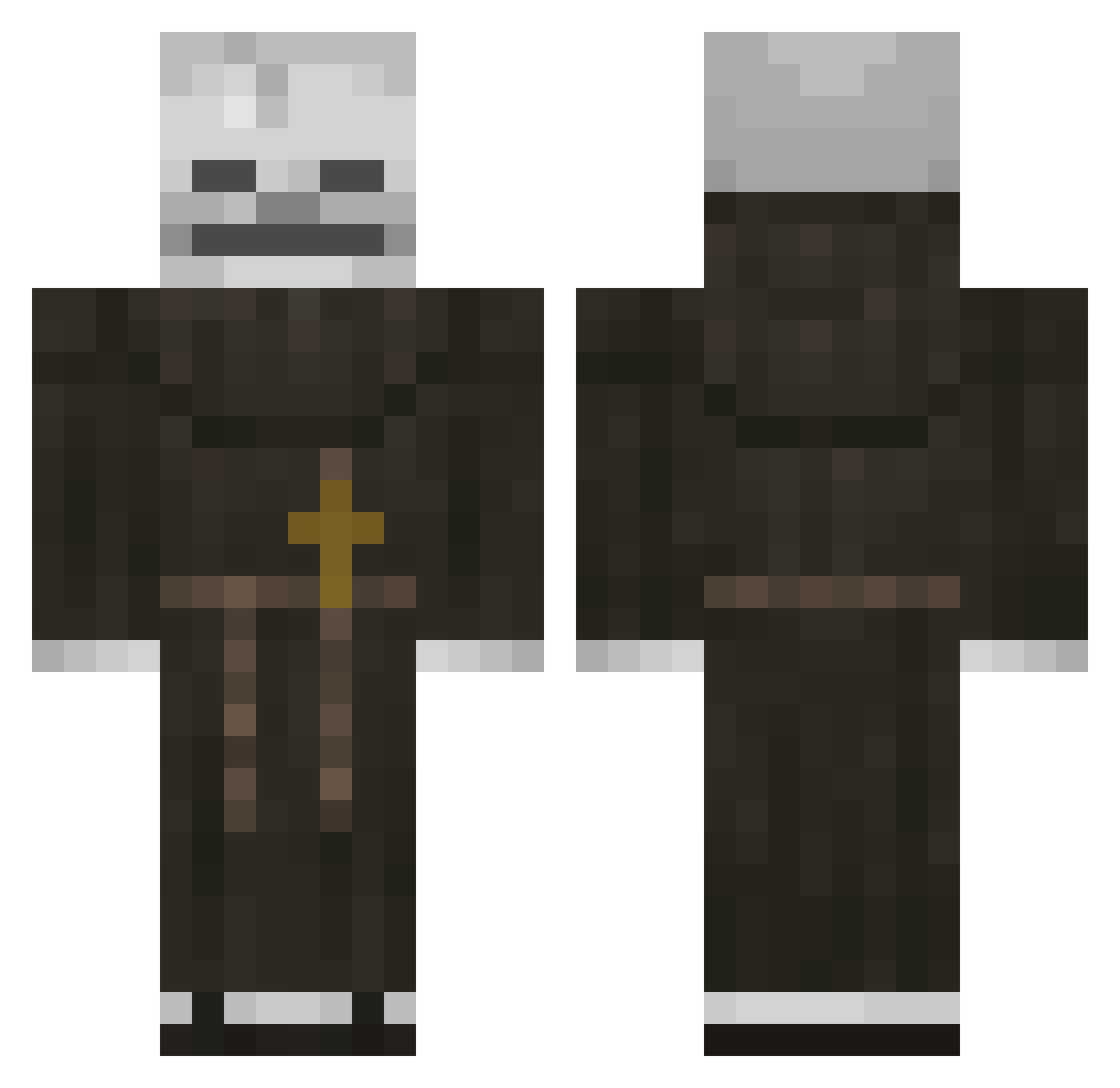
Current Minecraft skin of the player PeterGrill03, loaded from the official Mojang API. Rotate the 3D model with your mouse or finger, then download the skin as a PNG file and use it in Minecraft: Bedrock Edition or Java Edition for free. When PeterGrill03 changes their skin, this page updates automatically and the old skin stays in the history below.
Other players with this skin (118)
PeterGrill03 was the 77th player we have seen with this skin, first spotted on 29.09.2026. The same skin was seen on these players. Open a nickname to see their current skin and skin history.
 Bizarre_Username Ozuuuu Dominiusweb ElJulian1 killbotejh _Sve StolenGiraffe Caura4 aleponce lofasz123 Mithrandir7321 KrabbiePaddy DragonTamer876 anisword1 superiorglitch1 Teddyv027 guskimba noxyi1 Mi_ca x0zyun_ P1lly adidas54785478 quieroqueque1 HonestBabe Al3st0 macio1425 LinhDawn2hfUwU ArleWWW Somikamare LoncheMC_007 Murkanna LiaanOnPH BlooD_KILL MMMMMMMMMMMMM36 7elt illaksii NimbusX0 PanGame123 Nenitrox Pixxlite MSCgod prestino210 minarvitroo Atoche PQL1 SoyDiego1 Plathyth CapCrunch710 Gac_Vs TheDumbOne86 KAREEMTJ
 MR3miloff R0WE_44 Mrmonkey_MC JoaoZinhoRoblox H1ddenGhost R4NZ1 majestic7686 DemonSlayer4269 frauu21
More Monk Minecraft skins
How to install the PeterGrill03 skin
- Press the Download button above to save the skin as a PNG file.
- Minecraft: Bedrock Edition (PE): open the Dressing Room from the main menu (or tap your character → Edit Character), go to Classic Skins → Owned, press the + (new skin) button, choose the downloaded PNG and pick the Classic (Steve) model. Works on PC and mobile; consoles cannot import custom skins.
- Minecraft: Java Edition: open the Minecraft Launcher, go to the Skins tab, click New Skin, load the PNG, pick the Classic (Steve) model and press Save & Use. You can also upload it at minecraft.net → Profile → Change Skin.
The skin does not show up after import - what should I do?
Restart Minecraft and open the Dressing Room again - imported skins sometimes appear only after a restart. Also make sure you selected the imported skin and picked the Classic (Steve) model.
Which model should I choose, Classic or Slim?
This skin is designed for the Classic (Steve) model. If you pick the wrong model, the arms of the skin will look stretched or squeezed.
Is the skin of PeterGrill03 free to download?
Yes. Press Download, save the PNG file and use it in Minecraft: Bedrock Edition or Java Edition - no payment or registration needed. The skin also works on multiplayer servers and Realms.
More skins
Looking for more? Go back to all Minecraft skins and check the top skins of the week, month and all time, or find any player's skin by nickname.