
PVGZero1 - Minecraft Skins & Skin History
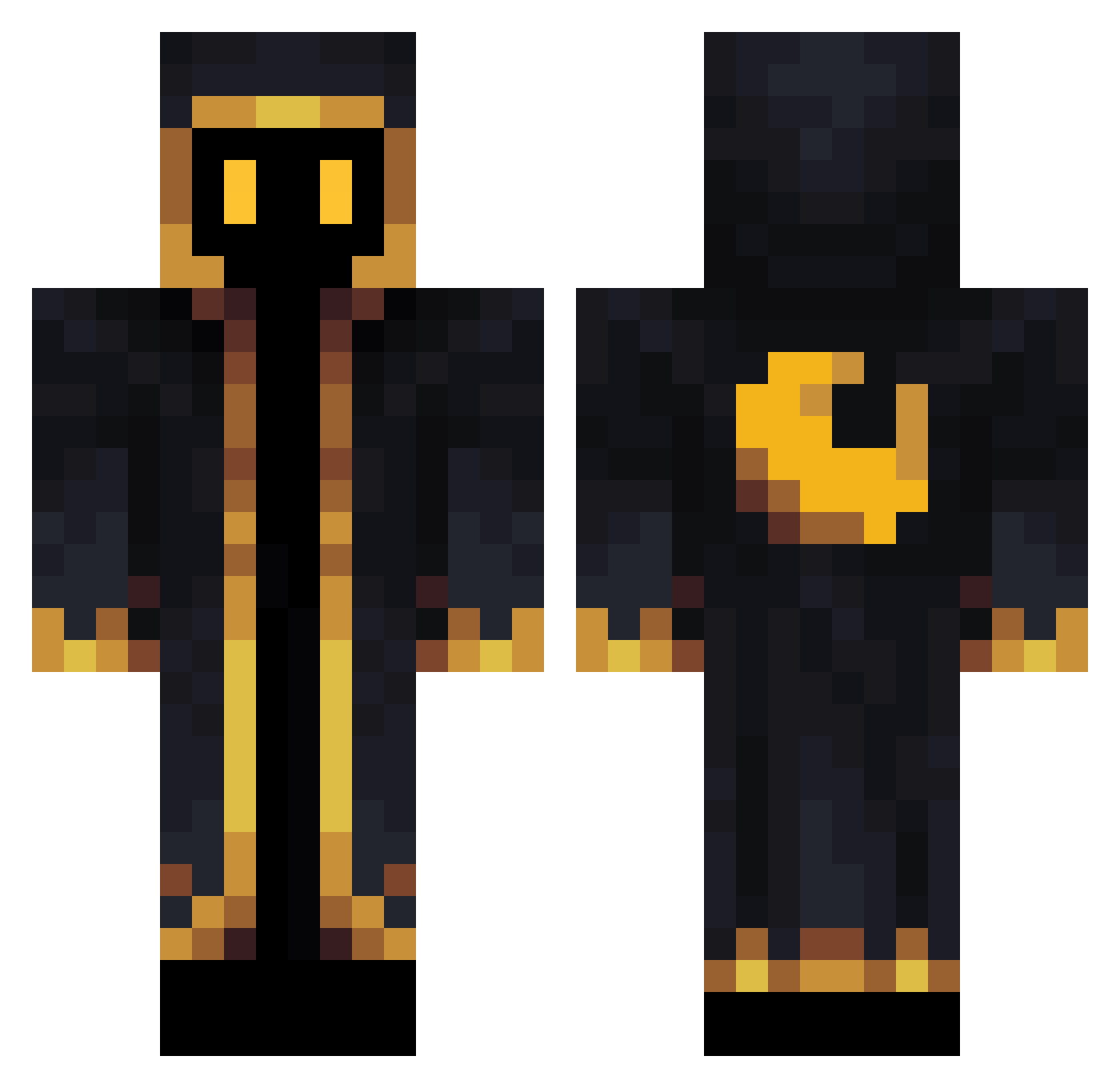
Current Minecraft skin of the player PVGZero1, loaded from the official Mojang API. Rotate the 3D model with your mouse or finger, then download the skin as a PNG file and use it in Minecraft: Bedrock Edition or Java Edition for free. When PVGZero1 changes their skin, this page updates automatically and the old skin stays in the history below.
Other players with this skin (564)
PVGZero1 was the 47th player we have seen with this skin, first spotted on 03.08.2026. The same skin was seen on these players. Open a nickname to see their current skin and skin history.
 BMG17 5Madare Hdsbrr Blaze_______ BascaVila01 NyrutheMyru superorange_junk Tiedmannt Dredgen_Sneeze MullerTsukiko acvigue ClearlyZero CorgiDuke Dagbarox macedexxxxx oOl3k Vaga_bund Joltinn m7n6 gatorgraded Lauritz561 AVEINVICTUS SkreechW DevilSix6 Gwen85412022 kgmehmet
 Bag4Life Eleanqe Hugma Ypzeh_ Sabbag Nasti_xo BlackLion8877 Naromix RandomInt Rewrite_T MajesticMajora3 J0HNNII THG_Gia TedSteb thiboude BeanChong __EdgyDabs TheeeRagemonster Lexatron Vyrtex1 eLi0__ lMr_Rohaanl Orangejuice251 Exarch44 Akio_prod Darkk7k ritaro23 flux171 suiminzzz MrDAced OkeDaan100 Skowek SilnZ attarh
More Crescent Moon Minecraft skins
See all 274 Crescent Moon skins
How to install the PVGZero1 skin
- Press the Download button above to save the skin as a PNG file.
- Minecraft: Bedrock Edition (PE): open the Dressing Room from the main menu (or tap your character → Edit Character), go to Classic Skins → Owned, press the + (new skin) button, choose the downloaded PNG and pick the Classic (Steve) model. Works on PC and mobile; consoles cannot import custom skins.
- Minecraft: Java Edition: open the Minecraft Launcher, go to the Skins tab, click New Skin, load the PNG, pick the Classic (Steve) model and press Save & Use. You can also upload it at minecraft.net → Profile → Change Skin.
The skin does not show up after import - what should I do?
Restart Minecraft and open the Dressing Room again - imported skins sometimes appear only after a restart. Also make sure you selected the imported skin and picked the Classic (Steve) model.
Which model should I choose, Classic or Slim?
This skin is designed for the Classic (Steve) model. If you pick the wrong model, the arms of the skin will look stretched or squeezed.
Is the skin of PVGZero1 free to download?
Yes. Press Download, save the PNG file and use it in Minecraft: Bedrock Edition or Java Edition - no payment or registration needed. The skin also works on multiplayer servers and Realms.
More skins
Looking for more? Go back to all Minecraft skins and check the top skins of the week, month and all time, or find any player's skin by nickname.