
P0M3RU - Minecraft Skins & Skin History
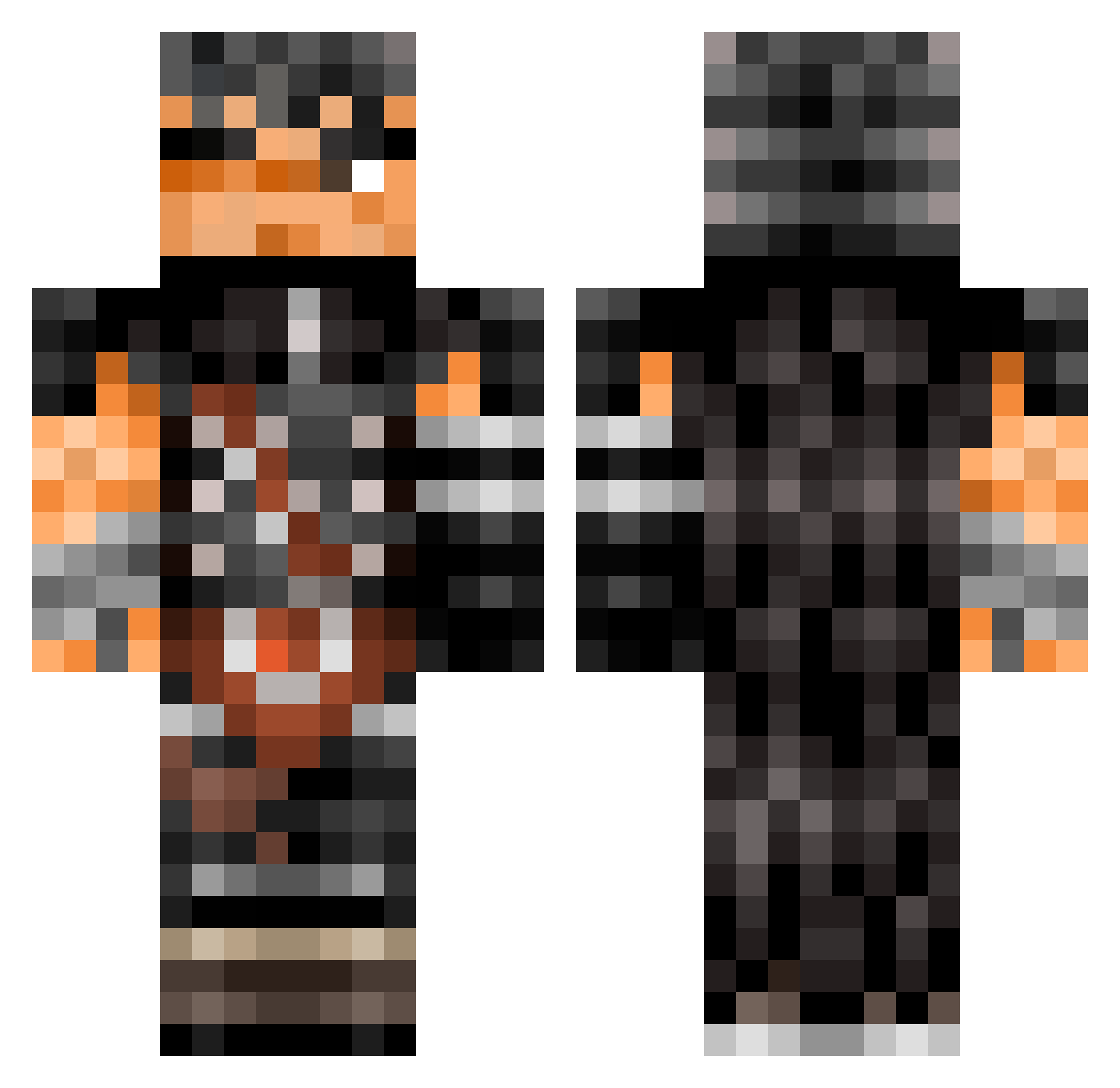
Current Minecraft skin of the player P0M3RU, loaded from the official Mojang API. Rotate the 3D model with your mouse or finger, then download the skin as a PNG file and use it in Minecraft: Bedrock Edition or Java Edition for free. When P0M3RU changes their skin, this page updates automatically and the old skin stays in the history below.
Other players with this skin (504)
P0M3RU was the 41st player we have seen with this skin, first spotted on 01.08.2026. The same skin was seen on these players. Open a nickname to see their current skin and skin history.
 CheeseBorgerr Jaimierda DIOpappagallo Ald3an0 DFizzy333 Sniperstef21 BramskE sarkleeee The_Toaster117 KorbsenN VALANCE12 weelittleman bigloge GregShanTheMan __Griffith__ Sand___ ShidokiBinks
 welford47 JustMag4456 mikiioo ShiiroAang TheValiantKing xXRajenXx Chloe_Mobed Aegius Frix_MG Infinite376 WALLEX123 Moriartyss alemaotnb GaizkaMG voz1nha Deader210 AverageToast296 Charlyy17 garkeus McMarxman07 qPinos Nemsaupoulet SuyuBulanAdam cowboiboi23 copporonga Mini_Rage _GATSU Phones_ ciinerino Dannuz blonded01 CuuteAnna ShakySteward cnozee bakagamerhd _The_bin_ Archit006YT JackOvie BoxGobbler69 LoneWolf7 llPuckll DreadWarden toyshugan
More Guts Minecraft skins
How to install the P0M3RU skin
- Press the Download button above to save the skin as a PNG file.
- Minecraft: Bedrock Edition (PE): open the Dressing Room from the main menu (or tap your character → Edit Character), go to Classic Skins → Owned, press the + (new skin) button, choose the downloaded PNG and pick the Classic (Steve) model. Works on PC and mobile; consoles cannot import custom skins.
- Minecraft: Java Edition: open the Minecraft Launcher, go to the Skins tab, click New Skin, load the PNG, pick the Classic (Steve) model and press Save & Use. You can also upload it at minecraft.net → Profile → Change Skin.
The skin does not show up after import - what should I do?
Restart Minecraft and open the Dressing Room again - imported skins sometimes appear only after a restart. Also make sure you selected the imported skin and picked the Classic (Steve) model.
Which model should I choose, Classic or Slim?
This skin is designed for the Classic (Steve) model. If you pick the wrong model, the arms of the skin will look stretched or squeezed.
Is the skin of P0M3RU free to download?
Yes. Press Download, save the PNG file and use it in Minecraft: Bedrock Edition or Java Edition - no payment or registration needed. The skin also works on multiplayer servers and Realms.
More skins
Looking for more? Go back to all Minecraft skins and check the top skins of the week, month and all time, or find any player's skin by nickname.