
OutDrunk - Minecraft Skins & Skin History
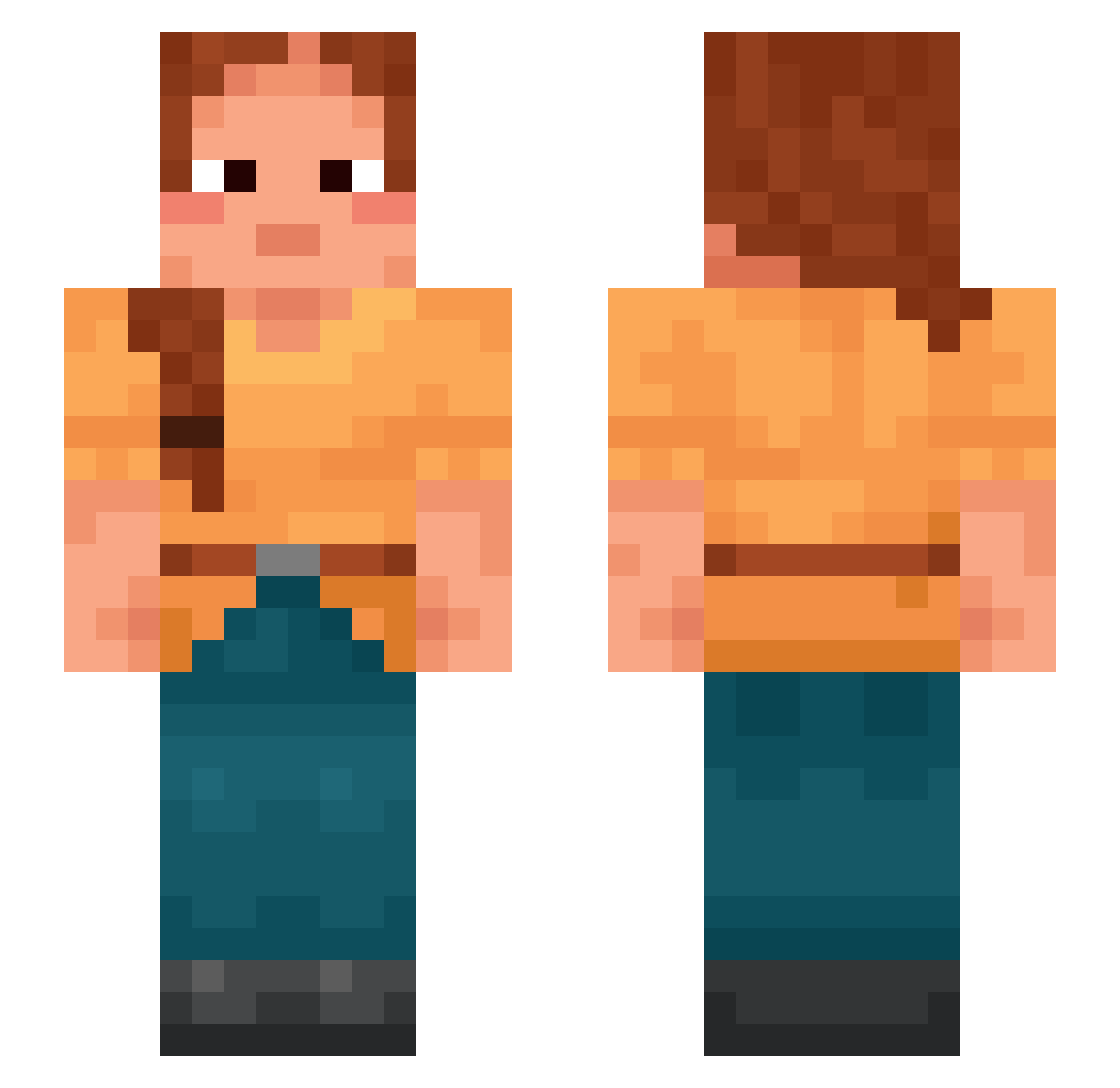
Current Minecraft skin of the player OutDrunk, loaded from the official Mojang API. Rotate the 3D model with your mouse or finger, then download the skin as a PNG file and use it in Minecraft: Bedrock Edition or Java Edition for free. When OutDrunk changes their skin, this page updates automatically and the old skin stays in the history below.
Other players with this skin (998)
OutDrunk was the 271st player we have seen with this skin, first spotted on 25.08.2026. The same skin was seen on these players. Open a nickname to see their current skin and skin history.
 thelytoky Xman220077 sithlord1998 lobbygow Wippen TheeCapitaine moocha unfur Maloca ana19 Timer Mercile55 Marcellina choriamb LimitWei Rickyjuan _sajin_ Formlessness Nemo_CAT Nassa Diega1 Mountie Venecinn K11DZ levitating Gooisee Elloelli catlover875 Mushy Misstep Crono69 FlazeMinecraft Syrup Spring_TW56 satou8187 Sneery HalleMik Barlock GiggleNut Tannery ImVome Calvish Totery chataka BeWizard damonvilla oxid Bastinounours sumpt xReach_123 OUTSWIRL Avocational Ajoldrito neurogenic Exothermicity adaxlupin FlatHead unnaturalist racist77031 hadrosaur
More Braid Minecraft skins
How to install the OutDrunk skin
- Press the Download button above to save the skin as a PNG file.
- Minecraft: Bedrock Edition (PE): open the Dressing Room from the main menu (or tap your character → Edit Character), go to Classic Skins → Owned, press the + (new skin) button, choose the downloaded PNG and pick the Slim (Alex) model. Works on PC and mobile; consoles cannot import custom skins.
- Minecraft: Java Edition: open the Minecraft Launcher, go to the Skins tab, click New Skin, load the PNG, pick the Slim (Alex) model and press Save & Use. You can also upload it at minecraft.net → Profile → Change Skin.
The skin does not show up after import - what should I do?
Restart Minecraft and open the Dressing Room again - imported skins sometimes appear only after a restart. Also make sure you selected the imported skin and picked the Slim (Alex) model.
Which model should I choose, Classic or Slim?
This skin is designed for the Slim (Alex) model. If you pick the wrong model, the arms of the skin will look stretched or squeezed.
Is the skin of OutDrunk free to download?
Yes. Press Download, save the PNG file and use it in Minecraft: Bedrock Edition or Java Edition - no payment or registration needed. The skin also works on multiplayer servers and Realms.
More skins
Looking for more? Go back to all Minecraft skins and check the top skins of the week, month and all time, or find any player's skin by nickname.